Ultimate Graphics Mod – Summer Time Override for American Truck Simulator
Brings back the fixed summer day length when you use Ultimate Graphics Mod and lets you pick any day of the year by editing a single value. Free on Steam Workshop.
Download Ultimate Graphics Mod – Summer Time Override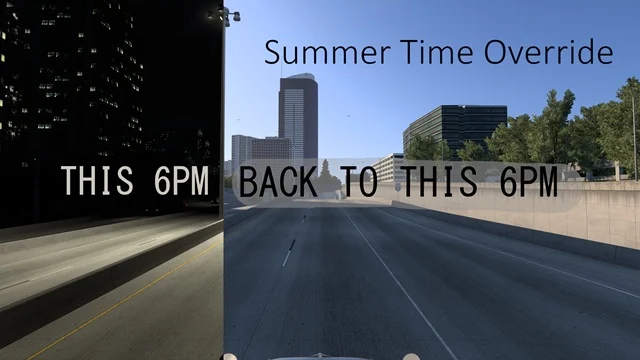
More screenshots on Steam Workshop ↗
What this mod does
Summer Time Override is a mini mod by TEH Megamin for players who use Ultimate Graphics Mod (UGM) and aren’t sold on its «realistic» day length, which in winter means driving many hours in the dark. The mod goes back to the base game’s fixed summer day length.
How it works
The game uses a day of the year to calculate lighting. The mod sets that value to day 180 by default, but you can change it by editing the day_in_year property in the universal/def/env_data.sii file, inside the ATS Workshop folder (270880) for this mod. The author gives some examples:
- 124: May 4.
- 172: June solstice.
- 185: July 4.
Compatibility
- It doesn’t need UGM: according to the author, it also works in the base game, although there you’ll barely notice it unless you change the day manually.
- It must go above UGM in the Mod Manager.
- If another weather or seasons mod modifies the same file, the one higher up wins.
Before installing it
The description doesn’t list a game version, and the mod hasn’t been updated since December 2025. Since it’s a single config file it should keep working, but it’s a good idea to try it on a secondary profile first.
Holyfix Check
Will it work with your mods?
Load your game.log.txt and check whether this mod is for your ATS version, whether you're missing a mod or DLC it needs and where to place it.
It's in Documents › American Truck Simulator › game.log.txt. It's read in your browser: the file is never uploaded.
Something else failing? Holyfix for ATS checks all your mods at once.
User rating
Highlights and things to keep in mind
- Avoids the long nights of UGM's realistic cycle
- Lets you set any day of the year
- Tiny (19 KB)
- No game version listed and no updates since December 2025
- Changing the day means editing a file by hand
- Must go above UGM and other seasons mods
Requirements
- American Truck Simulator (no version listed; released around 1.57)
- Steam account
- Ultimate Graphics Mod recommended (not required, per the author)
How to install it
- Open the "Ultimate Graphics Mod - Summer Time Override" page on Steam Workshop and click "Subscribe".
- Launch American Truck Simulator and wait for Steam to finish downloading the mod.
- Go to your profile's Mod Manager and enable "Ultimate Graphics Mod - Summer Time Override".
- Place it above Ultimate Graphics Mod and any other seasons mod.
- If you want a different day of the year, edit day_in_year in universal/def/env_data.sii inside the Workshop folder 270880/3627275651.
Version history
-
20 Dec 2025Current
Release (1 change note)
Common problems
Do I need Ultimate Graphics Mod?
It isn't required, but without it you'll barely notice the change because the base game already uses summer.
How do I set a different day of the year?
Change the day_in_year value (180 by default) in universal/def/env_data.sii; for example, 172 is the June solstice.
Does it work on 1.61?
The author doesn't list a version; it's a small config file, but try it on a separate profile first.
More mods for ATS
 ✓ ATS 1.61
  ATS 1.59
  ✓ ATS 1.61
  ✓ ATS 1.61
  ✓ ATS 1.61
  ✓ ATS 1.61