Real World Car Colors for American Truck Simulator
Real-world colors for ATS parked cars: whites, grays, blacks and silvers, with few flashy shades. Goodbye, green Dodge Magnum. Free, 476 KB.
Download Real World Car Colors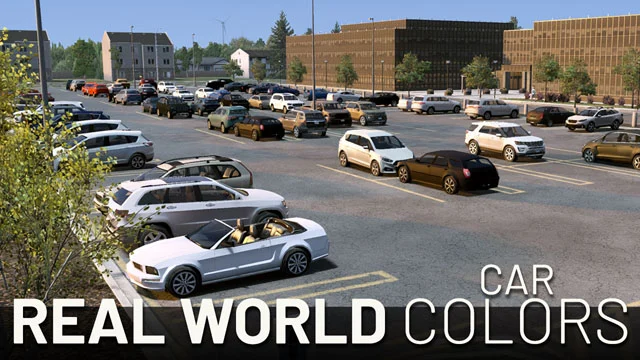
More screenshots on Steam Workshop ↗
What this mod does
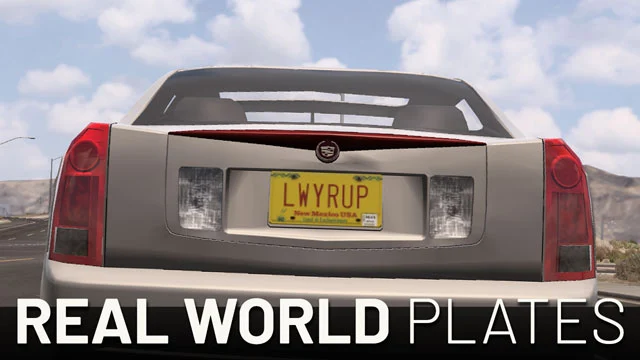
Real World Car Colors changes the colors of the parked cars that decorate the American Truck Simulator map so they look like a real parking lot. It’s by the same author as Real World Plates, ExtraNoise.
What it changes
- Whites, grays, blacks and silvers dominate, with some metallics and bright shades (blues, reds); unusual colors show up rarely.
- The author compared each vehicle with its real counterpart and picked colors that suit every model sharing the same color texture.
- It removes the green Dodge Magnum, which never existed: the Magnums are still there, but only in colors Dodge actually offered.
- Since May 2026 it also covers the static car groups SCS has added since version 1.50.
Compatibility
It only replaces a few textures, so it works with almost everything. If another mod changes vehicle colors, place this one above it in the Mod Manager. It doesn’t affect moving traffic or the cars added by traffic packs: only the parked background vehicles.
Version
The author confirmed compatibility with ATS 1.59 in May 2026 and last updated it on October 6, with 1.61 already out.
Holyfix Check
Will it work with your mods?
Load your game.log.txt and check whether this mod is for your ATS version, whether you're missing a mod or DLC it needs and where to place it.
It's in Documents › American Truck Simulator › game.log.txt. It's read in your browser: the file is never uploaded.
Something else failing? Holyfix for ATS checks all your mods at once.
User rating
Highlights and things to keep in mind
- Parking lots that look far more real
- Very light and compatible
- No more green Dodge Magnum
- Only affects parked cars
- One user sees too many parked Priuses
- No exact version listed for 1.61
Requirements
- American Truck Simulator 1.59 or later
- Steam account
- No required DLC
How to install it
- Open the Real World Car Colors page on Steam Workshop and click Subscribe.
- Launch ATS and enable the mod in the Mod Manager.
- If another mod changes vehicle colors, place this one above it.
- Visit a parking lot or rest area to see the parked cars.
Version history
-
—6 Oct 2026Current
Latest update on Steam
-
—16 May 2026
Support for static car groups added since 1.50 and compatibility with 1.59
Common problems
Does it change traffic colors?
No. It only affects the parked cars that decorate the map.
Does it work with modded traffic packs?
Yes; it doesn't touch the vehicles they add, since those are moving.
Why are there no exact before-and-after shots?
Parked cars change places every time you load your save; the last image in the gallery shows the game without the mod.
Does it work on ATS 1.61?
The author confirmed 1.59 and updated it in October 2026, with 1.61 already out.
More mods for ATS
 ✓ ATS 1.61
  ✓ ATS 1.61
  ATS 1.59
  ✓ ATS 1.61
  ✓ ATS 1.61
  ATS 1.60