Realistic Interaction Symbols for American Truck Simulator
Replaces the floating green symbols with inspection boxes and reflectors that show where to drop the trailer, lit at night. A free Brazilian mod on Steam Workshop, updated October 2026.
Download Realistic Interaction Symbols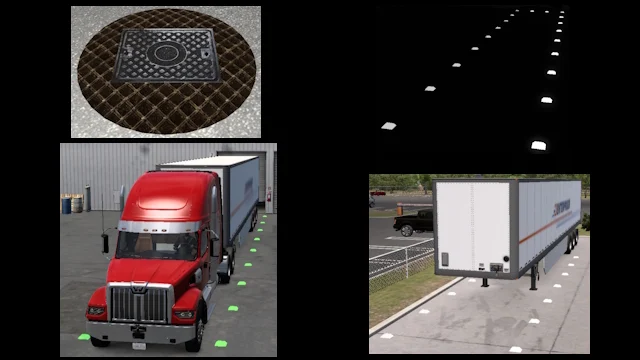
More screenshots on Steam Workshop ↗
What this mod does
Realistic Interaction Symbols is a mod by Brazilian modder Carlitos that replaces the animated green symbols floating over interaction zones with things you could see in a real truck yard. One comment describes it as the modern version of the classic «Sewer Mod» for ETS2.
What changes
- Inspection points: inspection boxes surrounded by anti-slip plates instead of the green symbol.
- Weigh stations: the cover is adjusted so it shows up on low scales; on high ones it stays invisible and you’ll have to go by the GPS.
- Loading: white reflectors around the trailer to identify it, which light up at night.
- Unloading: reflectors that mark where the back of the trailer should end up and turn green when you place it correctly.
Compatibility
It’s designed for the official map and its DLCs. On map mods there may be visual glitches due to uneven terrain or different object heights. The author doesn’t list a game version, but he updated it on October 11, 2026 to add an inspection box to Road Trip DLC jobs, and plans to cover more of that DLC’s symbols.
Combinations
If you use another mod that changes these markers, like Real Icons, enable only one so they don’t overlap. There’s also a version for Euro Truck Simulator 2.
Holyfix Check
Will it work with your mods?
Load your game.log.txt and check whether this mod is for your ATS version, whether you're missing a mod or DLC it needs and where to place it.
It's in Documents › American Truck Simulator › game.log.txt. It's read in your browser: the file is never uploaded.
Something else failing? Holyfix for ATS checks all your mods at once.
User rating
Highlights and things to keep in mind
- Goodbye to the floating green symbols
- Reflectors that help you park the trailer, at night too
- Active author who replies in the comments
- No game version listed
- On high scales the cover isn't visible
- Possible visual glitches on map mods
Requirements
- American Truck Simulator (no version listed; updated in October 2026)
- Steam account
- Official SCS map recommended
How to install it
- Open the "Realistic Interaction Symbols" page on Steam Workshop and click "Subscribe".
- Launch American Truck Simulator and wait for Steam to finish downloading the mod.
- Go to your profile's Mod Manager and enable "Realistic Interaction Symbols".
- Disable other mods that change the loading, unloading or inspection markers.
- Take a job and check the reflectors when you hitch and drop the trailer.
Version history
-
11 Oct 2026Current
Inspection box for Road Trip jobs (6 change notes in total)
Common problems
How do I know I parked the trailer correctly?
The reflectors in the unloading zone turn green when the back of the trailer is in place.
Does it work on map mods?
Yes, but there may be visual glitches due to terrain differences and object heights.
Is it compatible with Road Trip?
In October 2026 the author added an inspection box for those jobs and plans more.
More mods for ATS
 ATS 1.59
  ✓ ATS 1.61
  ATS 1.59
  ATS 1.57
  ✓ ATS 1.61
  ATS 1.59