Waze colors for navigation [Purple] for American Truck Simulator
Swaps the navigation colors for a Waze-style palette, with the route in purple. A tiny, free UI mod on Steam Workshop, for SCS maps only.
Download Waze colors for navigation [Purple]![Waze colors for navigation [Purple] for American Truck Simulator](https://holymod.com/wp-content/uploads/2026/10/waze-colors-navigation-ats-ats.webp)
More screenshots on Steam Workshop ↗
What this mod does
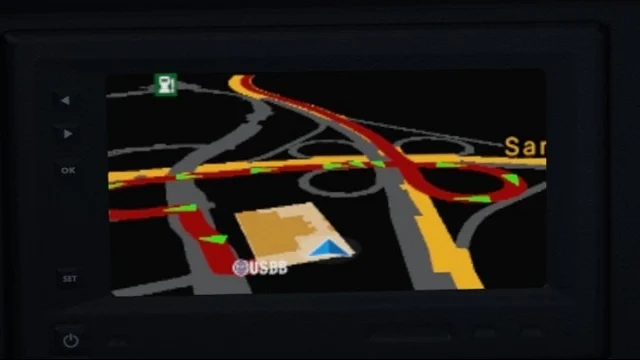
Waze colors for navigation is a UI mod by Hungarikum that replaces the game’s navigation colors with a palette inspired by the Waze app. This version paints the route purple.
Color palette
- Undiscovered roads and intersections: gray.
- Discovered roads: dark blue.
- Main map and job map: yellow.
- Discovered intersections: pale blue.
- Navigation route: purple.
Compatibility
It’s only compatible with the SCS maps, so don’t count on it with map mods. It doesn’t include the light background, which the author offers as a separate download. The description doesn’t list a game version; the latest update is from September 27, 2026, already in the 1.61 era.
Related mods by the author
- A version with the route in blue.
- Waze Navigation Icons, with icons in the same style.
- Better Navigation FOV and its light variant, to widen the field of view of the dashboard GPS.
- A version for Euro Truck Simulator 2.
At just 24 KB it’s one of the lightest mods you can install; the two posted comments are positive and report no bugs.
Unofficial fan-made mod. Names, logos and liveries belong to their respective owners; neither the author nor Holymod is affiliated with them.
Holyfix Check
Will it work with your mods?
Load your game.log.txt and check whether this mod is for your ATS version, whether you're missing a mod or DLC it needs and where to place it.
It's in Documents › American Truck Simulator › game.log.txt. It's read in your browser: the file is never uploaded.
Something else failing? Holyfix for ATS checks all your mods at once.
User rating
Highlights and things to keep in mind
- Clear, easy-to-read palette
- Tiny (24 KB)
- Pairs with the author's other navigation mods
- SCS maps only
- No game version listed
- Unofficial mod: trademarks belong to their owners
Requirements
- American Truck Simulator (no version listed; updated in September 2026)
- Steam account
- Official SCS map
How to install it
- Open the "Waze colors for navigation [Purple]" page on Steam Workshop and click "Subscribe".
- Launch American Truck Simulator and wait for Steam to finish downloading the mod.
- Go to your profile's Mod Manager and enable "Waze colors for navigation [Purple]".
- If you use other navigation color mods, keep this one above them or disable the others.
- Open the GPS or the map to check the new colors.
Version history
-
27 Sep 2026Current
Latest update (9 change notes)
Common problems
Does it work with map mods?
No; the author says it's only compatible with the SCS maps.
Is there a version with a blue route?
Yes, the author publishes it as a separate mod.
Does it include the light map background?
No, that's a separate download.
More mods for ATS
 ATS 1.59
  ✓ ATS 1.61
  ✓ ATS 1.61
  ATS 1.59
  ✓ ATS 1.61
  ATS 1.59