U.S. State Abbreviations Map (Light Edition) for American Truck Simulator
A light map background with no state colors, showing state abbreviations. Made for experienced drivers; free on Steam Workshop and tested on ATS 1.61.
Download U.S. State Abbreviations Map (Light Edition)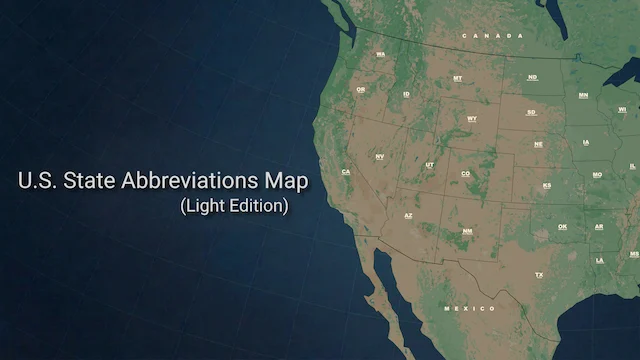
More screenshots on Steam Workshop ↗
What this mod does
U.S. State Abbreviations Map (Light Edition) is a UI mod by ガチたけ (Gachitake) that swaps the game’s map background for a light version with no state colors, with abbreviated state names. The author aims it at experienced drivers who no longer need a busy map.
Where it comes from
It’s a variant of his earlier mod, U.S. State Abbreviations Map, with the same overall approach. The author thanks BOBmat4 for providing the base map.
Compatibility
- Tested on 1.61; one user confirms it already includes the South Dakota DLC.
- Not compatible with ProMods, and the author has no plans to add support: it only uses the SCS maps.
- With other map mods, like Reforma, the author says he doesn’t know whether it works. One user says it works for them with a U.S. cities mod, but not with a full map mod.
Before installing it
It weighs almost 230 MB, quite a lot for a UI mod, because of the texture resolution. If you use another map background mod, enable only one. The author explicitly asks that his work not be copied, modified or reuploaded.
If you’d prefer a color map, there are alternatives of the same kind, like [8k] US Color Map or Allan’s America Background Map.
Holyfix Check
Will it work with your mods?
Load your game.log.txt and check whether this mod is for your ATS version, whether you're missing a mod or DLC it needs and where to place it.
It's in Documents › American Truck Simulator › game.log.txt. It's read in your browser: the file is never uploaded.
Something else failing? Holyfix for ATS checks all your mods at once.
User rating
Highlights and things to keep in mind
- Clean, easy-to-read map
- Tested on 1.61 and with South Dakota
- Author who updates frequently
- Incompatible with ProMods
- No guarantee with Reforma or other map mods
- Weighs almost 230 MB
Requirements
- American Truck Simulator 1.61
- Steam account
- Official SCS maps only
How to install it
- Open the "U.S. State Abbreviations Map (Light Edition)" page on Steam Workshop and click "Subscribe".
- Launch American Truck Simulator and wait for Steam to finish downloading the mod.
- Go to your profile's Mod Manager and enable "U.S. State Abbreviations Map (Light Edition)".
- Disable other map background mods.
- Open the map (M) to check the new background with the abbreviations.
Version history
-
17 Oct 2026Current
Latest update (9 change notes)
Common problems
Does it work with ProMods?
No, and the author has no plans to add support.
What about Reforma or other Mexico maps?
The author says he doesn't know; it's made only for the SCS maps.
Does it include South Dakota?
Yes, according to a user who runs it with that DLC on 1.61.
More mods for ATS
 ✓ ATS 1.61
  ✓ ATS 1.61
  ✓ ATS 1.61
  ATS 1.59
  ✓ ATS 1.61
  ATS 1.59