SCAR – Super Compact Advisor Rework for American Truck Simulator
A minimal route advisor at the bottom of the screen with only the essential trip info. A remake of BOBmat4's SuperCompact Advisor, free on Steam Workshop for ATS 1.61.
Download SCAR – Super Compact Advisor Rework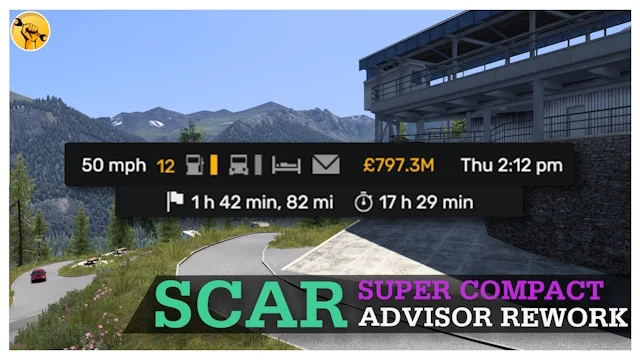
More screenshots on Steam Workshop ↗
What this mod does
SCAR (Super Compact Advisor Rework) is a UI mod by Cal, who also made YARA, that replaces the stock route advisor with a much smaller one. It shows only the essential trip info, placed almost entirely at the bottom of the screen.
Origin
It’s a new version of BOBmat4‘s SuperCompact Advisor. Cal credits him in the description and thanks him for his work and his openness with the community.
Required setup
Since 1.59 the game uses widgets, so you need to enable them manually: press F1, go to Widgets and enable navigation, tachometer, company messages, finances and damage. The author links a sample setup on the Workshop.
Version
It’s made for 1.61 and earlier; the author warns that on other versions the game may crash. He updated it on October 4, 2026.
What it doesn’t include
- No GPS or navigation: that’s a deliberate choice by the author.
- Reuploads aren’t allowed.
If you still want to see a map, pair it with the dashboard GPS, for example with Better Navigation FOV. If you prefer the info at the top, check out Adviser Top Bar or Top Bar for ATS.
Holyfix Check
Will it work with your mods?
Load your game.log.txt and check whether this mod is for your ATS version, whether you're missing a mod or DLC it needs and where to place it.
It's in Documents › American Truck Simulator › game.log.txt. It's read in your browser: the file is never uploaded.
Something else failing? Holyfix for ATS checks all your mods at once.
User rating
Highlights and things to keep in mind
- Minimal interface that shows more of the road
- Updated for 1.61
- Well-known author (YARA) who maintains his mods
- No on-screen GPS or navigation
- You have to set up the widgets manually
- May crash the game on versions other than those listed
Requirements
- American Truck Simulator 1.61 or earlier
- Steam account
- Widgets enabled (F1) since 1.59
How to install it
- Open the "SCAR - Super Compact Advisor Rework" page on Steam Workshop and click "Subscribe".
- Launch American Truck Simulator and wait for Steam to finish downloading the mod.
- Go to your profile's Mod Manager and enable "SCAR - Super Compact Advisor Rework".
- Once in your save, press F1, go to Widgets and enable navigation, tachometer, company messages, finances and damage.
- Check that the info appears compactly at the bottom.
Version history
-
4 Oct 2026Current
Updated for 1.61 (4 change notes)
Common problems
Why don't I see anything after enabling it?
Since 1.59 you have to enable the widgets with F1: navigation, tachometer, messages, finances and damage.
Does it have GPS?
No, the author removed it on purpose.
Is it an original mod?
It's a remake of BOBmat4's SuperCompact Advisor, with credit to the original author.
More mods for ATS
 ✓ ATS 1.61
  ✓ ATS 1.61
  ✓ ATS 1.61
  ✓ ATS 1.61
  ✓ ATS 1.61
  ✓ ATS 1.61