New Compact Advisor + mini mirrors for American Truck Simulator
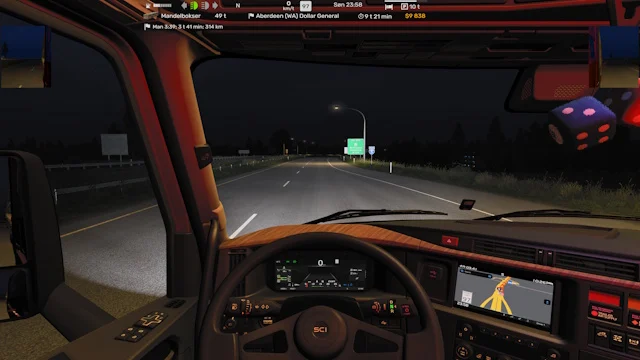
Compact HUD: map in the right corner with speed and limit beside it, delivery info below, gauges on the left and small mirrors. No tachometer. Free on Steam.
Download New Compact Advisor + mini mirrors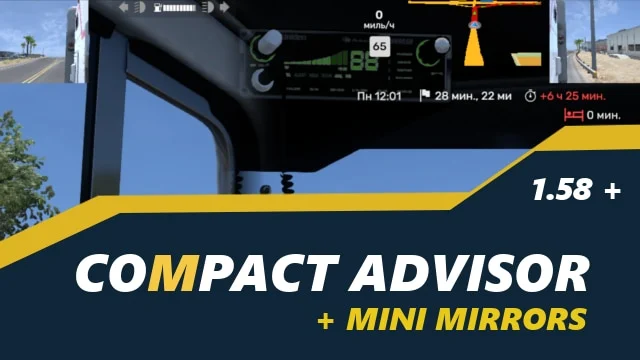
More screenshots on Steam Workshop ↗
What this mod does
New Compact Advisor + mini mirrors is a UI mod by ĐỰ₭Ḝ that rearranges American Truck Simulator’s Route Advisor so it takes up less of the screen. The author made it to bring back an older mod of his that was no longer possible as-is after SCS redesigned the advisor.
What the HUD looks like
- The map stays in the right corner, with the speed limit and your speed next to it.
- Below it there’s a block with the delivery info.
- The tachometer is hidden.
- Warning lights, the fuel gauge and the other indicators move to the left corner.
- It includes smaller HUD mirrors.
Version
The latest update is from May 6, 2026, in the 1.59 era; the author doesn’t list a game version or confirm 1.61. As with any HUD mod, it’s best to use only one at a time so they don’t clash.
Before you install it
The author warns that he made it for his own use and asks people not to request changes: take it as it is or leave it. If you want something actively supported for 1.61, check out SCAR – Super Compact Advisor Rework or the Adviser Top Bar Small HUD.
Holyfix Check
Will it work with your mods?
Load your game.log.txt and check whether this mod is for your ATS version, whether you're missing a mod or DLC it needs and where to place it.
It's in Documents › American Truck Simulator › game.log.txt. It's read in your browser: the file is never uploaded.
Something else failing? Holyfix for ATS checks all your mods at once.
User rating
Highlights and things to keep in mind
- Compact HUD that frees up more of your view
- Small mirrors included
- Very popular for its size
- No version listed and no confirmation for 1.61
- The author doesn't take change requests
- Don't combine it with other HUD mods
Requirements
- American Truck Simulator 1.59 (the author doesn't list a version)
- No DLC
How to install it
- Open the “New Compact Advisor + mini mirrors” page on Steam Workshop and click “Subscribe”.
- Launch American Truck Simulator and wait for Steam to finish downloading the mod.
- Open your profile's Mod Manager and enable “New Compact Advisor + mini mirrors”.
- Disable other HUD or Route Advisor mods to avoid conflicts.
Version history
-
6 May 2026Current
Latest update (2 notes in the changelog)
-
13 Feb 2026
First release
Common problems
Does it work on 1.61?
The author doesn't say; the latest update is from May 2026 (1.59).
Can I ask the author for changes?
No: he says he made it for his own use and won't take requests.
Does it show the tachometer?
No, it hides it to save space.
More mods for ATS
 ✓ ATS 1.61
  ATS 1.60
  ✓ ATS 1.61
  ATS 1.60
  ✓ ATS 1.61
  ✓ ATS 1.61