Tjs ATS HD GPS (high-definition GPS units for the cab) for American Truck Simulator
High-definition cab GPS for ATS: hanging, windshield, dash and A/C placements for the SCS trucks and dozens of mod trucks. Tested on 1.62 by the author; updated October 22, 2026.
Download Tjs ATS HD GPS (high-definition GPS units for the cab)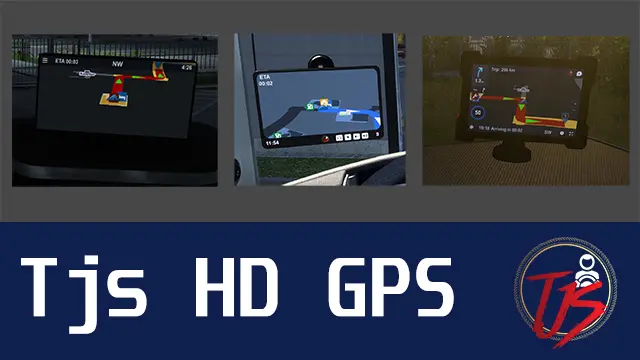
More screenshots on steamcommunity.com (Steam Workshop) ↗
What this mod does
Tjs ATS HD GPS, by The Jetz Stream, is the American Truck Simulator version of the Tjs HD GPS Mod for ETS2: it adds GPS units with a high-definition screen that you install as a tuning part in the shop. There are five families of accessories: hanging GPS (the author recommends them for widescreen monitors), windshield corner, windshield sets, A/C placements and dash sets.
Supported trucks
It covers the SCS trucks (Freightliner Cascadia, International LT and 9900i, Kenworth T680 and W900, Mack Anthem and Pinnacle, Peterbilt 389 and 579, Volvo VNL and VNL 2025, Western Star 49X, 57X and 5700XE) and a long list of mod trucks: Coronado, FLB, FLD, Argosy, Lonestar, K100e, T610, T800, W990, Cruiseliner, 379X, Outlaw 359 v2, Rezbilt 389, Edison and more. If your mod truck isn’t there, the author asks for a comment with its folder name under def/vehicle/truck.
Version and warnings
The author states «Tested on Version 1.62.x»; the October 22, 2026 change note reads «update to support version 1.62». It weighs 69.2 MB, needs no DLC and has 80,770 subscribers with 54 change notes. It must sit above map mods in the Mod Manager. Known issue: some variants only show the text «GPS» because of an SCS change in 1.55; equip another GPS model and switch back. Not recommended for TruckersMP. More interior mods for ATS.
Holyfix Check
Will it work with your mods?
Load your game.log.txt and check whether this mod is for your ATS version, whether you're missing a mod or DLC it needs and where to place it.
It's in Documents › American Truck Simulator › game.log.txt. It's read in your browser: the file is never uploaded.
Something else failing? Holyfix for ATS checks all your mods at once.
User rating
Mod video
Highlights and things to keep in mind
- Much sharper GPS screen, with several placements per truck
- Author-confirmed support for 1.62 (10-22-2026) and 54 change notes
- Over 80,000 subscribers and support for dozens of mod trucks
- Must sit above map mods in the Mod Manager
- Some variants may only show the text "GPS": switch models and switch back
- Not recommended for TruckersMP, according to the author
- May not work with mod trucks that don't use the standard accessory names
- The author asks not to reupload it elsewhere: share the Steam link
Requirements
- American Truck Simulator 1.62
- An SCS truck or a mod truck from the author's list
- Steam account to subscribe on the Workshop
- No DLC needed
How to install it
- Open the Tjs ATS HD GPS page on the Steam Workshop and hit Subscribe
- In the ATS Mod Manager, enable it above map mods, as the author asks
- Go to the shop, cab accessories, and pick the HD GPS and its placement (hanging, windshield, dash or A/C)
- If the screen only shows the text "GPS", equip another GPS model and then switch back to the one you want
Version history
-
—22 Oct 2026Current
Support for version 1.62 ("update to support version 1.62")
-
—8 Sep 2026
Support for the Outlaw 359 v2 (hanging item and above A/C unit)
-
—4 Sep 2026
Support for version 1.61
-
—5 Jun 2026
Support for version 1.60
-
—28 May 2026
Support for the new Volvo VNL 2025 (GPS, toy hang, A/C placement, windshield)
-
—7 Jan 2024
Posted on the Steam Workshop
Common problems
Which ATS version is it for?
The author states "Tested on Version 1.62.x" and the October 22, 2026 update adds support for 1.62.
Does it work with mod trucks?
Yes, with the ones on the author's list (Coronado, FLB, Lonestar, K100e, W990, 379X, Outlaw 359 v2, Rezbilt 389, Edison...). If yours doesn't use the standard accessory names, the GPS won't show up.
Where do I put it in the Mod Manager?
Above map mods; the author classifies it as a tuning part.
Why does the GPS only show the text "GPS"?
The author blames SCS changes in 1.55. Equip a GPS that works and then switch back to the one you wanted.
Is it OK for TruckersMP?
The author doesn't recommend it for TMP and doesn't guarantee it works.
More mods for ATS
 ATS 1.61Requires DLC
 ATS 1.61Requires DLC
 ATS 1.61Requires DLC
 ATS 1.59
 ATS 1.60