Custom Tachometers and Boost Gauges for BeamNG.drive
Six tachometer themes with a matching boost gauge for any vehicle, with configurable color schemes, units and elements. One of the most downloaded UI apps.
Download Custom Tachometers and Boost Gauges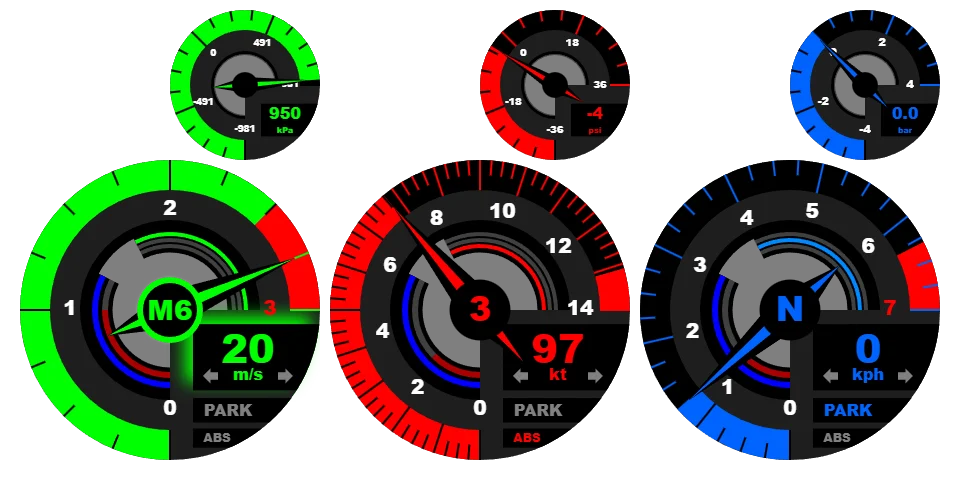
More screenshots on Official BeamNG Repository (beamng.com/resources) ↗
What this mod does
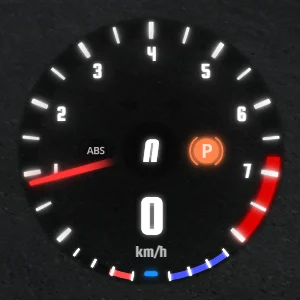
Custom Tachometers and Boost Gauges replaces the tachometer in BeamNG.drive’s UI with flashier designs and adds matching turbo or supercharger boost gauges. It works with any vehicle and is one of the most downloaded UI apps on the Repository.
What’s included
- Six themes: Velocity, Fusion, Ringularity, Arcentric, GranTourer and Hyperspeed (the last one added in May 2026).
- For each theme, a tachometer app and a boost pressure app.
- Several color schemes, with a BeamNG-style default.
- Elements you can show or hide, and a choice of units.
How to configure it
Add the apps you want to your UI layout. To change their look, hover over the app and left-click: a menu opens in the center of the screen where you choose the color scheme, units and which parts are shown. Each app is independent, so the tachometer and the boost gauge can use different colors, and the chosen scheme is remembered in your next session.
Compatibility
The latest version is from June 2026. In December 2025 the author acknowledged that the apps behaved somewhat differently in 0.38 and released fixes afterward. It doesn’t mention 0.39 or 0.40, so it might need a tweak in the current game version.
User rating
Highlights and things to keep in mind
- Six designs with a matching boost gauge
- Highly configurable and remembers your settings
- Almost 600,000 downloads and good reviews
- The current game version is 0.40 (October 19, 2026): the mod doesn't list it and may need an update; also, after a major update the game disables mods and you have to re-enable them
- Latest version from June 2026, with no mention of 0.39
- The boost gauges only make sense on turbocharged or supercharged cars
Requirements
- BeamNG.drive 0.38
How to install it
- Open the Custom Tachometers and Boost Gauges page on the official BeamNG Repository.
- Click Download to get the .zip, or click Subscribe to install it from the in-game Repository.
- If you download it manually, copy the .zip (don't unzip it) into the mods folder in your user folder (AppData > Local > BeamNG > BeamNG.drive > current > mods; the launcher opens it with Manage User Folder).
- Launch the game and check in the Mod Manager that it's enabled.
- In the game, press Esc, open UI Apps, enter layout editing and add the tachometer and boost gauge you want.
- Left-click the app to open its menu for colors, units and elements.
Version history
-
3.4.18 Jun 2026Current
Minor improvements.
-
—15 May 2026
New Hyperspeed theme.
-
—1 Apr 2026
Description fix.
Common problems
Does it work with modded cars?
Yes, the author says it works with any vehicle.
Can I mix different colors?
Yes: each app is independent and saves its own color scheme.
I found a bug. Where do I report it?
The author asks for bugs to be sent via private message on the BeamNG forum.
More mods for BeamNG
 Multiplayer