Gavril MT-Series ’87-’98 for BeamNG.drive
Late-'80s facelift for the Gavril T-Series: new MT and ST cabs, sleepers, modernized engines and 10- and 18-speed automated gearboxes. Needs the Truck Wheel Mod.
Download Gavril MT-Series ’87-’98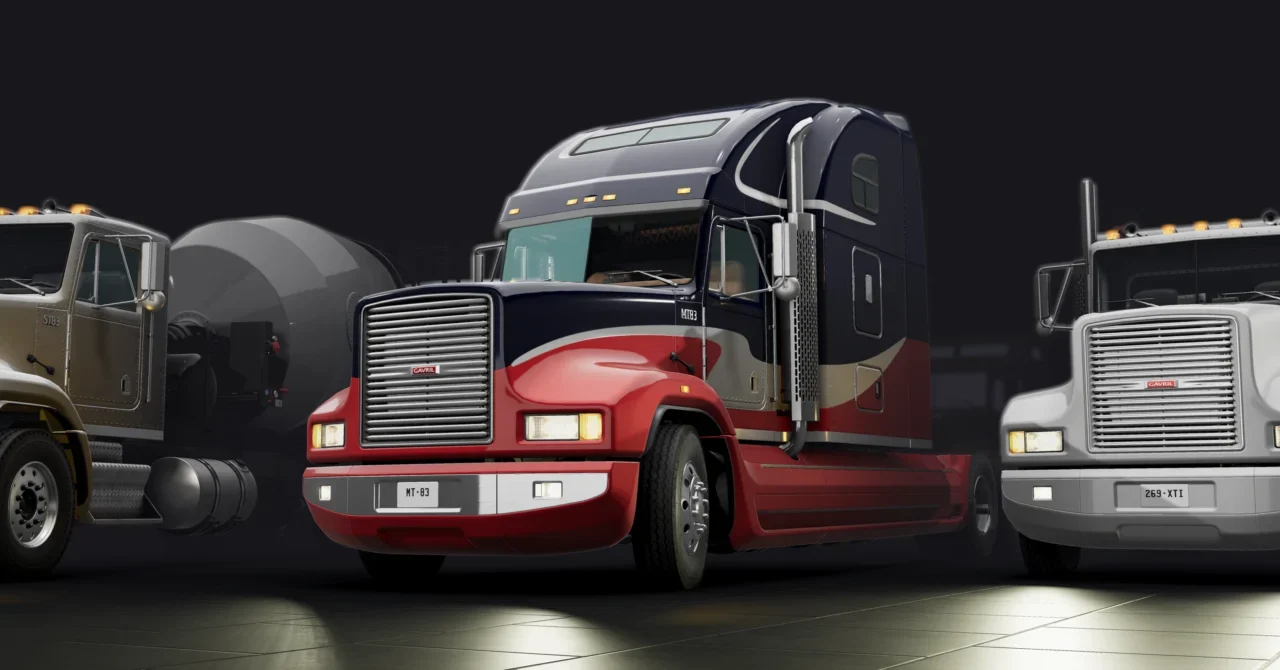
More screenshots on Official BeamNG Repository (beamng.com/resources) ↗
What this mod does
The Gavril MT-Series turns the in-game T-Series truck into a late-’80s, early-’90s tractor, with the typical plastic facelift of the era and a set-back front axle. It’s a very complete expansion that integrates with the game’s original parts.
What’s included
- Two variants: the MT-Series, the modernized and more aerodynamic version, and the short-nose ST-Series.
- New hoods, bumpers, fenders, roof deflectors and side fairings.
- Sleeper cabs, including an integrated high-roof version.
- Modernized 900 and 640 cubic inch engines with revised turbos.
- 10- and 18-speed automated gearboxes, an 18-speed manual and a 6-speed automatic.
- Front air suspension controlled by a dashboard switch.
- New steering wheels and shifter, and skins compatible with the in-game ones.
Who it’s for
For anyone who enjoys heavy hauling in BeamNG and wants an American highway truck that’s more modern than the original T-Series, with many-speed gearboxes and a sleeper cab for long routes. It works with several bodies by other authors, such as tow trucks or garbage trucks.
Release notes
Version 1.0 is from May 2026. The page doesn’t mention 0.39, but the reviews posted after its release are positive. All the new parts carry the (MT-Series) prefix in the configurator.
User rating
Mod video
Highlights and things to keep in mind
- Near-perfect rating on the Repository
- Gearboxes and engines designed for heavy hauling
- Integrates with the game's parts and skins
- Requires the Truck Wheel Mod
- Known issues: jerky automated gearboxes and an oil pan that hits the axle
- No specific update for 0.39
Requirements
- BeamNG.drive (latest version tested by users: 0.39)
- Truck Wheel Mod by RenAzuma66
- About 70 MB of free space
How to install it
- Open the Gavril MT-Series page on the official BeamNG Repository.
- Also download the Truck Wheel Mod by the same author; without it, most configurations run steel wheels.
- Copy both .zip files (don't unzip them) into the mods folder inside your user folder, or subscribe to both from the in-game Repository.
- Launch the game and check in the Mod Manager that both are enabled.
- In the vehicle selector, open the Gavril T-Series and choose one of the MT or ST configurations.
- In the configurator, look for parts with the (MT-Series) prefix.
Common problems
Why does my truck have steel wheels?
Because the Truck Wheel Mod is missing; install it from its Repository page.
The automated gearboxes jerk, is that normal?
Yes, the author acknowledges it as a known issue, and they also lack multiple reverse gears.
With the mod enabled, the original T-Series cab textures look wrong, what's going on?
A user has reported it; try clearing the game's cache and disable other truck mods to rule out conflicts.
More mods for BeamNG