Google Maps Navigation Dark Mode (Addon) (addon to use the dark GPS with ProMods and Afroeurasia background maps) for Euro Truck Simulator 2
17.7 KB addon so Google Maps Navigation Dark Mode works with background maps (ProMods, Afroeurasia, SaltySeeds). Goes at the very top of the Mod Manager and needs the main mod. Updated January 1, 2026.
Download Google Maps Navigation Dark Mode (Addon) (addon to use the dark GPS with ProMods and Afroeurasia background maps)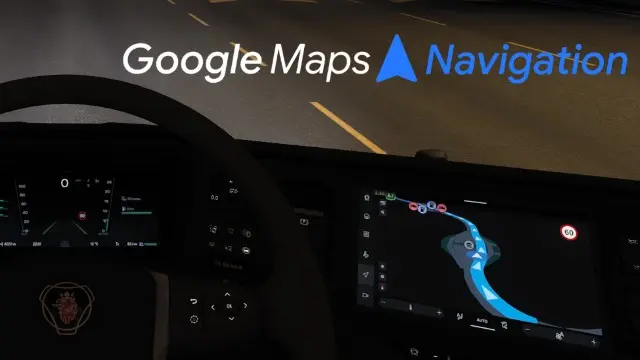
More screenshots on steamcommunity.com (Steam Workshop) ↗
What this mod does
Google Maps Navigation Dark Mode (Addon), by predator, is the background map addon for his Google Maps-style dark GPS for Euro Truck Simulator 2. According to the author, you need it when you use a background map or a map mod so navigation displays correctly; with the vanilla map you don’t need it. Steam lists the main mod, Google Maps Navigation Dark Mode, as a required item, and the author asks you not to use the addon without it.
Supported background maps
- ProMods High Quality Background Map, by DOWL (recommended if you only use ProMods).
- ProMods Complete Afroeurasia Background Map, by DOWL.
- ETS2 Global Background Map, by SaltySeeds (all versions).
Other background maps: trial and error.
Load order
From top to bottom: the addon at the very top of the Mod Manager (highest priority), then the background map, and below it Google Maps Navigation Dark Mode; the map files go further down.
Status
Posted on September 23, 2025 and updated on January 1, 2026, with 4 change notes and 5,061 subscribers. The author doesn’t state a game version. In the comments, one player says in April 2026 that it works on 1.58; others report an orange route line or a shifted map when using the addon without a background map, which is exactly what the author says not to do. More tools for ETS2.
Holyfix Check
Will it work with your mods?
Load your game.log.txt and check whether this mod is for your ETS2 version, whether you're missing a mod or DLC it needs and where to place it.
It's in Documents › Euro Truck Simulator 2 › game.log.txt. It's read in your browser: the file is never uploaded.
Something else failing? Holyfix for ETS2 checks all your mods at once.
User rating
Highlights and things to keep in mind
- Lets you use the Google Maps dark GPS with ProMods, Afroeurasia and SaltySeeds' background map
- Only 17.7 KB
- The author explains the exact load order and replies in the comments
- Unofficial mod: brands belong to their owners; neither Holymod nor the author is affiliated with them
- The author doesn't say which game version it's for; Holyfix will warn you if it throws errors
- It needs the main Google Maps Navigation Dark Mode mod and a compatible background map; without a background map the map shifts, according to several comments
- It must go at the very top of the Mod Manager; one comment reports an orange route line
- The main mod isn't compatible with TruckersMP, according to its author
Requirements
- Euro Truck Simulator 2
- Google Maps Navigation Dark Mode mod by predator (Steam lists it as required)
- A compatible background map: ProMods High Quality Background Map or Afroeurasia Background Map (DOWL) or ETS2 Global Background Map (SaltySeeds)
- Steam account to subscribe on the Workshop
How to install it
- Subscribe to Google Maps Navigation Dark Mode (the main mod) and to this addon (17.7 KB)
- Subscribe to or download the compatible background map you use (DOWL or SaltySeeds)
- Open ETS2, go to the Mod Manager and order from top to bottom: addon, background map, Google Maps Navigation Dark Mode, map files
- If the route or the background looks wrong, check that order first
Version history
-
—1 Jan 2026Current
Latest author update (4 change notes; text not visible on the page)
-
—23 Sep 2025
Posted on the Steam Workshop
Common problems
Do I need this addon?
Only if you use a map mod or a background map. With the vanilla ETS2 map it isn't needed, according to the author.
Does it work on its own?
No: Steam lists Google Maps Navigation Dark Mode as a required item and the author asks you not to use the addon without it.
Which background maps does it support?
DOWL's ProMods maps (High Quality and Afroeurasia) and SaltySeeds' ETS2 Global Background Map; others, by trial and error.
Where do I place it?
At the very top of the Mod Manager, above the background map and the main mod.
Which ETS2 version is it for?
The author doesn't say; the latest update is from January 1, 2026 and one player says it works on 1.58.
More mods for ETS2
 ETS2 1.61
 ETS2 1.61
 ETS2 1.60