ETS2 GPS EVO 2027: a revamped GPS with a blue route and a white truck for Euro Truck Simulator 2
A revamped GPS for ETS2 1.61: dark blue route with white arrows, explored roads in green, new icons and a white truck as the pointer. Free; updated 25-10-2026.
Download ETS2 GPS EVO 2027: a revamped GPS with a blue route and a white truck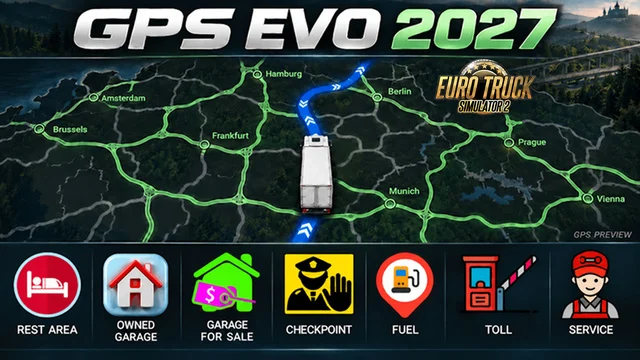
More screenshots on Steam Workshop ↗
What this mod does
ETS2 GPS EVO 2027, by Erik1520, changes the look of the GPS and the map in Euro Truck Simulator 2. It already has over 45,000 subscribers on Steam Workshop.
What it changes
- GPS route in dark blue with white direction arrows.
- Explored roads and areas in light green; the names of discovered cities stay green.
- Custom 60×60 icons, with a new red icon for rest areas and others for garages.
- A white truck instead of the player arrow.
- Keeps your exploration progress.
Compatibility
The standard edition is for the official 1.61 map and its DLCs. For ProMods, RusMap or custom map backgrounds, you need a compatibility patch or the Modular Maps edition, which is released separately. Don’t enable both editions at the same time. The author warns that specific ProMods and RusMap versions haven’t been checked yet, and one player says it stopped working for them with ProMods.
Steam lists MercedesBenz MP6 New, another mod by the same author, as a required item, so Steam will ask you to subscribe to it too.
Version
The title lists 1.61 and the 1.62 beta. The last update was on October 25, 2026. The author is changing the garage icons, which are currently the same for your own garages and other people’s.
Holyfix Check
Will it work with your mods?
Load your game.log.txt and check whether this mod is for your ETS2 version, whether you're missing a mod or DLC it needs and where to place it.
It's in Documents › Euro Truck Simulator 2 › game.log.txt. It's read in your browser: the file is never uploaded.
Something else failing? Holyfix for ETS2 checks all your mods at once.
User rating
Our rating
0.0 / 5- A modern, very readable GPS
- Made for 1.61
- Updated in October 2026
- Steam also asks you to subscribe to MercedesBenz MP6 New, by the same author
- With ProMods or RusMap you need the Modular Maps edition
- Your own garages and other people's still share the same icon
Requirements
- Euro Truck Simulator 2 1.61
- A Steam account to subscribe on the Workshop
- Required item on Steam: MercedesBenz MP6 New (by the same author)
- With ProMods or RusMap: a compatibility patch or the Modular Maps edition
How to install it
- Open the “ETS2 GPS EVO 2027” page on Steam Workshop and click “Subscribe”.
- Launch Euro Truck Simulator 2 and wait for Steam to finish the download.
- Open your profile's Mod Manager and enable the mod.
- Accept the subscription to the required item (MercedesBenz MP6 New) if Steam asks.
- If you play with ProMods or RusMap, use the Modular Maps edition instead of this one; don't enable both.
Common problems
Does it work with ProMods?
The standard edition doesn't: you need a patch or the Modular Maps edition.
Why is it asking for a Mercedes truck?
Steam lists MercedesBenz MP6 New, by the same author, as a required item.
Will I lose what I've explored?
No, the author says it keeps your exploration progress.
More mods for ETS2
 ETS2 1.60
  ✓ ETS2 1.61
  Multiplayer
  ETS2 1.59
  ✓ ETS2 1.61
  ✓ ETS2 1.61