Scania Smart Dash-GPS Colors (GPS colors to match the SmartDash) for Euro Truck Simulator 2
Changes the ETS2 GPS colors to match the SmartDash screen on Scanias. Works in any truck and is updated for 1.61. There's a separate version for ProMods.
Download Scania Smart Dash-GPS Colors (GPS colors to match the SmartDash)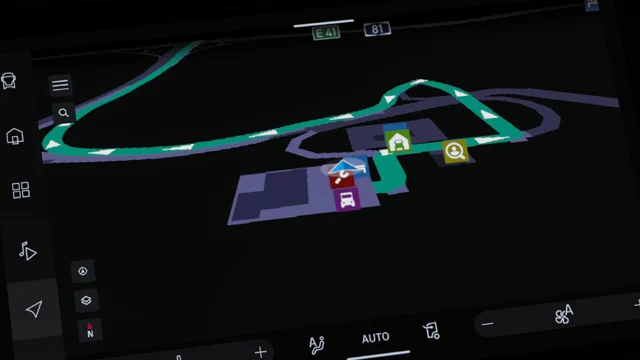
More screenshots on Steam Workshop ↗
What this mod does
Scania Smart Dash-GPS Colors is a mod by UserBinLogin that changes the Euro Truck Simulator 2 navigation colors to match the SmartDash screen on the latest Scanias. It works in any truck, but the colors are designed for SmartDash interiors.
What it changes
- Special colors on the GPS map and the navigation screen.
- It only touches one file: map_data.sii inside def.scs, so it’s very lightweight.
ProMods
The author warns that it may cause problems with ProMods. For that map he publishes a separate version, Scania Smart Dash-GPS Colors for ProMods, which you should use instead.
Version and compatibility
Several users asked for the 1.61 update in September 2026, and the author released it on October 14, 2026; the page was last updated on October 15. One user said that after updating, he couldn’t open his profile on 1.60. The author explained that the new code is required for 1.61, so the current version only works on 1.61. If you’re still on 1.60, don’t enable it.
Requirements
It doesn’t need DLC or other mods. It pairs really well with mods that improve the Scania SmartDash.
Holyfix Check
Will it work with your mods?
Load your game.log.txt and check whether this mod is for your ETS2 version, whether you're missing a mod or DLC it needs and where to place it.
It's in Documents › Euro Truck Simulator 2 › game.log.txt. It's read in your browser: the file is never uploaded.
Something else failing? Holyfix for ETS2 checks all your mods at once.
User rating
Our rating
0.0 / 5- Updated for 1.61
- Very lightweight: it only changes one file
- Separate version for ProMods
- The current version doesn't work on 1.60
- With ProMods, use the dedicated version
- Unofficial mod: trademarks belong to their owners; neither Holymod nor the author is affiliated with them
Requirements
- Euro Truck Simulator 2 updated to version 1.61
- No DLC or other mods required
- Steam account
How to install it
- Open the mod's page on Steam Workshop and click “Subscribe” (if you play with ProMods, use the ProMods version).
- Wait for Steam to finish the download.
- Launch ETS2, open the Mod Manager and enable the mod.
- Start a job with a route to see the new GPS colors.
Common problems
Does it only work on Scanias?
No: it works in any truck, although the colors are designed for the SmartDash.
Does it work with ProMods?
Use the ProMods version the author publishes.
My profile won't open on 1.60
The current version is for 1.61; the author confirmed it.
More mods for ETS2
 Multiplayer
  ETS2 1.59
  ✓ ETS2 1.61
  ✓ ETS2 1.61
  ✓ ETS2 1.61
  ETS2 1.60