Display mirrors on the navigation screen (mirrors on the truck’s nav screen) for Euro Truck Simulator 2
Shows the right mirror, the front mirror or both on the truck's navigation screen, also next to the GPS. Version 2.10 updated for 1.59, free on Steam, with an ATS version.
Download Display mirrors on the navigation screen (mirrors on the truck’s nav screen)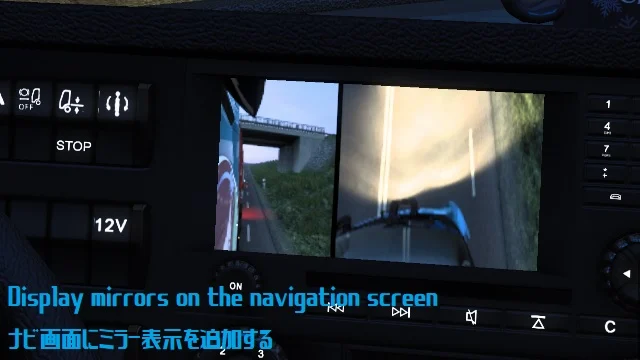
More screenshots on Steam Workshop ↗
What this mod does
Display mirrors on the navigation screen is a mod by みれにあさん for Euro Truck Simulator 2 that uses the dashboard navigation screen to show the mirrors. The author warns that the image is forced onto that screen, so it has a few glitches, but it’s perfectly usable.
Screen modes
- Right mirror.
- Front mirror.
- Right and front mirror at the same time.
- Right mirror next to the GPS.
You switch modes with the key bound to “Infotainment display mode”. On the MAN TGX 2020 it adds a full-screen GPS, on some trucks the arrival and rest times, and on the Renault T the mirrors on the Cabin Accessories DLC phone and tablet. Modded trucks with the stock screen may also work.
Version
Version 2.10, from May 21, 2026, updates it for 1.59, which changed the names of parts and accessories. Several users say it doesn’t work on 1.61.
Known issues
On the Volvo FH6 a bed icon shows up even if you turn off fatigue, and on the Scania 2025 with SmartDash the screen area may flicker. With Blind spot sensor indicator you need an add-on from the author.
Holyfix Check
Will it work with your mods?
Load your game.log.txt and check whether this mod is for your ETS2 version, whether you're missing a mod or DLC it needs and where to place it.
It's in Documents › Euro Truck Simulator 2 › game.log.txt. It's read in your browser: the file is never uploaded.
Something else failing? Holyfix for ETS2 checks all your mods at once.
User rating
Our rating
0.0 / 5- Mirrors on the dashboard screen, very handy with a single monitor
- Several modes, including next to the GPS
- Author updates it frequently
- Latest game version confirmed by the author: 1.59. It may cause errors on 1.61; Holyfix will warn you if so.
- Several users say it doesn't work on 1.61
- On the Volvo FH6 a bed icon shows up and on the Scania 2025 with SmartDash it may flicker
- With Blind spot sensor indicator you need the author's add-on
- Unofficial mod: trademarks belong to their owners; neither Holymod nor the author is affiliated with them
Requirements
Links go to each DLC’s official Steam page.
- Euro Truck Simulator 2 (the author confirms 1.59)
- A key bound to “Infotainment display mode”
- Optional: Cabin Accessories DLC to see the mirrors on the Renault T's phone and tablet
- Steam account
How to install it
- Open the mod's page on Steam Workshop and click “Subscribe”.
- Wait for Steam to finish the download.
- Launch ETS2, open the Mod Manager and enable the mod.
- In Options > Controls, bind a key to “Infotainment display mode”.
- In the cab, press that key to cycle through the mirror modes.
Version history
-
2.1021 May 2026Current
Updated for 1.59, which changed the names of parts and accessories
-
2.926 Feb 2026
Clearer split-screen lines and fixed arrival and rest times
Common problems
How do I switch views?
With the key bound to “Infotainment display mode”.
Does it work on 1.61?
The author updated it for 1.59; several users say it doesn't work on 1.61.
Does it work on modded trucks?
It may work if they use the game's stock navigation screen.
I use it with Blind spot sensor indicator
The author publishes an add-on to use both together.
Is there an ATS version?
Yes, the author publishes another one for American Truck Simulator.
More mods for ETS2
 ✓ ETS2 1.61
  ✓ ETS2 1.61
  ✓ ETS2 1.61
  ETS2 1.60
  ETS2 1.59