Heads-Up Display GPS: GPS navigator projected onto the windshield of ETS2 trucks for Euro Truck Simulator 2
Heads-Up Display GPS, by furkan wick, is a cabin accessory that projects the navigator onto the windshield of stock ETS2 trucks. Last update: June 28, 2018; support ended in 2019; 446,000 subscribers.
Download Heads-Up Display GPS: GPS navigator projected onto the windshield of ETS2 trucks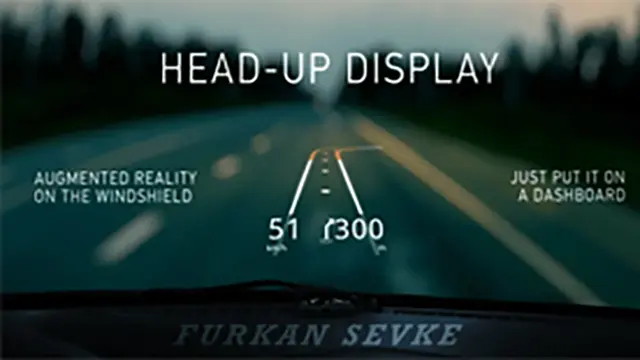
Official screenshots by the author: © Steam Workshop · furkan wickMore screenshots on steamcommunity.com ↗
What this mod does
Heads-Up Display GPS is a cabin accessory by furkan wick for Euro Truck Simulator 2 that projects the truck’s navigator onto the windshield, HUD style, so you do not have to look down at the dashboard screen. You buy it at the shop like any other part: it takes the driver plate slot and turns on when you start the engine. The author includes left and right versions.
Trucks and settings
- Works on the stock SCS trucks available as of June 29, 2018, including the Scania S (added June 27, 2018).
- Does not cover later trucks such as the Renault T; the author did not update it after the Scania S.
- Only works on trucks with GPS; the author recommends a field of view of 50 to 60 and keeping the seat position fixed.
- According to the author, it is not compatible with multiplayer.
Mod status
The page states «end of support» in 2019 and the last update is from June 28, 2018, so the author does not confirm any recent version. According to Holymod’s anonymous analyzer logs, it errors on 1.61/1.62 for some players. As of November 23, 2026 it has 446,242 subscribers. If you want something maintained with the same idea, check YTHQ GPS.
Real player data: in the last 90 days, 6 players on ETS2 1.62 had this mod active when using our analyzer, and in 50 % of their logs this mod threw no errors. No errors doesn't guarantee it works perfectly. Analyze your log.
Holyfix Check
Will it work with your mods?
Load your game.log.txt and check whether this mod is for your ETS2 version, whether you're missing a mod or DLC it needs and where to place it.
It's in Documents › Euro Truck Simulator 2 › game.log.txt. It's read in your browser: the file is never uploaded.
Something else failing? Holyfix for ETS2 checks all your mods at once.
User rating
Highlights and things to keep in mind
- Navigator on the windshield without taking your eyes off the road
- Left or right side versions
- Very light (221.5 KB) and no DLC
- Over 446,000 subscribers on Steam
- The author does not confirm any game version (last update June 28, 2018; support ended in 2019). It may error on the current version; Holyfix will warn you if so.
- According to Holymod's anonymous analyzer logs, it errors on 1.61/1.62 for some players.
- Does not work on trucks without GPS or on models released after June 2018, such as the Renault T.
- The author states it is not compatible with multiplayer.
- With a field of view other than 50–60 or after moving the seat, the projection may be misaligned.
Requirements
- Euro Truck Simulator 2 (no DLC)
- Stock SCS truck with GPS, from those available in June 2018 (does not work on trucks without a navigator or on later models such as the Renault T)
- Single player (the author states it is not compatible with multiplayer)
How to install it
- Open the mod page on the Steam Workshop and click "Subscribe"
- Start Euro Truck Simulator 2 and enable "Heads-Up DISPLAY GPS" in the Mod Manager
- Go to the shop with your truck and find the driver plate slot
- Buy the HUD GPS in its left or right version
- Start the engine so the projection turns on
- Set the field of view between 50 and 60 and keep the seat position, as the author recommends
Version history
-
—28 Jun 2018Current
Added Scania S support
Common problems
Does it work on 1.62?
The author ended support in 2019 and confirms no version. According to Holymod's analyzer, some players get errors on 1.61/1.62. Holyfix will warn you if that is your case.
Where is it installed on the truck?
At the shop, in the driver plate slot. It turns on when you start the engine.
Does it work on any truck?
Only on stock trucks with GPS available in June 2018; not on the Renault T or later models.
Can I use it on TruckersMP or Convoy?
The author states it is not compatible with multiplayer.
Why does it look misaligned?
The author recommends a field of view of 50 to 60 and not moving the seat position.
More mods for ETS2
 ETS2 1.61
 ETS2 1.61
 ETS2 1.57
 ETS2 1.58Multiplayer
 ETS2 1.59
 ETS2 1.53Multiplayer