Scania NG Improved Dashboard for Euro Truck Simulator 2
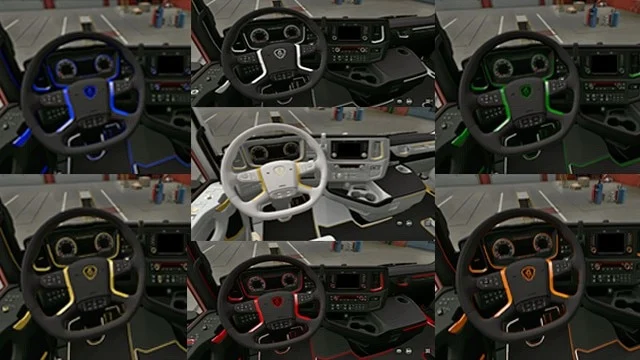
Rebuilds the Scania Next Generation dashboard with oil temperature, turbo, range, ETA, time to next rest and blind spot info. Free on Steam, version 5.2 for ETS2 1.59.
Download Scania NG Improved Dashboard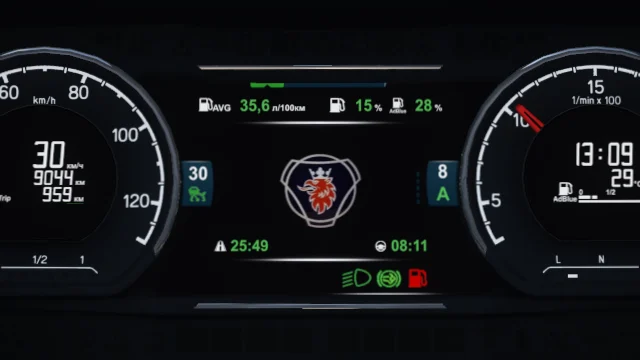
More screenshots on Steam Workshop ↗
What this mod does
Scania NG Improved Dashboard is a complete overhaul of the Scania Next Generation instrument cluster by KnightRider (Knights Gaming). It weighs just over 1 MB and adds lots of useful info on the road.
What it adds
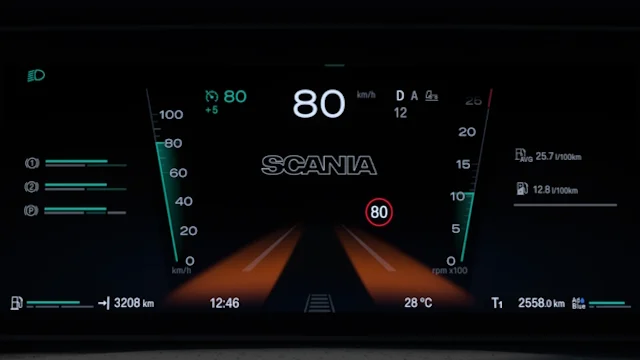
There are two dashboard variants. The Exclusive one includes:
- Oil temperature and turbo pressure gauges, plus low beam, engine brake and fuel reserve warning lights.
- Cruise control speed on any page, cruise memory and a low air pressure warning.
- Estimated range, fuel and AdBlue percentage, trip distance and average speed.
- Estimated time of arrival and time until rest, which are hidden if there’s no delivery or if fatigue is disabled.
- Left and right blind spot, and a V8 logo in the V8 interior.
The Standard one includes most of these improvements, without the oil, turbo or blind spot indicators.
Compatibility
It works with SCS’s Scania NG and with Eugene’s Next Generation Scania P G R S Pack. There are optional add-ons with V8, SCANIA and SUPER logos. For the Smart Dash interior, the author publishes a separate mod.
Version
5.2 (May 6, 2026) adds compatibility with 1.59.
Holyfix Check
Will it work with your mods?
Load your game.log.txt and check whether this mod is for your ETS2 version, whether you're missing a mod or DLC it needs and where to place it.
It's in Documents › Euro Truck Simulator 2 › game.log.txt. It's read in your browser: the file is never uploaded.
Something else failing? Holyfix for ETS2 checks all your mods at once.
User rating
Highlights and things to keep in mind
- Lots of new information on the dashboard
- Compatible with Eugene's Scania
- Very lightweight file (1.4 MB)
- Latest version is for 1.59: not confirmed on 1.61
- Some features are only in the Exclusive variant
- The logos come in separate add-ons
Requirements
- Euro Truck Simulator 2 1.59
- Steam account
- SCS's Scania NG or Eugene's pack
How to install it
- Open the "Scania NG Improved Dashboard" page on Steam Workshop and click "Subscribe".
- Launch Euro Truck Simulator 2 and wait for Steam to finish downloading the mod.
- Go to your profile's Mod Manager and enable "Scania NG Improved Dashboard".
- If you like, also subscribe to the logo add-on (V8, SCANIA or SUPER) you prefer.
- At the garage, choose the Exclusive or Standard interior for your Scania NG.
- Switch pages on the dashboard display to see the new data.
Version history
-
5.26 May 2026Current
Compatibility with 1.59
-
5.120 Nov 2025
Compatibility with 1.57
-
5.026 May 2025
Fixes
-
4.98 Aug 2024
Compatibility with 1.50
Common problems
Does it work with Eugene's Scania?
Yes, the author states compatibility with SCS's Scania and with the Next Generation Scania P G R S Pack.
Why can't I see the ETA?
It's hidden when no time is available, for example with no delivery and no route in the navigation.
Does it work with the Smart Dash interior?
No; for that interior the same author has Scania Smart Dash Improved Dashboard.
More mods for ETS2
 ETS2 1.53Multiplayer
  ETS2 1.59Multiplayer
  ✓ ETS2 1.61Multiplayer
  ✓ ETS2 1.61
  ETS2 1.57
  ✓ ETS2 1.61