Interior Light & Emblems by Braakie for Euro Truck Simulator 2
Custom and LED emblems for the cab's back panel, with colored interior lighting, for SCS and modded trucks. Free on Steam; version 26.09 for ETS2 1.61, needs Part 2.
Download Interior Light & Emblems by Braakie
More screenshots on Steam Workshop ↗
What this mod does
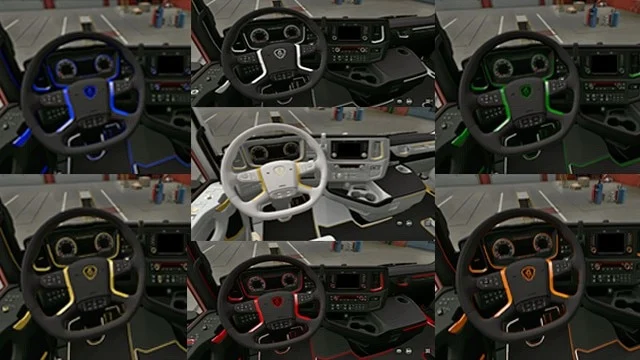
Interior Light & Emblems by Braakie adds custom emblems and LED emblems for the cab interior, along with colored ambient lighting. It’s standalone: it doesn’t replace anything in the game.
How it works
- When you choose an emblem for the back panel, a new slot appears at the top left to pick the interior light color.
- The interior light turns on with the headlights.
- There are optional add-ons to turn it on with the beacon key or the parking lights, and another with flashing and Christmas emblems. They go above the main mod.
Compatible trucks
All SCS trucks and a long list of mods: Eugene’s Scania, RJL’s Scanias, Sanax’s Volvo FH 2022, Gloover’s MAN TGX E6, Madster’s MAN TGA and XBS’s MAN F2000, among others.
Requirements and version
Part 1 hit the file size limit, so new content goes into Part 2, which is required. Version 26.09 is tested on 1.61. It works in single player and in Convoy. You can request new emblems in the discussions, and the author adds them every month.
Several users report FPS drops and stuttering with the interior lights; there’s a pinned bug thread.
Holyfix Check
Will it work with your mods?
Load your game.log.txt and check whether this mod is for your ETS2 version, whether you're missing a mod or DLC it needs and where to place it.
It's in Documents › Euro Truck Simulator 2 › game.log.txt. It's read in your browser: the file is never uploaded.
Something else failing? Holyfix for ETS2 checks all your mods at once.
User rating
Highlights and things to keep in mind
- Compatible with a huge number of modded trucks
- Monthly updates with user-requested emblems
- Tested on 1.61
- Requires Part 2
- Large download (about 394 MB for Part 1)
- Reports of FPS drops with the interior light
Requirements
- Euro Truck Simulator 2 1.61
- Steam account
- Interior Light & Emblems Part 2 (required)
- About 394 MB of free space for Part 1 alone
How to install it
- Open the "Interior Light & Emblems" page on Steam Workshop and click "Subscribe".
- Launch Euro Truck Simulator 2 and wait for Steam to finish downloading the mod.
- Open your profile's Mod Manager and enable "Interior Light & Emblems".
- Also subscribe to "Interior Light & Emblems Part 2" and enable it.
- If you use the lighting or Christmas emblem add-ons, place them above the main mod.
- At the service shop, choose an emblem for the back panel and pick the light color in the slot that appears at the top left.
Version history
-
26.097 Sep 2026Current
1.61 support
Common problems
Do I need Part 2?
Yes. The author says Part 1 hit the file limit and the latest additions are in Part 2.
Does it work in multiplayer?
Yes in the official Convoy mode; the author says it's for single player and Convoy only.
Can I request an emblem?
Yes, in the Workshop request thread. The author asks for a good example of the logo and one request at a time.
When does the light turn on?
With the headlights. There are add-ons to turn it on with the beacons or the parking lights.
More mods for ETS2
 ✓ ETS2 1.61
  ETS2 1.57
  ✓ ETS2 1.61
  ETS2 1.55Requires DLC
  ✓ ETS2 1.61Requires DLC
  ETS2 1.54Requires DLC