SibirMap 2.0 Ural Expansion for Euro Truck Simulator 2
Extends ETS2 1.61 to the Urals and western Siberia: Omsk, Tyumen, Yekaterinburg, Ufa and more. Version 2.13.1 FV; needs RusMap and three other Russian maps.
Download SibirMap 2.0 Ural Expansion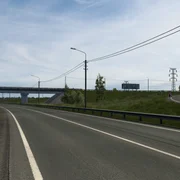
More screenshots on forum.scssoft.com ↗
What this mod does
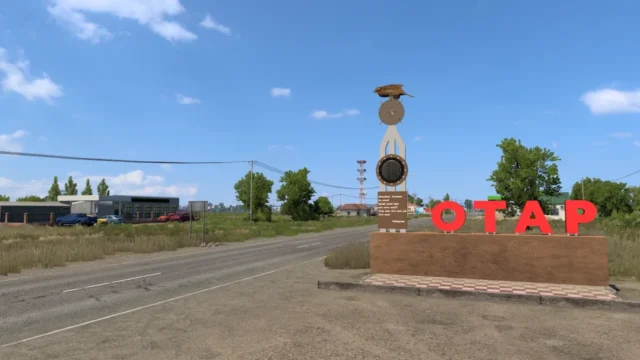
SibirMap 2.0 Ural Expansion is the map by Valery “10AVOID” that takes Euro Truck Simulator 2 beyond the Urals. He has been publishing it on the official SCS forum since January 2021 and adapts it to each game version.
What it adds
- The Urals and western Siberia, with areas such as Omsk, Tyumen, Kurgan, Chelyabinsk, Yekaterinburg and Ufa.
- Parts of Tatarstan and Orenburg.
- Part of northern Kazakhstan, with Petropavlovsk and the M-51 highway.
- Since 2.13, the R-254 highway between the Omsk southern bypass and Barabinsk.
Requirements and load order
It needs all the map DLCs and four other maps: RusMap (map, def and model files), VolgaMap, Southern Region and KirovMap. The author gives this install order: RusMap, VolgaMap, SouthernRegion, KirovMap and, last, SibirMap. You can also play it as a separate module: create a new profile, enable the mods and pick the siburmap.mdb module before you start.
Version
2.13.1 FV, released September 18, 2026, is the 1.61 update. The main link in the thread, on ModsFire, is labeled “2.13FV (for 1.60)”, although the mirror file is named “for161”. The author warns that the time zone settings are only guaranteed when playing offline.
Holyfix Check
Will it work with your mods?
Load your game.log.txt and check whether this mod is for your ETS2 version, whether you're missing a mod or DLC it needs and where to place it.
It's in Documents › Euro Truck Simulator 2 › game.log.txt. It's read in your browser: the file is never uploaded.
Something else failing? Holyfix for ETS2 checks all your mods at once.
User rating
Highlights and things to keep in mind
- Takes the map all the way to the Urals and western Siberia
- Updated for 1.61 in September 2026
- Free, with its own module to start there
- Needs four more maps and all the map DLCs
- The thread's main link is labeled “for 1.60”, even though the author announces 1.61
- Time zone settings are only guaranteed offline
- The author asks you to keep the original download links
Requirements
Links go to each DLC’s official Steam page.
- Euro Truck Simulator 2 1.61
- Map DLCs: Going East!, Scandinavia, Vive la France !, Italia, Beyond the Baltic Sea, Road to the Black Sea, Iberia, West Balkans, Greece and Nordic Horizons
- RusMap (map, def and model files)
- VolgaMap, Southern Region and KirovMap
How to install it
- Go to the official SibirMap thread on the SCS forum.
- Download version 2.13.1 FV from the author's main link (ModsFire).
- Install RusMap, VolgaMap, Southern Region and KirovMap first.
- Copy the SibirMap .scs file to Documents/Euro Truck Simulator 2/mod.
- In the Mod Manager, enable the maps in the order the author gives: RusMap, VolgaMap, SouthernRegion, KirovMap and SibirMap.
- If you want to start right in Siberia, create a new profile and pick the siburmap.mdb module.
Version history
-
2.13.1 FV18 Sep 2026Current
Update for game version 1.61
Common problems
Does it work on its own?
No. It needs RusMap, VolgaMap, Southern Region and KirovMap, plus all the map DLCs.
Is it compatible with 1.61?
Yes, according to the author: 2.13.1 FV is the 1.61 update.
Can I start my save in Siberia?
Yes: create a new profile and pick the siburmap.mdb module before you start.
More mods for ETS2
 ✓ ETS2 1.61
  ✓ ETS2 1.61Requires DLC
  ✓ ETS2 1.61Requires DLC
  ✓ ETS2 1.61Requires DLC
  ✓ ETS2 1.61Requires DLC
  ✓ ETS2 1.61Requires DLC