PerfectEdge for Farming Simulator 25
A script that locks an axis while you paint terrain, so you can draw perfectly straight edges by holding Shift. It takes up 0.14 MB and is PC/Mac only.
Download PerfectEdge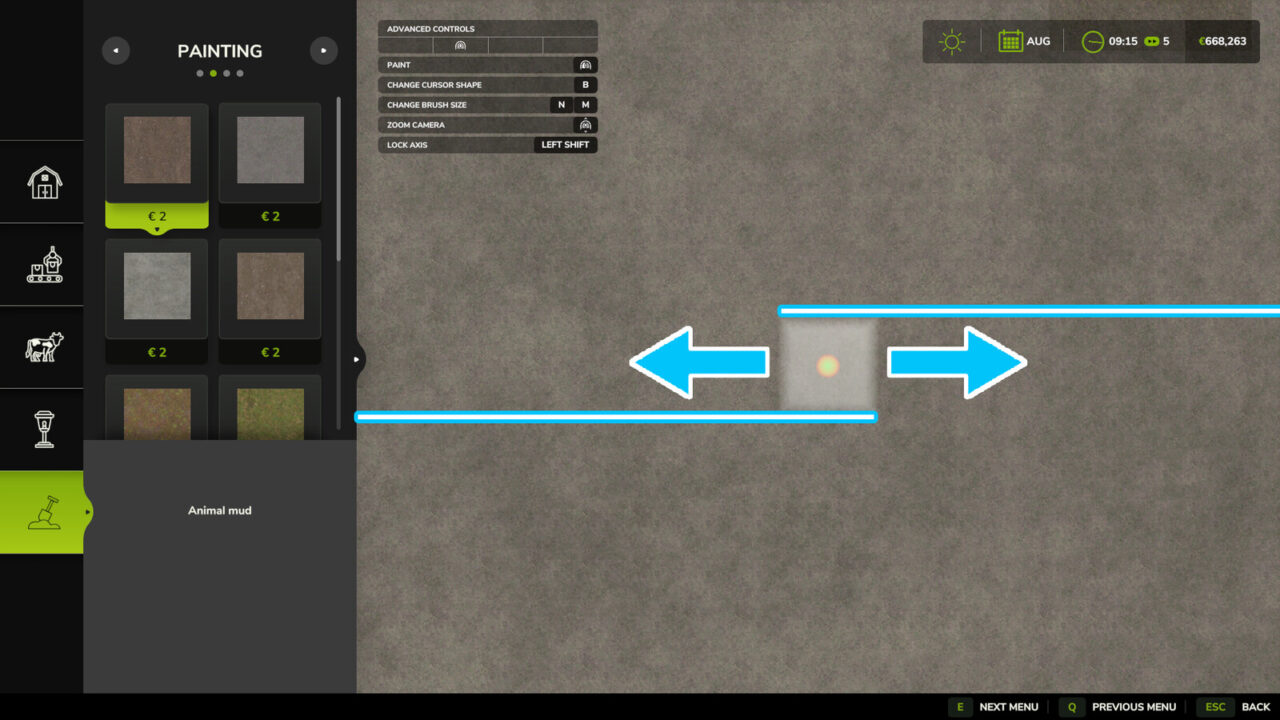
More screenshots on GIANTS ModHub (farming-simulator.com) ↗
What this mod does
PerfectEdge, by olaf.tnt, is a small script for players who care about how their farm looks. When painting terrain in construction mode, it lets you lock the brush direction so edges come out perfectly straight, something that’s nearly impossible by hand with the mouse.
How it works
- Hold Left Shift while you paint.
- Move the mouse in the direction you want.
- After 0.25 meters of movement, the mod picks the axis (X or Z) based on your movement.
- As long as you keep holding Shift, the brush only moves along that axis. When you let go, it moves freely again.
What it’s for
It’s useful for painting gravel paths, concrete yard edges, grass areas next to sheds or clean strips around silos and barns. The result really shows in screenshots and on decorative farms, where one crooked edge spoils the whole look.
Availability
It’s only available for PC and Mac, because it relies on the keyboard and mouse. It weighs 0.14 MB and doesn’t need any other mods. Version 1.1 fixed a visibility-related script error. It doesn’t change anything about gameplay or the economy, so you can use it in any savegame without worrying about throwing it off balance.
Holyfix Check
Will it work with your mods?
Load your log.txt and check whether this mod is for your FS25 version, whether you're missing a mod or DLC it needs and where to place it.
It's in Documents › My Games › FarmingSimulator2025 › log.txt. It's read in your browser: the file is never uploaded.
Something else failing? Holyfix for FS25 checks all your mods at once.
User rating
Highlights and things to keep in mind
- Straight edges when painting terrain
- Tiny: 0.14 MB
- Very well rated: 4.7 out of 5
- PC/Mac only
- Only locks the X and Z axes, no diagonals
Requirements
- Farming Simulator 25 on PC or Mac
- Keyboard and mouse
How to install it
- Open the game's Mods/ModHub menu (on PC or console) and search for "PerfectEdge", or download FS25_PerfectEdge.zip from the official mod page.
- If you download it manually on PC, copy the .zip (don't unzip it) to Documents > My Games > FarmingSimulator2025 > mods.
- Enable the mod when you load or create your savegame.
- In construction mode, choose the terrain painting brush, hold Left Shift and move the mouse in a line.
Version history
-
1.1.0.022 Nov 2024Current
Fixes a script error related to getVisibility
Common problems
Is it on consoles?
No. The ModHub only offers it for PC/Mac.
Which key does it use?
Left Shift: hold it down while you paint.
Does it change my savegame?
No. It only helps you paint straight edges.
More mods for FS25
 PC and consoles
  PC and consoles
  PC and consoles
  PC and consoles
  PC and consoles
  Multiplayer