Elemental Church Pack for Hytale
Pack of six elemental-themed ruined church prefabs (blood, storm, azure, emerald, void and diamond) to place in your world with the Paste tool.
Download Elemental Church Pack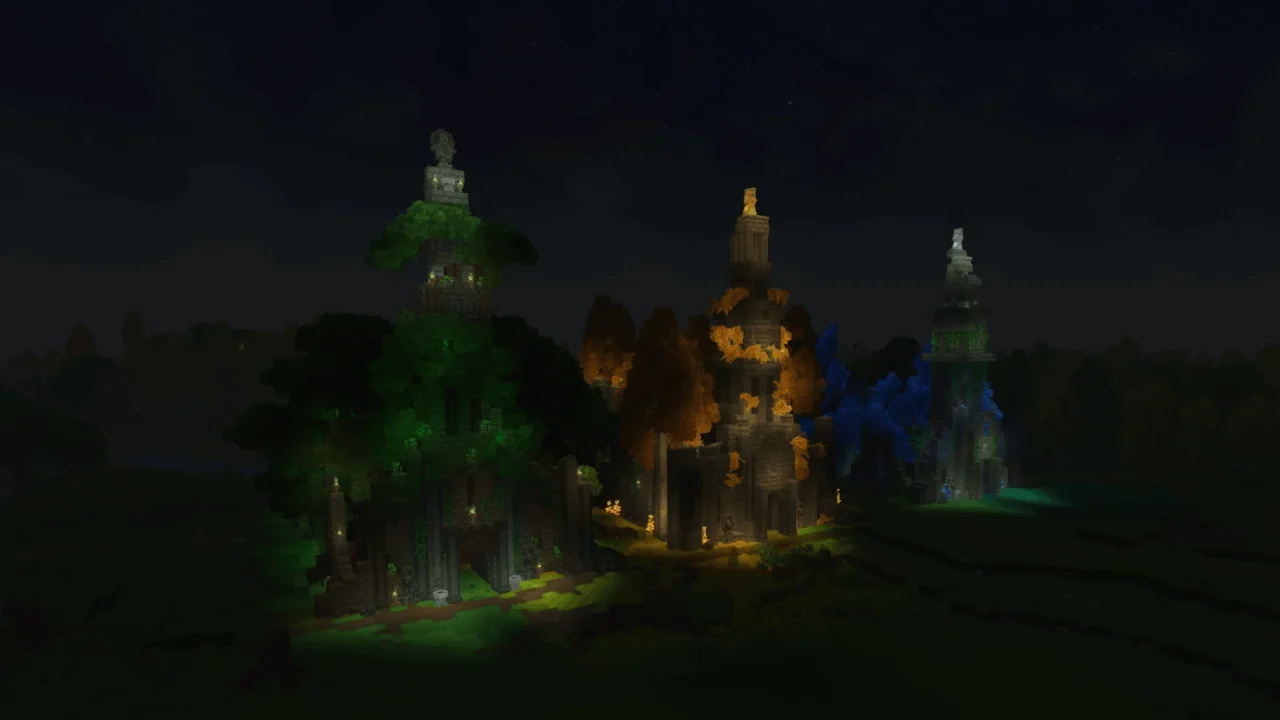
More screenshots on CurseForge ↗
What this mod does
Elemental Church Pack is a collection of ready-to-place builds (prefabs) for your Hytale worlds. They’re ruined stone churches slowly being reclaimed by nature, with glowing spires, collapsed arches, ivy creeping up the walls and weathered masonry.
What’s included
- Blood Church, the pack’s original.
- Azure Church.
- Storm Church.
- Emerald Church.
- Void Church.
- Diamond Church, the latest addition.
Each church follows the colors and gems of one of the game’s elements, so you can spread them across different biomes or group them in a themed area.
Who it’s for
For builders and server admins who want to decorate a dark fantasy, medieval or survival world without putting up every building block by block, and for anyone making adventure maps who needs ruins to explore. It doesn’t add new blocks or items: they’re structures made from the game’s own blocks.
How to use it
Prefabs aren’t enabled like a regular mod. You copy them into the world’s or server’s prefabs folder and place them from Creative mode with the Paste tool. Version 1.9 is released for Hytale 0.6.
Checked on October 20, 2026: the author hasn’t yet released a file tagged for Hytale 0.7 (Update 7) on CurseForge. We’ll check again and update this page as soon as it’s out.
User rating
Mod video
Highlights and things to keep in mind
- Six detailed builds ready to place
- Look that fits the game's elements and gems
- Lightweight with no dependencies
- Requires Creative mode or operator permissions to place them
- It isn't installed like a mod: you have to copy the files into the prefabs folder
- Small project, with far fewer downloads than content mods
Requirements
- Hytale (Early Access) on PC, version 0.6 for version 1.9 of the pack
- Creative mode (or operator permissions on a server) to use the Paste tool
How to install it
- Download the version 1.9 .zip from the Files tab on the pack's CurseForge page and unzip it.
- In single player, open the game folder from the launcher settings, go to UserDataSaves(your world) and create a folder called prefabs inside it if it doesn't exist.
- Copy the pack's .prefab.json files into that folder. On a server, create the prefabs folder in the server's root, upload the files there and restart it.
- Join the world in Creative mode, open the creative tools tab in your inventory and grab the Paste tool.
- With the tool in hand, press E, pick the church from the prefab list and click where you want to place it.
Common problems
The churches don't show up in the Paste tool list
The files must end in .prefab.json and be in the prefabs folder; reload the world or restart the server after copying them.
Can I use them on a server?
Yes, by uploading them to the server's prefabs folder; you need operator permissions to place them.
Do I need to enable it in the world settings?
Not like a mod: prefabs are only used with the Paste tool and become regular blocks once placed.
More mods for Hytale
 Multiplayer
 Multiplayer