InsightHUD for Hytale
A HUD that shows the status of the creatures, crops, workbenches and chests you're looking at, configurable and in Spanish. Version 1.8.8 for Hytale 0.7.
Download InsightHUD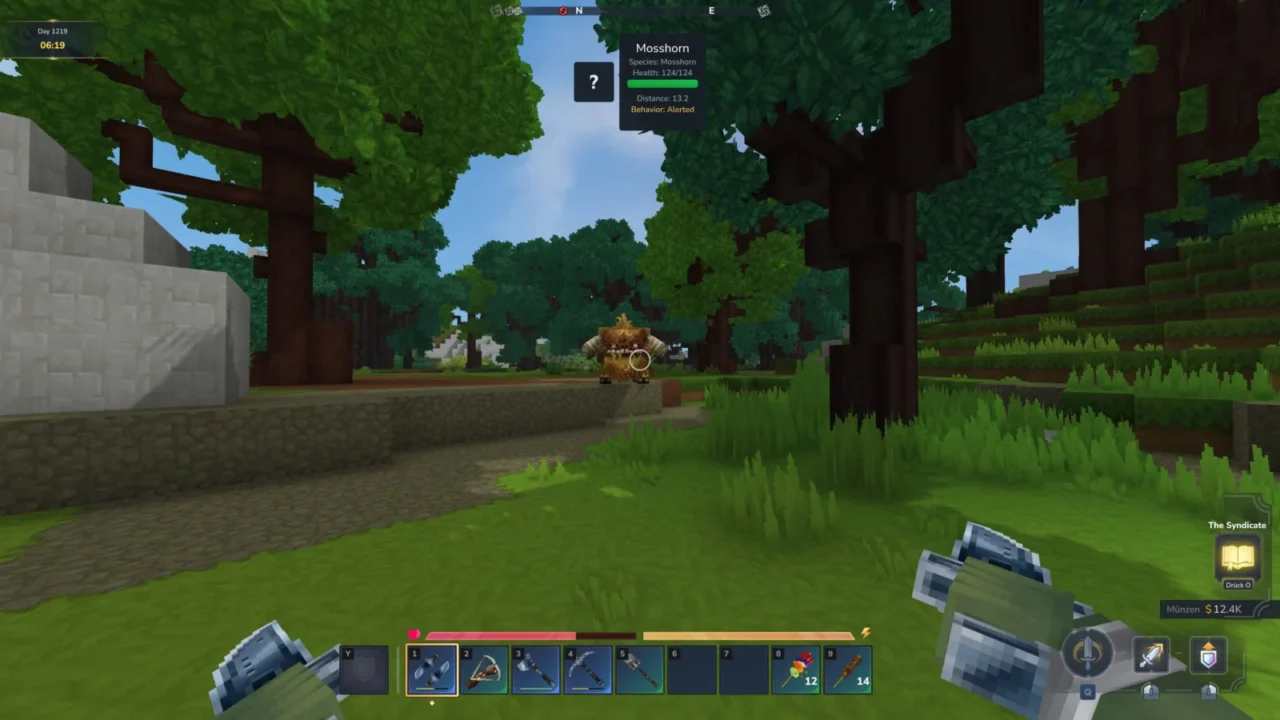
More screenshots on CurseForge ↗
What this mod does
InsightHUD is an information overlay that shows, in real time, what whatever you’re looking at is doing: whether a creature is alert, tamed, calm or hostile, whether a crop is ready or how a workbench is getting on.
What it shows
- Creatures and NPCs: status, mood and whether they can be tamed, petted, ridden or traded with. It recognizes custom names from HyCitizens.
- Crops: growth and a harvest alert.
- Benches, stations, salvagers and tanneries: progress and whether they’re active.
- Chests and containers: a preview of their contents.
- YetAnotherShop shops: the name of the linked shop.
You configure it with /insighthudsettings (or /ihs): position, scale, spacing, icons, background and language, Spanish included. Server owners can set global defaults for new players and even enforce them; /ihsreload reloads the config. It has an API so other mods can add their own info.
Update 7
Version 1.8.8 (October 12, 2026) is a compatibility update for 0.7: it uses the new chunk section API, removes the 0–319 height limit for detecting blocks and doesn’t change the config files. The author recommends testing chests, stations, crops and NPC info in-game. It has no dependencies and uses the MIT license. For item details, check out Advanced Item Info.
User rating
Highlights and things to keep in mind
- Lots of useful info without opening menus
- Translated into Spanish
- Highly configurable, server-side too
- MIT license
- The author recommends testing 1.8.8 thoroughly in-game
- HyCitizens and YetAnotherShop integrations only matter if you use them
- The page doesn't say whether installing it on the client is enough or it's needed on the server
Requirements
- Hytale (Early Access) on PC or server, version 0.7 (file insighthud-1.8.8.jar)
- No dependencies
How to install it
- Open the InsightHUD page on CurseForge and click Install to set it up with the CurseForge app, or download insighthud-1.8.8.jar from the Files tab (the file marked 0.7).
- If you download it manually, copy the file as is, without unzipping it, into the mods folder: on Windows, %APPDATA%\Hytale\UserData\Mods.
- Open Hytale, right-click the world, check InsightHUD in the mod list and save the world settings.
- On a dedicated server, put the file in the server's mods folder and restart it.
- In-game, type /ihs to choose the HUD's position, scale and language.
Version history
-
1.8.812 Oct 2026Current
Compatibility with Update 7 (0.7.x); chunk section API; no 0–319 height limit; no config changes
-
1.8.627 Aug 2026
Version for Hytale 0.6
Common problems
Is it available in Spanish?
Yes. It includes English, German, French, Spanish and Brazilian Portuguese, and you pick the language in /ihs.
Can I enforce a config across the whole server?
Yes. Server owners set global values that apply when players join for the first time, with an optional mode to enforce them.
Will I lose my settings when moving to 1.8.8?
You shouldn't: the changelog says there are no breaking changes to the config files.
More mods for Hytale
 Multiplayer
  Multiplayer
  Multiplayer
 Multiplayer
  Multiplayer