Advanced Item Info for Hytale
A searchable window listing every item in the game (and your mods) with its hidden data: quality, level, durability, fuel value and where it's crafted.
Download Advanced Item Info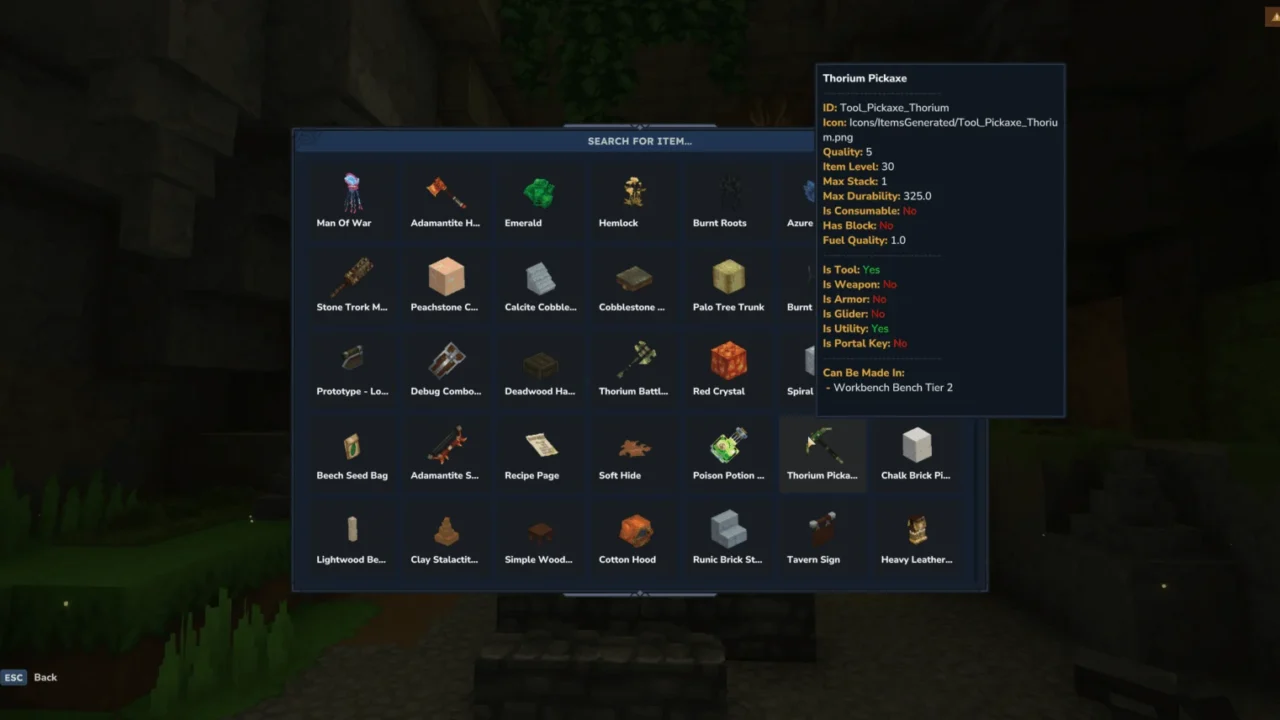
More screenshots on CurseForge ↗
What this mod does
Advanced Item Info is an in-game item encyclopedia. A single command opens a searchable window that gathers every available item and shows you properties Hytale normally doesn’t display in your inventory.
What data it shows
- The item’s internal ID, icon, quality and level.
- Max stack size and max durability.
- Whether it’s a consumable or corresponds to a block.
- Fuel quality, handy for knowing what to burn in furnaces.
- Its type: tool, weapon, armor, glider, utility or portal key.
- Which station it’s crafted at.
How to use it
Type /advancedinfo in chat (the shortcuts /aii and /iteminfo work too) and search by name. It doesn’t add items or change anything in the game: it only looks up information.
Who it’s for
For players who want to compare weapons and armor before crafting them, for anyone playing with lots of content mods who doesn’t know what each new item does, and for admins who need an item’s exact ID for commands or configs. It’s very lightweight (under 20 KB), open source under the MIT license, and version 1.0.8 is published for Hytale 0.6.
Update (Oct 12, 2026): with Update 7 (0.7) now out, the author has already marked their current file (version 1.0.8) as compatible with 0.7.
User rating
Highlights and things to keep in mind
- Shows data the game doesn't reveal
- Super lightweight with no effect on your save
- Very useful with lots of mods installed
- It only opens via command; according to the page, it has no keybind
- It doesn't show full recipes, only the crafting station
Requirements
- Hytale (Early Access) on PC, version 0.7 for version 1.0.8 of the mod
- Enable the mod in the world settings or install it on the server
How to install it
- Open the mod's page on CurseForge and click Install to install it with the CurseForge app, or download the .jar from the Files tab.
- If you download it manually, copy the .jar into %APPDATA%\Hytale\UserData\Mods (Windows).
- In Hytale, right-click the world, check Advanced Item Info and click Save World Settings.
- On a server, put the .jar in its mods folder and restart it.
- In game, type /advancedinfo (or /aii) and use the search box.
Common problems
Does it show items from other mods?
The window lists every game item loaded in the world, so it should include those added by other active mods.
Does it change game balance?
No. It only shows information; it doesn't add items or modify their values.
The command doesn't work
Make sure the mod is checked in that world's settings; in Hytale, mods are enabled per world.
More mods for Hytale

 Multiplayer
 Multiplayer
  Multiplayer