Better Modlist for Hytale
Replaces the in-game mod list with a clearer window with search, logos and resource pack support. Open it with /modlist. By the author of Simple Claims.
Download Better Modlist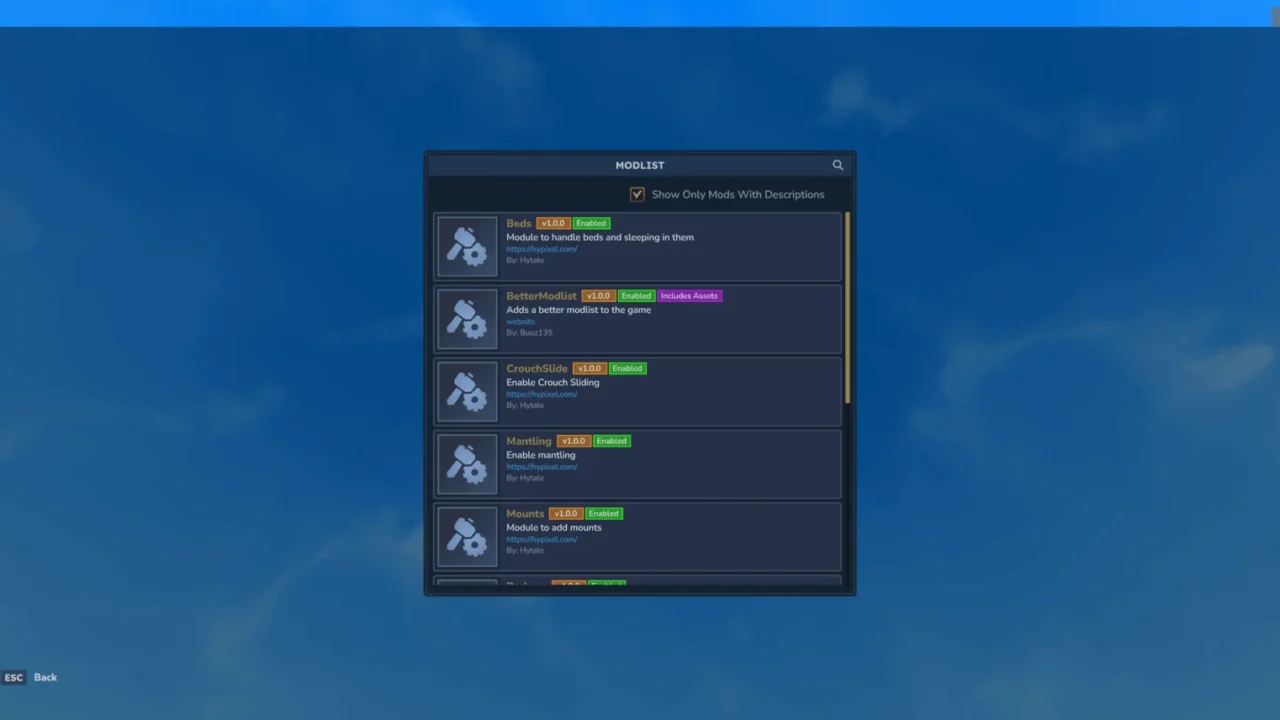
More screenshots on CurseForge ↗
What this mod does
Better Modlist, by Buuz135 (author of Simple Claims, Advanced Item Info and Lucky Mining), improves the mod list you see inside Hytale. When you have lots of mods installed, finding a specific one or checking what’s loaded gets awkward; this mod fixes that with a new window. Version 1.0.7, from August 26, 2026, is updated for 0.6.0.
What it adds
- A search bar to filter the list by name.
- Support for mods and resource packs in the same list.
- Logos for each mod, if its author includes one, and a default icon for those that don’t.
- A tidier, nicer-looking layout than the original list.
How to use it
Type /modlist in game to open the window. No configuration needed.
If you make mods, you can add your logo by placing a PNG named after your mod’s group in Common/UI/Custom/; the default size is 96×96, although the image gets scaled.
It’s a small tool, but very handy if you play a big modpack or run a server with lots of mods and want to see at a glance what’s active.
Update (Oct 12, 2026): with Update 7 (0.7) now out, the author has already marked the current file (version 1.0.7) as compatible with 0.7.
User rating
Highlights and things to keep in mind
- Useful search when you have lots of mods installed
- Lightweight with no setup
- MIT license and open source
- It's only a UI improvement; it doesn't manage or enable mods
- Logos depend on each author including one
- The description doesn't list languages
Requirements
- Hytale (Early Access) on PC, version 0.7
- No dependencies
How to install it
- Open the Better Modlist page on CurseForge and click Install to install it with the CurseForge app, or download the file BetterModlist-1.0.7.jar (version for 0.6) from the Files tab.
- If you download it manually, copy the file as is, without unzipping it, into the mods folder: on Windows %APPDATA%\Hytale\UserData\Mods.
- Open Hytale, right-click the world where you want to use it, tick Better Modlist in the mod list and save the world settings.
- On a dedicated server, place the file in the server's mods folder and restart it.
- In game, type /modlist to open the new mod list and use the search bar to find the one you want.
Version history
-
1.0.726 Aug 2026Current
Updated to version 0.6.0
Common problems
How do I open the list?
With the /modlist command in game.
Some mods show up without a logo
A logo only appears if that mod's author includes one; otherwise you get a generic icon.
Does it change anything in my world?
No. It only adds the mod list window.
More mods for Hytale

 Multiplayer
  Multiplayer