Simply Trash for Hytale
Adds a trash can that destroys whatever you put in it when you close its inventory. Crafted at the Workbench with 20 iron bars. Version 1.0.5 for Hytale 0.6.
Download Simply Trash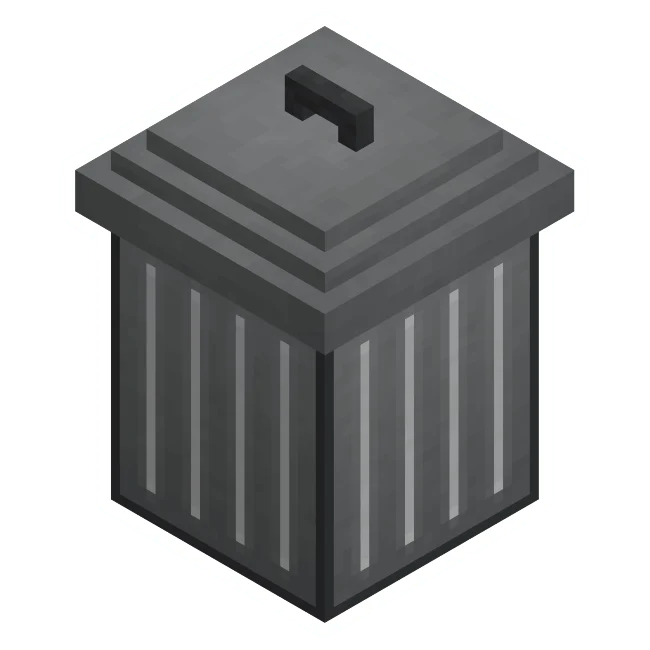
More screenshots on CurseForge ↗
What this mod does
Simply Trash solves a small but constant problem in Hytale: what to do with the dirt, stone and other items that pile up in your inventory and that you don’t want to keep. The mod adds a new block, the trash can, which destroys everything you put in it.
How it works
- The trash can is crafted at the Workbench with 20 iron bars.
- You place it like any container and open it to drag in whatever you don’t need.
- Items are destroyed when you close the trash can’s inventory, not when you drop them in. While it’s open you can take back anything you put in by mistake.
Who it’s for
For anyone who mines a lot or builds on a large scale and doesn’t want to keep tossing items on the ground or filling chests with useless blocks. It’s a very lightweight mod, with no options or commands, and one of the most downloaded Hytale mods on CurseForge.
It’s made by Jaredlll08, the same author behind Thorium Chests, Thorium Furnaces, Item Magnet and Miners Helmet. Version 1.0.5, from September 1, 2026, is the one updated for Update 6 (0.6).
Checked on October 20, 2026: the author hasn’t yet released a file tagged for Hytale 0.7 (Update 7) on CurseForge. We’ll check again and update this page as soon as it’s out.
User rating
Mod video
Highlights and things to keep in mind
- Very simple and lightweight, no configuration
- Room to fix mistakes while the trash can is open
- Very active author who updates it with every patch
- Anything destroyed can't be recovered
- You need 20 iron bars, which is pricey early on
- All Rights Reserved license
Requirements
- Hytale (Early Access) on PC, version 0.6 for version 1.0.5 of the mod
- Enable the mod in the world settings or install it on the server
- No other mods needed
How to install it
- Open the Simply Trash page on CurseForge and click Install to install it with the CurseForge app, or download the .jar file for version 0.6 from the Files tab.
- If you download it manually, copy the file as is (don't unzip it) into the mods folder: on Windows %APPDATA%\Hytale\UserData\Mods.
- Open Hytale, right-click the world where you want to use it, check Simply Trash in the mod list and save the world settings.
- On a dedicated server, put the file in the server's mods folder and restart it.
- In game, craft the trash can at the Workbench with 20 iron bars, place it and put in whatever you want to get rid of.
Version history
-
1.0.51 Sep 2026Current
Updated for Hytale 0.6
-
1.0.426 May 2026
Version for Hytale 0.5
Common problems
I put something in the trash can by mistake
Take it out before closing it. Items are only destroyed when you close the trash can's inventory.
I can't find the recipe
It's at the Workbench and costs 20 iron bars.
Does it need a library?
No. The Relations tab on CurseForge doesn't list any dependencies.
More mods for Hytale
 Multiplayer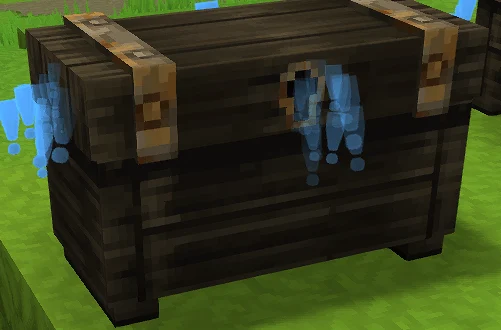
 Multiplayer