Better Item Viewer (JEI) for Hytale
JEI-style item and recipe viewer: search any item to see how it's crafted, what it's used for, what drops it and its hidden stats. Opens with Left Alt or /jei.
Download Better Item Viewer (JEI)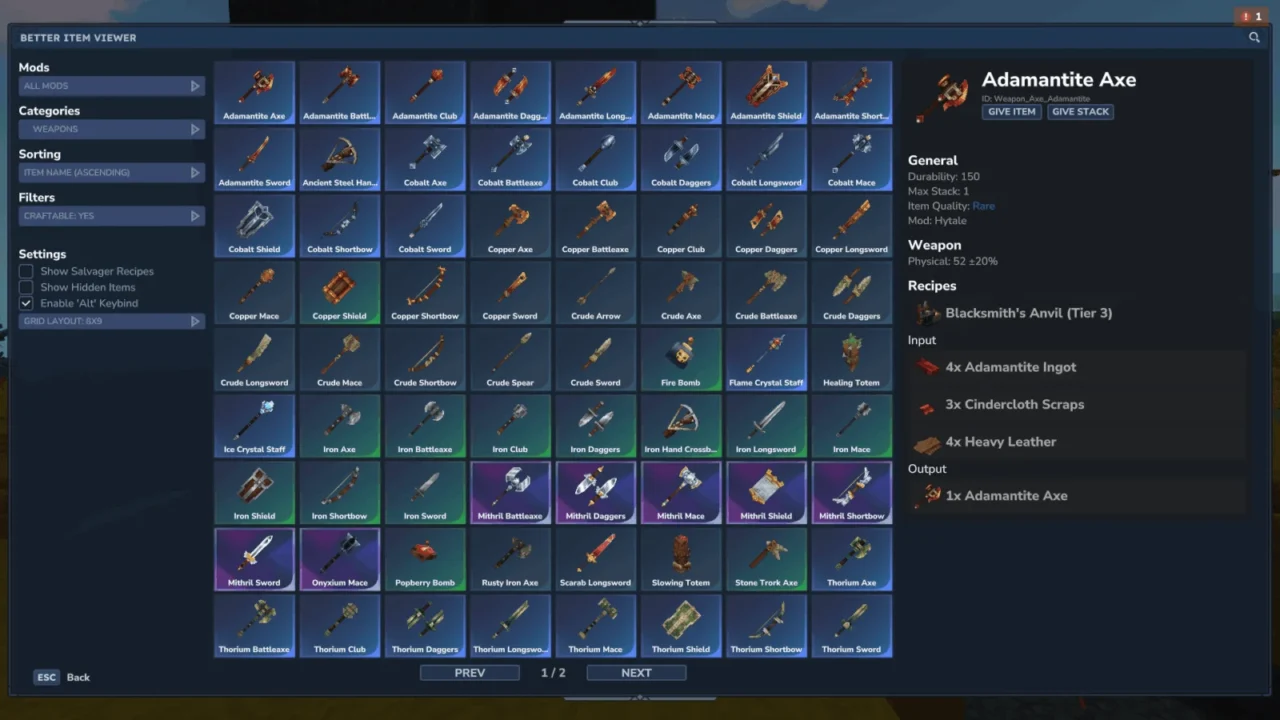
More screenshots on CurseForge ↗
What this mod does
Better Item Viewer is Hytale’s equivalent of JEI (Just Enough Items), the classic Minecraft recipe viewer. It opens a panel with every item from the game and your mods, and when you select one it shows you the information the base game doesn’t.
What it shows for each item
- All its recipes and which other recipes it’s used in.
- Stats for mining tools and armor.
- Weapon damage broken down by attack type.
- Which creatures drop it.
- Durability, stack size, quality and which mod it comes from.
Search and filters
You can filter by mod, by category (over 30) and subcategory, search by tags by typing # first, and show only what you can craft. In Creative mode or as an operator, right-clicking puts the item in your inventory.
How to open it
With Left Alt (it replaces the walk key; this can be turned off) or with the commands /betteritemviewer, /biv or /jei. The options are in mods/Drex_BetterItemViewer/BetterItemViewer.json.
Who it’s for
A must-have if you play with lots of mods and don’t know where each item comes from. Version 1.17.10 is updated to Hytale 0.6.1.
Checked on October 20, 2026: the author hasn’t yet released a file tagged for Hytale 0.7 (Update 7) on CurseForge. We’ll check again and update this page as soon as it’s out.
User rating
Highlights and things to keep in mind
- Shows recipes, uses, drops and hidden stats in one panel
- Mod and tag filters that are really handy with lots of mods
- Lightweight, no dependencies and open source (GPLv3)
- Takes over the Left Alt key by default
- The recipe book can't be obtained in survival by default
Requirements
- Hytale (Early Access) on PC, version 0.6 for version 1.17.10 of the mod
- Enable the mod in the world settings or install it on the server
- No other mods needed
How to install it
- Open the Better Item Viewer page on CurseForge and click Install with the CurseForge app, or download the .jar from the Files tab.
- If you download it manually, copy the file into the mods folder: on Windows %APPDATA%\Hytale\UserData\Mods.
- Open Hytale, right-click the world, check the mod in the list and save the world settings.
- On a dedicated server, put the .jar in the server's mods folder and restart it.
- In game, press Left Alt or type /jei to open the viewer.
Version history
-
1.17.1028 Aug 2026Current
Updated to Hytale 0.6.1
Common problems
Now I can't walk slowly with Alt
The mod uses Left Alt to open and replaces the walk key. Turn off that shortcut in BetterItemViewer.json and use the /jei command.
Does it clash with Vein Mining?
Vein Mining also uses the walk key (Alt). If you use both, turn off one of their shortcuts and open the viewer with /biv.
How do I search by item type?
Type # followed by the tag in the search box, or use the category and mod filters.
More mods for Hytale
 Multiplayer
 Multiplayer
 Multiplayer
  Multiplayer