Automatic Storage for Hytale
Adds an auto-storage crate: dump your expedition haul into it and it sorts items into nearby chests that already hold that type. Version 1.6.0 for 0.6.
Download Automatic Storage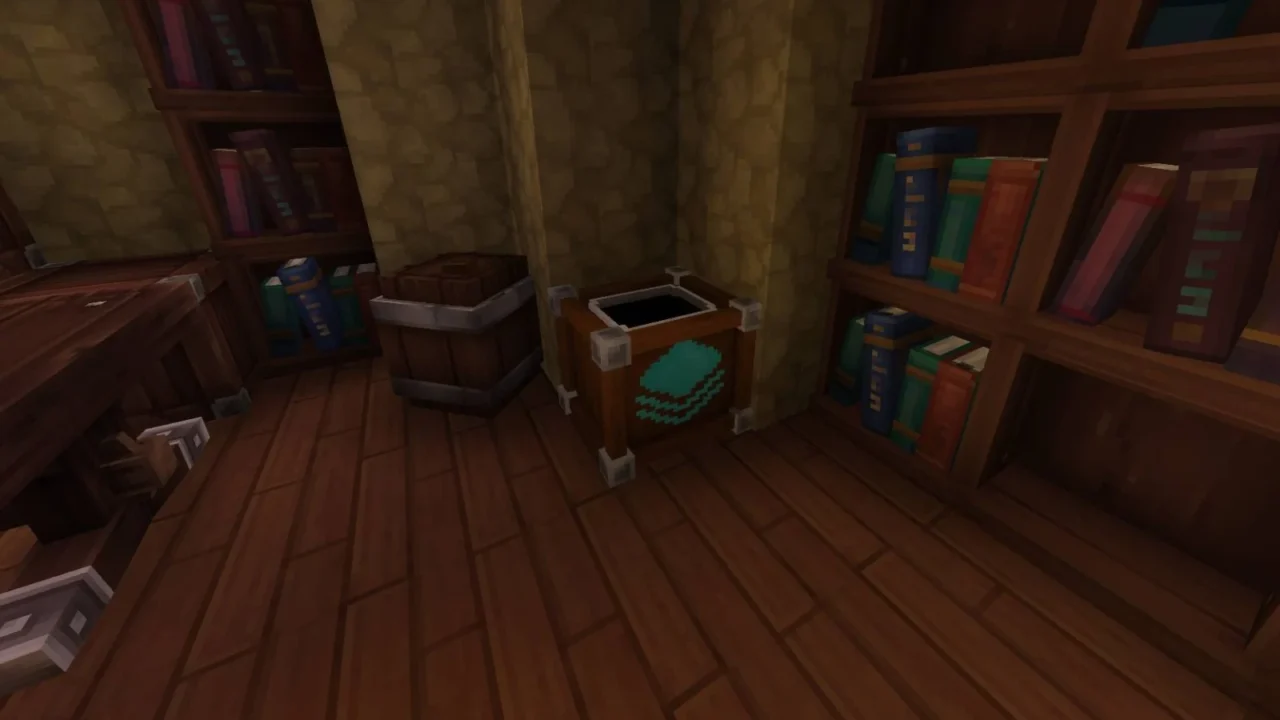
More screenshots on CurseForge ↗
What this mod does
Automatic Storage, by Exlcior, tackles the most tedious moment after an expedition: emptying your inventory chest by chest. The mod adds an automatic storage crate you craft once and place in your base. You put everything you’ve brought back into it and it takes care of distributing it among the surrounding chests. Version 1.6.0, from August 27, 2026, is released for Update 6 (0.6).
How it sorts items
- It sends each item to the chest that already contains that type of item, prioritizing the one with the most.
- It fills partial stacks first and respects each stack’s maximum size.
- It can sort by exact item or by category, and it keeps pristine items separate from damaged ones.
- It works with chests from other mods and never sends items to furnaces, campfires, tanneries or salvagers.
Crafting and settings
It’s crafted at the tier 2 Tinkering Bench with 5 Concentrated Life Essence, 20 Copper Bars, 20 Iron Bars and 1 Gold Bar. To configure it, crouch and press F while looking at the crate: a window opens where you can change the range (14 blocks horizontally and 6 vertically by default) and the sorting mode.
For servers
It has permissions to limit who can craft it or configure other players’ crates, respects SimpleClaims claims and is translated into about twenty languages, including Spanish.
Update (October 20, 2026): the author has now released a file for Hytale 0.7 (Update 7): version 1.6.1, from October 13, 2026.
User rating
Highlights and things to keep in mind
- Saves a lot of time when you get back from exploring or mining
- Sorts sensibly: fills existing stacks and respects durability
- Translated into Spanish, with permissions for servers
- The recipe calls for mid-tier materials (iron, gold and concentrated essence)
- It only sends items to chests that already hold that item unless you change the mode
- Weighs about 4 MB, more than most utility mods
Requirements
- Hytale (Early Access) on PC, version 0.6
- No other mods needed
- Tier 2 Tinkering Bench to craft the crate
How to install it
- Open the Automatic Storage page on CurseForge and click Install to install it with the CurseForge app, or download the file AutoStorage-1.6.1.jar (version for 0.6) from the Files tab.
- If you download it manually, copy the file as is, without unzipping it, into the mods folder: on Windows %APPDATA%\Hytale\UserData\Mods.
- Open Hytale, right-click the world where you want to use it, tick Automatic Storage in the mod list and save the world settings.
- On a dedicated server, place the file in the server's mods folder and restart it.
- In game, craft the crate at the tier 2 Tinkering Bench, place it near your chests and crouch + F to adjust range and mode.
Version history
-
1.6.113 Oct 2026Current
File for Hytale 0.7 (Update 7)
-
1.6.027 Aug 2026
Updated to version 0.6, with optimizations and bug fixes
Common problems
The crate doesn't move some items
By default it only sends them to chests that already contain that same item. Put one of it in the chest where you want it stored, or switch the mode to sort by category.
Does it reach chests on another floor?
The default vertical range is 6 blocks and can be raised to 15 from the crate's window; horizontally it goes up to 18.
Nobody on my server can craft it
Check the config: if the admin enabled permission-based crafting, the autostorage.craft permission is required.
Can it be combined with SimpleClaims?
Yes, the mod includes SimpleClaims compatibility and it's enabled by default.
More mods for Hytale


 Multiplayer
 Multiplayer