PartyPro for Hytale
Party system for Hytale servers: up to 16 players, a HUD with teammates' health and distance, party chat, stats and shared XP with RPG Leveling or MMO Skill Tree.
Download PartyPro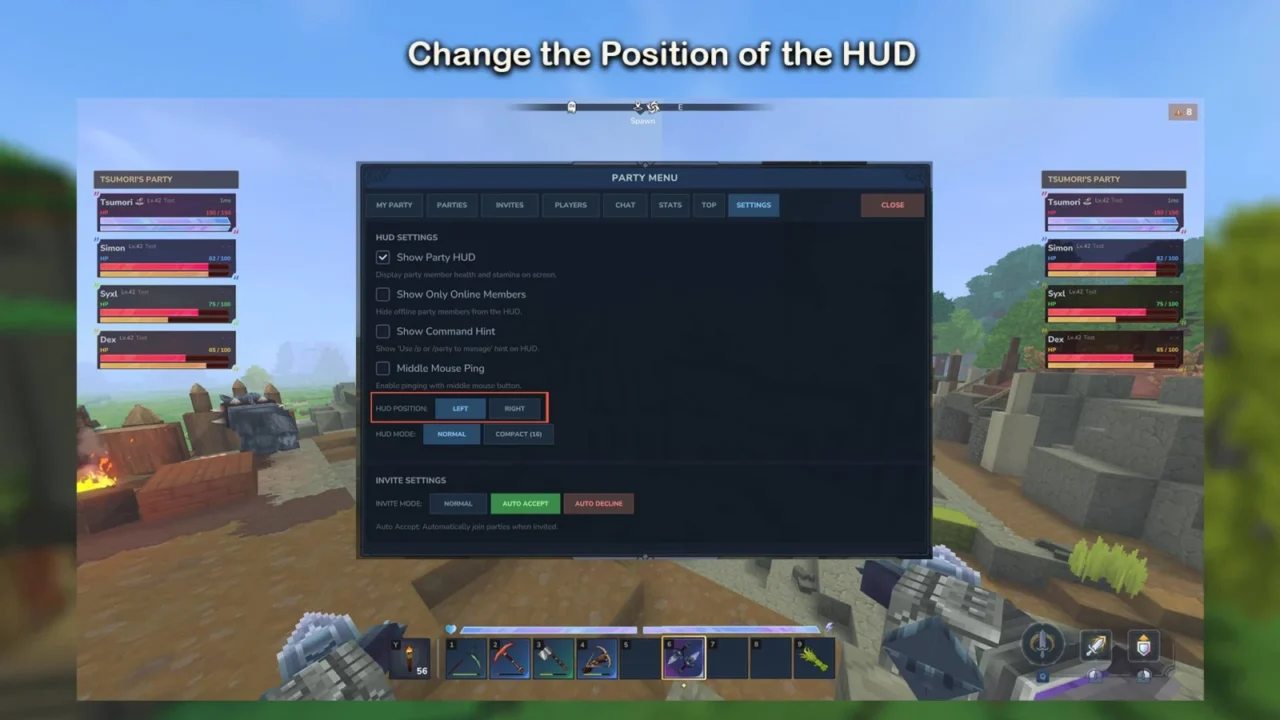
More screenshots on CurseForge ↗
What this mod does
PartyPro, by tsumori, adds a full party system for playing on a server with friends. It works on its own, with no dependencies, and integrates with several popular mods if you have them installed. Version 1.0.35, from August 27, 2026, is updated for Update 6.
What it offers
- Parties of up to 16 players, public or private with a password, that persist through server restarts.
- A HUD showing each teammate’s health, stamina, distance and status, which you can move and make compact.
- Teammates marked on the world map, party chat and teleporting to a member.
- Stats and leaderboards for kills, damage, blocks or distance, with daily or monthly resets.
- Friendly fire is off by default.
Integrations
With RPG Leveling it splits or boosts experience across the party; with MMO Skill Tree it shares skill XP; and with Simple Claims it adds your teammates as allies on your claims and removes them when they leave the party.
Usage
Everything is handled from the party browser that /p (or /party) opens, or with subcommands such as /p create, /p invite, /p accept and /p leave. Spanish is among its languages. On the server, the admin has to give players the mod’s permissions. Heads-up: the author warns that in 0.6 the middle-mouse-button ping doesn’t work yet.
Update (Oct 12, 2026): with Update 7 (0.7) now out, the author has already released a compatible file: version 1.0.36 (October 12, 2026). What’s described on this page was tested with the previous version; check the author’s changelog in case anything has changed.
User rating
Highlights and things to keep in mind
- Very complete party system with HUD and map
- Integration with RPG Leveling, MMO Skill Tree and Simple Claims
- Translated into Spanish, with editable language files
- In 0.6 the middle-mouse-button ping doesn't work
- Requires setting up permissions on the server
- Designed for multiplayer; makes little sense in single-player
Requirements
- Hytale (Early Access) on PC, version 0.7
- Designed for multiplayer servers
- Mod permissions for players (tsumori.partypro.command.*)
- Optional: RPG Leveling And Stats/Skills, MMO Skill Tree & Abilities or Simple Claims for the integrations
How to install it
- Open the PartyPro page on CurseForge and download the file partypro-1.0.36.jar (version for 0.6) from the Files tab.
- Copy the file, without unzipping it, into the server's Mods folder (or into %APPDATA%\Hytale\UserData\Mods if you host the game from your PC, and enable it in the world settings).
- Restart the server: the config files are created automatically in the PartyPro folder.
- Give players the mod's permissions, for example tsumori.partypro.command.* for all commands.
- If you use RPG Leveling, MMO Skill Tree or Simple Claims, adjust their integration in the Integrations tab of the party browser.
- In game, type /p to open the party browser and create or join one.
Version history
-
1.0.3612 Oct 2026Current
File for Hytale 0.7 (Update 7)
-
1.0.3527 Aug 2026
Updated for Update 6; the middle-mouse-button ping doesn't work yet
Common problems
Players can't create parties
They need permissions. Grant tsumori.partypro.command.p.create and the rest, or the wildcard tsumori.partypro.command.*.
The middle-mouse-button ping does nothing
It's a known bug in 0.6 that the author is fixing. In the meantime, use /pping while looking at the block.
How is experience shared?
With RPG Leveling you can choose to split it across the party or give a bonus, with multipliers based on party size and a distance limit; you set it in RPGLeveling_x_PartyPro.json.
More mods for Hytale
 Multiplayer

 Multiplayer