ATS GPS EVO 2027: GPS and map with blue routes and new icons for American Truck Simulator for American Truck Simulator
Restyles the ATS GPS and map: dark blue routes with white arrows, explored areas in light green and new icons. For 1.61 and the 1.62 beta. Released on October 25, 2026; 438 KB.
Download ATS GPS EVO 2027: GPS and map with blue routes and new icons for American Truck Simulator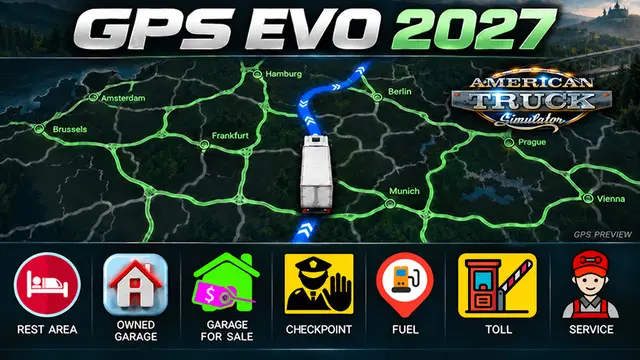
Official screenshots by the author: © Erik1520 on Steam WorkshopMore screenshots on steamcommunity.com (Steam Workshop) ↗
What this mod does
ATS GPS EVO 2027 1.61 & B-1.62, by Erik1520, changes the look of the GPS and map in American Truck Simulator. Routes become dark blue with white direction arrows, and explored roads and areas show up in light green.
What it changes
- Dark blue routes with white arrows.
- Explored roads and areas in light green; discovered city names stay green.
- Custom 60×60 icons, with a red rest-area icon and custom garage icons.
- A white truck as the player marker and a new English cover.
- It keeps your saved exploration progress.
Version and warnings
The title states version 1.61 and the 1.62 beta. Keep an eye on the comments: one player says the game crashes and asks for an update, and another says it does not work even though it is in the correct load order. Others rate it well, and one asks for a variant with inverted colors. It has 3 stars from 30 ratings and about 1,400 subscribers. It was released on October 25, 2026, weighs 438 KB and Steam lists no required DLC. The author gives no further compatibility details. If you use other UI mods, check the ATS load order guide.
Holyfix Check
Will it work with your mods?
Load your game.log.txt and check whether this mod is for your ATS version, whether you're missing a mod or DLC it needs and where to place it.
It's in Documents › American Truck Simulator › game.log.txt. It's read in your browser: the file is never uploaded.
Something else failing? Holyfix for ATS checks all your mods at once.
User rating
Highlights and things to keep in mind
- More visible dark blue routes with white arrows
- New 60×60 icons, with rest areas in red
- Keeps your exploration progress
- Light: 438 KB
- One player reports a game crash and another says it does not work
- Rated 3 stars from 30 votes
- Tested on 1.61 and the 1.62 beta, according to the title
- The author gives no further details on compatibility with other map mods
Requirements
- American Truck Simulator
- A Steam account to subscribe on the Workshop
How to install it
- Open the mod page on Steam Workshop and click "Subscribe".
- Start American Truck Simulator and open the Mod Manager for your profile.
- Enable the mod and confirm the changes.
- Open the map or set a GPS route to see the new colors and icons.
Version history
-
initial25 Oct 2026Current
Released on Steam Workshop
Common problems
What exactly does it change?
Route and explored-area colors, map icons, the player marker and the cover.
Will I lose what I have explored?
No: the author says your saved exploration progress is kept.
Which version is it for?
1.61 and the 1.62 beta, according to the title.
Does it cause problems?
Two players report a game crash and that it does not work for them; others rate it well.
More mods for ATS
 ✓ ATS 1.62
 ✓ ATS 1.62

 ATS 1.61
 ATS 1.59
 ATS 1.61