Google Maps Style GPS – By Weaysy – Lightmode: a light GPS with a blue route for ATS for American Truck Simulator
A light theme for the ATS GPS with gray roads, soft green terrain, a blue route and 22 new icons. Includes packages for 1.61 and 1.62. Updated on November 4, 2026; 15.9 MB.
Download Google Maps Style GPS – By Weaysy – Lightmode: a light GPS with a blue route for ATS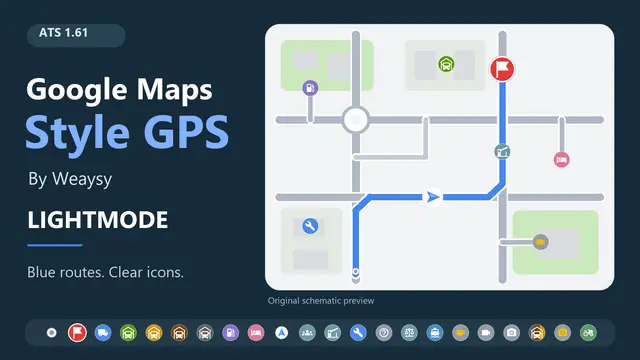
More screenshots on steamcommunity.com (Steam Workshop) ↗
What this mod does
Google Maps Style GPS – By Weaysy – Lightmode is uploaded by Snowdude, and the page credits Weaysy as the creator of the original artwork and code. It gives the American Truck Simulator GPS a light theme inspired by the Google Maps style. It is an independent project, unaffiliated with Google or SCS Software.
What it changes
- A light background with gray roads and soft green terrain.
- A blue route, including the current segment, and a prominent destination flag.
- 22 icons: a circular position marker, truck-shaped garages and cameras for viewpoints and photo spots.
- 256 px textures; it keeps the map’s discovery colors.
Version and warnings
It includes packages for 1.61 and 1.62 and uses the right one; on any other version it only shows a notice and leaves the GPS unchanged. The 1.62 update, from November 4, 2026, was not tested in-game or in virtual reality, according to the change note. Disable other GPS themes or icon packs and give it priority. Map or zoom mods that replace map_data.sii need a merged patch. It is a fixed theme, with no day-to-night switching; the author is testing a dark mode. It weighs 15.9 MB. Check the ATS load order guide.
Holyfix Check
Will it work with your mods?
Load your game.log.txt and check whether this mod is for your ATS version, whether you're missing a mod or DLC it needs and where to place it.
It's in Documents › American Truck Simulator › game.log.txt. It's read in your browser: the file is never uploaded.
Something else failing? Holyfix for ATS checks all your mods at once.
User rating
Highlights and things to keep in mind
- Highly visible blue route and destination flag
- 22 new icons with 256 px textures
- Picks the 1.61 or 1.62 package on its own
- Full credits and licenses included in the mod
- Based on the work of Weaysy, credited by the author
- The 1.62 update was not tested in-game or in virtual reality, according to the author
- Map mods that replace map_data.sii need a merged patch
- Fixed light theme, with no automatic day-to-night switching
- No live accident or roadworks reports
- Unofficial mod: trademarks belong to their owners; neither Holymod nor the author is affiliated with them
Requirements
- American Truck Simulator 1.61 or 1.62
- A Steam account to subscribe on the Workshop
How to install it
- Open the mod page on Steam Workshop and click "Subscribe".
- Start American Truck Simulator and open the Mod Manager for your profile.
- Disable other GPS themes or icon packs, and your local Weaysy copy if you have one.
- Enable the mod, place it above other mods that change the GPS or UI and confirm the changes.
- Set a GPS route to see the light theme.
Version history
-
1.624 Nov 2026Current
Normal and VR adviser HUDs move to the native 1.62 layout; the 1.61 package is kept unchanged
-
initial17 Oct 2026
Released on Steam Workshop
Common problems
Is it an official Google product?
No: the page states it is an independent project, unrelated to Google or SCS Software.
Which version is it for?
It includes packages for 1.61 and 1.62; on other versions it only loads a notice and leaves the GPS unchanged.
Is there a dark mode?
This version is a fixed light theme; the author says a separate dark mode is being tested.
Does it work with map mods?
Those that replace map_data.sii need a merged patch, according to the author.
Does it work with the Volvo VNL?
The author says yes with the stock VNL 2018 and VNL 2025; modded VNLs may need a patch.
More mods for ATS

 ATS 1.61
 ATS 1.59
 ATS 1.61
 ATS 1.61
 ATS 1.61