Dash GPS Map (modern navigation look for the ATS GPS and map) for American Truck Simulator
Free mod by Superneo10 that gives the ATS GPS, route advisor and world map a modern navigation look: blue route, new icons, company logos and a tilted 3D view. Built and tested on 1.61; version 1.0.1 from October 28, 2026.
Download Dash GPS Map (modern navigation look for the ATS GPS and map)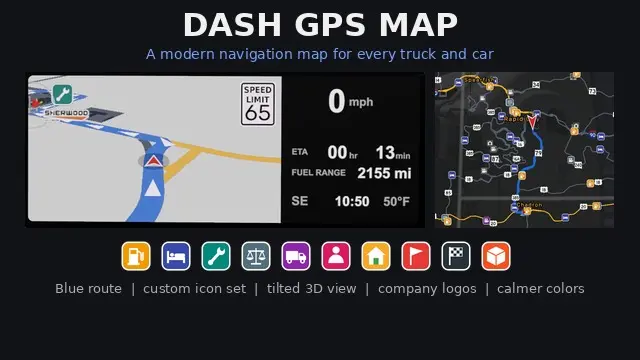
Official screenshots by the author: © Superneo10 on Steam WorkshopMore screenshots on steamcommunity.com ↗
What this mod does
Dash GPS Map is the centerpiece of Superneo10’s Dash GPS series for American Truck Simulator: it restyles the in-cab GPS, the route advisor and the world map so they look like a modern navigation app. It works on its own, with any truck or car.
What changes
- Blue route with white turn arrows and a brighter blue for the stretch you are on; red player arrow with a white outline.
- New icon set in a single style (fuel, rest stops, service, weigh stations, garages, pickup and drop-off); points of interest turn from gray to gold once discovered.
- Company logos on the GPS, bigger names, a tilted 3D view and thicker roads.
- Calmer colors: undriven roads in slate gray and company yards in amber; driven roads keep the original color.
Compatibility and load order
The author built and tested it on ATS 1.61. It edits def/map_data.sii, so it cannot be combined with other mods that change GPS colors or the world map background. Place it near the top of the list, below the optional Dark Edition, Lime Green Route and Grey Roads add-ons and below Dash GPS Displays and Voices. Version 1.0.1 (October 28, 2026) fixes map scrolling with expansions such as Coast to Coast.
Holyfix Check
Will it work with your mods?
Load your game.log.txt and check whether this mod is for your ATS version, whether you're missing a mod or DLC it needs and where to place it.
It's in Documents › American Truck Simulator › game.log.txt. It's read in your browser: the file is never uploaded.
Something else failing? Holyfix for ATS checks all your mods at once.
User rating
Highlights and things to keep in mind
- Modern navigation look with no plugins or external software
- Consistent icons that turn from gray to gold when you discover points of interest
- Optional add-ons (dark, lime green route, grey roads) by the same author
- Incompatible with other mods that change GPS colors or the map background
- Must sit near the top of the mod list
- Built and tested on 1.61: the author does not mention 1.62 yet
Requirements
- American Truck Simulator 1.61
- Steam lists no required DLC or mods
- Steam account
How to install it
- Open the mod page on Steam Workshop and click Subscribe.
- Open ATS, go to the Mod Manager and enable Dash GPS Map.
- Place it near the top of the list, below Dash GPS Displays, Dash GPS Voices and the Dark Edition, Lime Green Route or Grey Roads add-ons if you use them.
- Disable any other mod that changes GPS colors or the map background.
- Reload your profile and open the map or GPS to see the new style.
Version history
-
1.0.128 Oct 2026Current
Fixed world map scrolling with expansions such as Coast to Coast or Ontario & Quebec
-
1.0.026 Oct 2026
Released on Steam Workshop
Common problems
Does it need Dash GPS Displays?
No: it works on its own with any truck or car, with or without the series' display units.
Is it compatible with other GPS mods?
Not with those that change GPS colors or the map background, because it edits def/map_data.sii.
Where does it go in the load order?
Near the top: only the optional add-ons (Grey Roads, Lime Green Route, Dark Edition), Dash GPS Displays and Dash GPS Voices go above it.
Does it work with maps like Coast to Coast?
Yes: 1.0.1 fixed the world map not scrolling past the vanilla edge.
Is there a dark version?
Yes, Dash GPS Map - Dark Edition, a separate add-on by the same author.
More mods for ATS
 ✓ ATS 1.61Requires DLC
 ✓ ATS 1.61
 ✓ ATS 1.61
 ATS 1.59
 ✓ ATS 1.61
 ✓ ATS 1.61