Backing & Lane Prediction – ATS: reverse guide lines and a path line for ATS for American Truck Simulator
Draws backing guide lines on the ground from the trailer's corners and a blue path line when driving forward. Needs a plugin DLL from GitHub. For 1.61 and 1.62. Updated on October 19, 2026; 29 KB.
Download Backing & Lane Prediction – ATS: reverse guide lines and a path line for ATS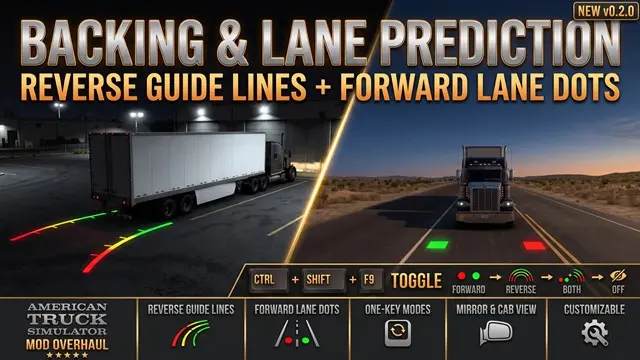
More screenshots on steamcommunity.com (Steam Workshop) ↗
What this mod does
Backing & Lane Prediction – ATS, by Telemichus, draws guide lines on the ground in American Truck Simulator, like a backup camera. Subscribing is not enough: the lines come from a separate plugin DLL that Steam cannot install, so you have to download it from GitHub, close the game and run Install.bat.
What it does
- Reverse lines from the rear corners of the trailer or truck: red up to 3 m, yellow up to 8 m and green up to 15 m.
- They follow the actual wheel angles and work with single trailers, doubles, triples and self-steering axles.
- A translucent blue line when driving forward: 25 m at low speed and up to 40 m at highway speed.
- Ctrl+Shift+F9 cycles through four modes (forward, reverse, both or nothing).
Version and warnings
It works on 64-bit Windows with 1.61 or 1.62; 1.62 needs plugin 0.5.1 or newer, which you update by hand. The DLL is not signed, and Windows or your antivirus may block it; the author says it is safe. Do not use it together with Reverse Posture Assistant, by yyysheng, from which it takes the drawing technique and the base line model under the MIT license. One player says the lines do not show up for him on 1.62.2.2. It weighs 29 KB. More in the ATS 1.62 guide.
Holyfix Check
Will it work with your mods?
Load your game.log.txt and check whether this mod is for your ATS version, whether you're missing a mod or DLC it needs and where to place it.
It's in Documents › American Truck Simulator › game.log.txt. It's read in your browser: the file is never uploaded.
Something else failing? Holyfix for ATS checks all your mods at once.
User rating
Highlights and things to keep in mind
- Color-coded reverse lines that follow the real wheel angle
- Works with doubles, triples and self-steering axles
- Four modes on a single hotkey
- Open source under the MIT license
- You must install a plugin DLL from GitHub by hand
- The DLL is not signed: Windows or your antivirus may block it
- Not compatible with Reverse Posture Assistant
- One player cannot see the lines on 1.62.2.2
- Based on the work of yyysheng, credited by the author
Requirements
- American Truck Simulator 1.61 or 1.62 on 64-bit Windows
- The author's plugin DLL, downloaded from GitHub (0.5.1 or newer for 1.62)
- A Steam account to subscribe on the Workshop
How to install it
- Open the mod page on Steam Workshop and click "Subscribe".
- Download the plugin from the author's GitHub, close the game and run Install.bat.
- Start American Truck Simulator and open the Mod Manager for your profile.
- Enable the mod and confirm the changes.
- Press Ctrl+Shift+F9 to choose between the forward line, the reverse lines, both or none.
Version history
-
update19 Oct 2026Current
Latest update of the Workshop item (4 change notes in total)
-
initial18 Oct 2026
Released on Steam Workshop
Common problems
Why can't I see any lines?
The GitHub plugin DLL is missing, or the mode is set to "nothing": check the plugins folder and press Ctrl+Shift+F9.
Does it work on 1.62?
Yes, with plugin 0.5.1 or newer, according to the author.
Is the file safe?
The author says yes; the DLL is not signed yet, and Windows or your antivirus may block it.
Can I use it with Reverse Posture Assistant?
No: the author warns that both hook the same game component.
Is there an ETS2 version?
Yes, as a separate Workshop item; the same plugin works for both games.
More mods for ATS
 ✓ ATS 1.62
 ATS 1.61
 ATS 1.59
 ATS 1.61
 ATS 1.61