Dash GPS Displays – 2006 Crown Victoria (Road Trip: Ford) for American Truck Simulator
Mount a 7 or 9-inch touchscreen GPS on the dash of the Road Trip: Ford Crown Victoria, with map, speed, limit, range and night mode. Version 1.1.0 for ATS 1.61.
Download Dash GPS Displays – 2006 Crown Victoria (Road Trip: Ford)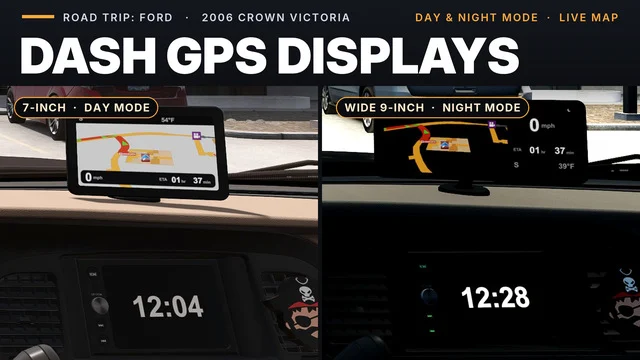
More screenshots on Steam Workshop ↗
What this mod does
Dash GPS Displays – 2006 Crown Victoria is the Crown Victoria version of the series by Superneo10. It adds an aftermarket touchscreen GPS on top of the dashboard, above the center console, in two sizes: 7 inches and 9-inch widescreen.
Four pages
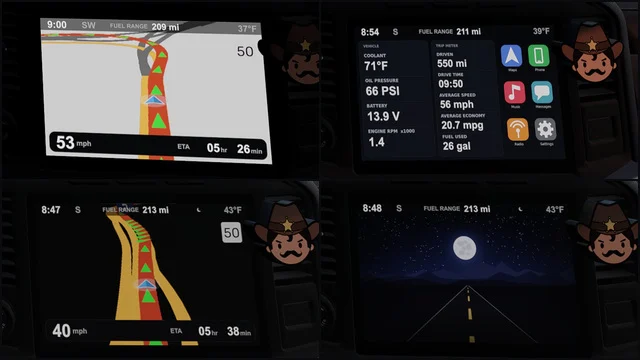
- Navigation: map, speed, speed limit sign, arrival time, range, heading, outside temperature, cruise speed and low fuel warning.
- Map only.
- Home: trip data, engine readings and range.
- Standby: a road image with heading and temperature.
You switch pages with the “Infotainment display mode” control. With the headlights on it switches to night mode, it dims with the dashboard brightness and turns off when the ignition is off. The car’s factory screen shows a large clock instead of its small map.
Where to install it
At any service shop, under interior accessories › hanging items. It uses the rearview mirror mount, so you can’t have a hanging item at the same time.
Version and compatibility
Version 1.1.0 added range, cruise, the fuel warning and the home page data, and slimmed the bezel by about 6 mm. It requires 1.61 and the Road Trip: Ford DLC. If you use another Crown Victoria interior mod, load this one above it.
Holyfix Check
Will it work with your mods?
Load your game.log.txt and check whether this mod is for your ATS version, whether you're missing a mod or DLC it needs and where to place it.
It's in Documents › American Truck Simulator › game.log.txt. It's read in your browser: the file is never uploaded.
Something else failing? Holyfix for ATS checks all your mods at once.
User rating
Our rating
0.0 / 5- Two screen sizes to choose from
- Lots of useful data: range, cruise, engine and temperature
- Automatic night mode and dimming
- Requires the Road Trip: Ford DLC
- Takes the rearview mirror mount: you can't add a hanging item
- The Workshop images show the old, thicker bezel
- Unofficial mod: trademarks belong to their owners; neither Holymod nor the author is affiliated with them
Requirements
Links go to each DLC’s official Steam page.
- American Truck Simulator 1.61
- Road Trip: Ford DLC
- A Steam account
How to install it
- Open the “Dash GPS Displays - 2006 Crown Victoria” page on Steam Workshop and click “Subscribe”.
- Launch American Truck Simulator, wait for Steam to download the mod and enable it in the Mod Manager (above any other Crown Victoria interior mods).
- Take the Crown Victoria to any service shop and go to interior accessories › hanging items.
- Pick the 7-inch GPS or the 9-inch widescreen one and install it.
- Bind a key to “Infotainment display mode” to switch pages.
Version history
-
1.1.017 Oct 2026Current
Range, cruise and fuel warning on Navigation; trip and engine data on Home; bezel about 6 mm slimmer (7 change notes)
-
3 Oct 2026
Release
Common problems
Where do I buy the GPS?
At any service shop, under interior accessories › hanging items.
Can I also have a hanging item?
No. The GPS uses the same rearview mirror mount.
Does it show the distance to the destination?
No. The arrival time is driving time only; the distance can't be displayed.
The images don't match the bezel
The screenshots are from the previous version; 1.1.0 has a bezel about 6 mm slimmer.
More mods for ATS
 ✓ ATS 1.61Requires DLC
  ✓ ATS 1.61
  ✓ ATS 1.61Requires DLC
  ✓ ATS 1.61Requires DLC
  ✓ ATS 1.61Requires DLC
  ATS 1.59