Freightliner Cascadia Dashboard Add-on (Dacova Modding) for American Truck Simulator
A sixth page with larger readouts for the Freightliner Cascadia 2019 and 2024 digital dashboard in ATS: speed, RPM, gear, speed limit, TRIP, fuel use and rest. Free on Steam Workshop, for 1.61.
Download Freightliner Cascadia Dashboard Add-on (Dacova Modding)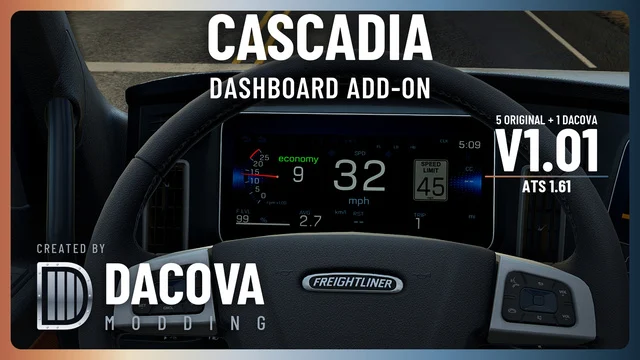
More screenshots on steamcommunity.com ↗
What this mod does
Freightliner Cascadia Dashboard Add-on is a mod by Dacova Modding for the digital dashboard of the SCS Freightliner Cascadia in American Truck Simulator. It keeps the five original dashboard pages and adds a sixth with larger readouts, reached with the usual dashboard computer control.
What the new page shows
- Large digital speedometer, left-side RPM gauge and gear display.
- US speed limit sign with a gray background to reduce glare.
- Cruise-control speed in green, TRIP distance, average fuel consumption, fuel, rest time and game clock.
- Lighting, turn signal, brake and warning indicators; active engine brake and retarder shown in red.
Compatibility and load order
The author develops it on ATS 1.61 for the stock Cascadia 2019 and 2024 digital dashboards, including the 72 Sleeper RR; analog interiors are not modified. He asks you to place it above any other mod that changes the Cascadia dashboard, GPS or onboard computer, and to disable mods that replace the same dashboard. It is optional in Convoy when the server allows it.
Version and limits
The title says version 1.01 (the description still says 1.00); the last update is from October 21, 2026 and it weighs 10.7 MB. TRIP is the distance traveled since the last manual reset, not the delivery distance remaining, and the speedometer does not turn red above the speed limit.
Holyfix Check
Will it work with your mods?
Load your game.log.txt and check whether this mod is for your ATS version, whether you're missing a mod or DLC it needs and where to place it.
It's in Documents › American Truck Simulator › game.log.txt. It's read in your browser: the file is never uploaded.
Something else failing? Holyfix for ATS checks all your mods at once.
User rating
Highlights and things to keep in mind
- The key data, bigger and on a single page
- Keeps the five original dashboard pages
- Optional in Convoy and compatible with the same author's Western Star add-on
- Only for the Cascadia 2019 and 2024 with the digital dashboard
- It must sit above other mods that change the Cascadia dashboard, GPS or onboard computer
- Don't enable the local .scs copy and the Workshop copy at the same time
- The speedometer does not turn red above the speed limit
- The title says version 1.01 and the description says 1.00
- Unofficial mod: brands belong to their owners; neither Holymod nor the author is affiliated with them
Requirements
- American Truck Simulator 1.61
- The SCS Freightliner Cascadia 2019 or 2024 with the digital dashboard
- Steam lists no required DLC or mods
- Steam account
How to install it
- Open the mod page on Steam Workshop and click Subscribe.
- Open ATS, go to the Mod Manager and enable the mod.
- Place it above other mods that change the Cascadia dashboard, GPS or onboard computer, and disable any that replace the same dashboard.
- Reload your profile and get into a Cascadia with the digital dashboard.
- Cycle through the dashboard pages with the dashboard computer control until you reach the Dacova page.
Version history
-
1.0121 Oct 2026Current
Latest update on Steam Workshop (2 change notes)
-
1.0017 Oct 2026
Released on Steam Workshop
Common problems
Does it remove the original pages?
No: it keeps the five SCS pages and adds Dacova's as a sixth.
Which Cascadia is it for?
The stock Cascadia 2019 and 2024 digital dashboards, including the 72 Sleeper RR; analog interiors are not changed.
Does it work in Convoy?
Yes, as an optional mod, when the server allows optional mods.
What does TRIP measure?
The distance traveled since the last manual reset, not the delivery distance remaining; resetting it also resets average fuel consumption.
Can I use it with the Western Star add-on?
Yes: the author says the Western Star and Cascadia add-ons can be used together.
More mods for ATS
 ✓ ATS 1.61
 ✓ ATS 1.61Multiplayer
 ✓ ATS 1.61Requires DLC
 ✓ ATS 1.61Requires DLC
 ✓ ATS 1.61Requires DLC
 ATS 1.59