Volvo VNL 2025 Dashboard Add-on (Dacova Modding) for American Truck Simulator
Adds an extra Dacova page to the SCS Volvo VNL 2025's digital cluster: speed, limit, gear, trip, fuel and rest time, keeping the three originals. ATS 1.61.
Download Volvo VNL 2025 Dashboard Add-on (Dacova Modding)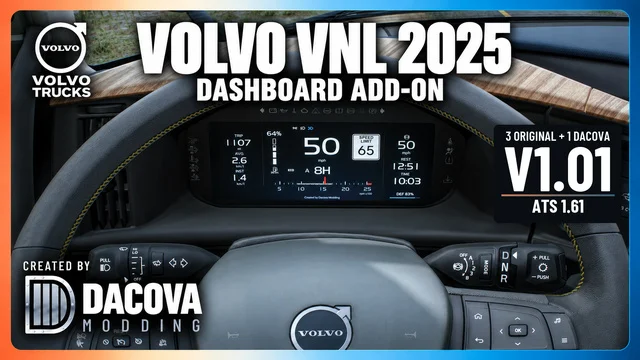
More screenshots on Steam Workshop ↗
What this mod does
Volvo VNL 2025 Dashboard Add-on is a mod by Dacova Modding for the digital dashboard of the SCS Volvo VNL 2025 in American Truck Simulator. It adds the author’s own screen and keeps the cluster’s three original pages, so you don’t lose anything the game already gives you.
What the Dacova screen shows
- Speed, speed limit, gear and RPM.
- Trip and fuel data.
- Cruise control, time until your next rest and a clock.
- The truck warning lights the game supports.
How to use it
Enable the mod and cycle through the cluster pages until you reach the Dacova one. Version 1.01, from October 21, 2026, fixes the speed readout from 100 km/h up so three-digit numbers stay on one line and centered.
Load order and compatibility
The author asks you to place it above any other mod that changes the VNL 2025’s dashboard, GPS or trip computer; otherwise another mod may cover the new screen. It’s for ATS 1.61, needs no DLC and is optional in Convoy. The description is available in English, Spanish and Portuguese.
Holyfix Check
Will it work with your mods?
Load your game.log.txt and check whether this mod is for your ATS version, whether you're missing a mod or DLC it needs and where to place it.
It's in Documents › American Truck Simulator › game.log.txt. It's read in your browser: the file is never uploaded.
Something else failing? Holyfix for ATS checks all your mods at once.
User rating
Our rating
0.0 / 5- Lots of info on a single screen without losing the originals
- Active author: fixed the three-digit speed display within four days
- No DLC and optional in Convoy
- Only for the SCS Volvo VNL 2025
- Must load above other dashboard or GPS mods for that truck
- Unofficial mod: trademarks belong to their owners; neither Holymod nor the author is affiliated with them
Requirements
- American Truck Simulator 1.61
- A Steam account
- The SCS Volvo VNL 2025
- No DLC or other mods required
How to install it
- Open the “Volvo VNL 2025 Dashboard Add-on” page on Steam Workshop and click “Subscribe”.
- Launch American Truck Simulator and wait for Steam to download the mod.
- In the Mod Manager, enable it and move it above any other VNL 2025 dashboard, GPS or trip computer mods.
- Confirm the changes and get into your Volvo VNL 2025.
- Cycle through the cluster pages until you reach the Dacova screen.
Version history
-
1.0121 Oct 2026Current
Fixes the three-digit speed so it stays on one line and centered
-
1.0017 Oct 2026
Release
Common problems
Does it remove the original screens?
No. It keeps the cluster's three pages and adds the Dacova one.
I can't see the new screen
Move the mod above any other mod that changes the VNL 2025's dashboard, GPS or trip computer.
Does it work in Convoy?
The author marks it as optional in Convoy.
What does 1.01 fix?
Three-digit speeds (100 km/h or more) now display on one line and centered.
More mods for ATS
 ✓ ATS 1.61
  ✓ ATS 1.61Multiplayer
  ✓ ATS 1.61
  ✓ ATS 1.61Requires DLC
  ✓ ATS 1.61Requires DLC
  ✓ ATS 1.61Requires DLC