Kenworth W900 Dashboard Add-on (Dacova Modding) for American Truck Simulator
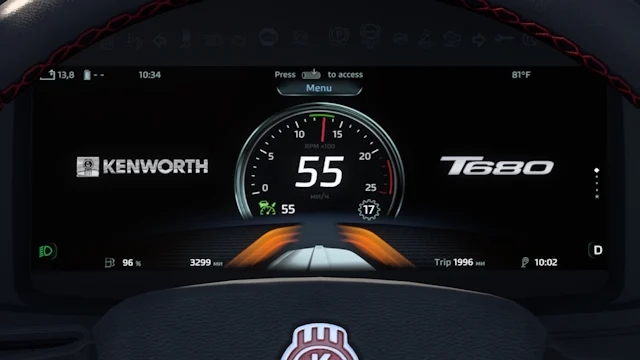
Adds an eighth page to the SCS Kenworth W900's trip computer with large speed, speed limit, gear and cruise. Tested on ATS 1.61 and under 1 MB in size.
Download Kenworth W900 Dashboard Add-on (Dacova Modding)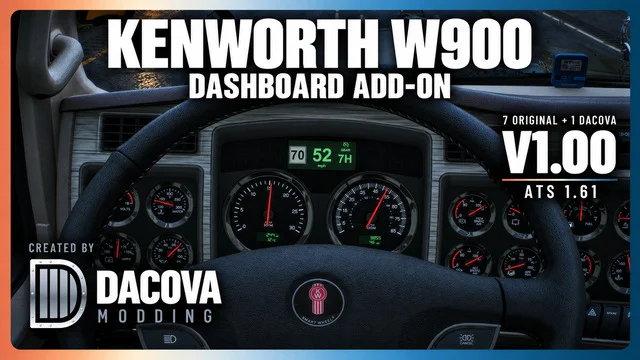
More screenshots on Steam Workshop ↗
What this mod does
Kenworth W900 Dashboard Add-on is a mod by Dacova Modding for the SCS Kenworth W900 in American Truck Simulator. It adds an eighth page to the trip computer, after the seven original ones and the clock, without touching the interior model.
What it shows
- Your current speed in large digits, in the center.
- A square speed limit sign on the left.
- The gear on the right, with room for three characters, including the Eaton Fuller gears the game provides.
- The cruise control icon above the gear when it’s on.
The analog gauges and the two small lower LCDs stay as they are. Units follow your game settings.
How to use it
Enable the mod, get into a stock W900 and turn on the ignition. Cycle through the trip computer pages with your control until you reach the eighth one. Speed limits and gear names come from the game: the mod doesn’t change them.
Compatibility
The author tested it on ATS 1.61.3.18. Disable other mods that replace the W900’s dashboard or give this one higher priority, and use only one copy (local or Workshop). He hasn’t tested custom interiors or multiplayer sessions.
Holyfix Check
Will it work with your mods?
Load your game.log.txt and check whether this mod is for your ATS version, whether you're missing a mod or DLC it needs and where to place it.
It's in Documents › American Truck Simulator › game.log.txt. It's read in your browser: the file is never uploaded.
Something else failing? Holyfix for ATS checks all your mods at once.
User rating
Our rating
0.0 / 5- Speed, limit and gear at a glance in the classic W900
- Doesn't touch the gauges or the interior
- Very lightweight: about 850 KB
- Only for the stock SCS Kenworth W900
- May conflict with other W900 dashboard, GPS or trip computer mods
- Not tested in multiplayer or with custom interiors
- Unofficial mod: trademarks belong to their owners; neither Holymod nor the author is affiliated with them
Requirements
- American Truck Simulator 1.61
- A Steam account
- The SCS Kenworth W900 with its stock interior
- No DLC or other dashboard mods required
How to install it
- Open the “Kenworth W900 Dashboard Add-on” page on Steam Workshop and click “Subscribe”.
- Launch American Truck Simulator and wait for Steam to download the mod.
- In the Mod Manager, enable it and disable other mods that replace the W900's dashboard, or keep this one above them.
- Get into a stock Kenworth W900 and turn on the ignition.
- Cycle through the trip computer pages to the eighth one, right after the clock.
Version history
-
1.0020 Oct 2026Current
Release (2 change notes that day)
Common problems
Where's the new page?
It's the eighth one, right after the clock; cycle through the pages with your trip computer control.
Does it change the interior?
No. The model, the gauges and the lower LCDs stay the same.
Does it work with modded W900s?
The author only made it for the stock SCS W900 and didn't test custom interiors.
Does it work in Convoy?
It's marked as optional, but the author hasn't tested it in multiplayer.
More mods for ATS
 ✓ ATS 1.61
  ✓ ATS 1.61Multiplayer
  ✓ ATS 1.61Requires DLC
  ✓ ATS 1.61Requires DLC
  ✓ ATS 1.61Requires DLC
  ✓ ATS 1.61Requires DLC