Peterbilt 389 Dashboard Add-on (Dacova Modding) for American Truck Simulator
Five new Dacova screens for the SCS Peterbilt 389's trip computer: gear, fuel, trip, engine and air. Keeps the gauges and the GPS. Tested on ATS 1.61.
Download Peterbilt 389 Dashboard Add-on (Dacova Modding)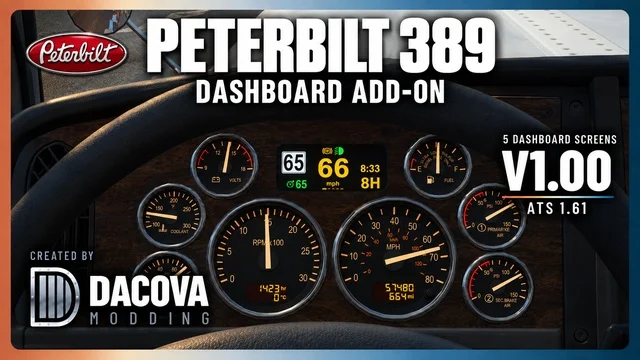
More screenshots on Steam Workshop ↗
What this mod does
Peterbilt 389 Dashboard Add-on is a mod by Dacova Modding for the SCS Peterbilt 389 in American Truck Simulator. It replaces the trip computer’s upper digital pages with five screens of its own and keeps the analog gauges, the lower LCD screens and the original GPS.
The five screens
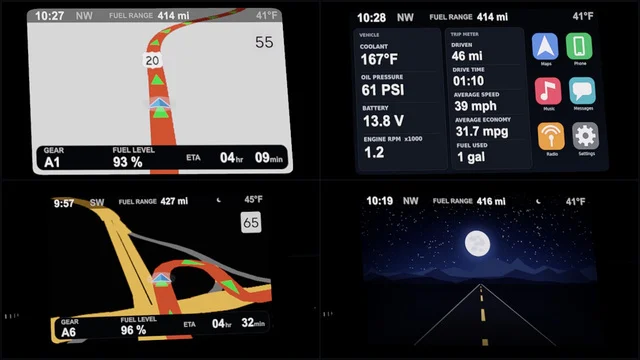
- DRIVE: speed, limit, gear, clock, cruise control and differential lock.
- FUEL: fuel consumption and range.
- TRIP: trip distance, estimated time of arrival and time until your next rest.
- ENGINE: oil and coolant temperature, oil pressure, battery and CHECK/STOP warnings.
- AIR/BRAKES: air pressure and a brake pedal bar.
Before you use it
You cycle through the screens with the game’s control for switching the dashboard display. The TRIP screen uses fixed miles, so set miles in your settings. The arrival time needs a route in the navigation, and the rest time needs fatigue turned on.
Version and load order
The author tested it on ATS 1.61 (1.61.3.18s) and warns that he hasn’t checked other versions. It goes above other mods that change the 389’s dashboard, GPS or trip computer, and you should enable only one copy. It needs no DLC and is optional in Convoy if the server allows it.
Holyfix Check
Will it work with your mods?
Load your game.log.txt and check whether this mod is for your ATS version, whether you're missing a mod or DLC it needs and where to place it.
It's in Documents › American Truck Simulator › game.log.txt. It's read in your browser: the file is never uploaded.
Something else failing? Holyfix for ATS checks all your mods at once.
User rating
Our rating
0.0 / 5- Five screens with engine, air and brake data the original doesn't show
- Keeps the analog gauges and the GPS
- No DLC
- Only for the SCS Peterbilt 389
- The TRIP screen only lines up with miles
- The author hasn't checked other game versions
- Unofficial mod: trademarks belong to their owners; neither Holymod nor the author is affiliated with them
Requirements
- American Truck Simulator 1.61
- A Steam account
- The SCS Peterbilt 389
- No DLC or other dashboard mods required
How to install it
- Open the “Peterbilt 389 Dashboard Add-on” page on Steam Workshop and click “Subscribe”.
- Launch American Truck Simulator and wait for Steam to download the mod.
- In the Mod Manager, enable it and move it above any other 389 dashboard, GPS or trip computer mods.
- In Options, set distances to miles so the TRIP screen lines up.
- Get into your Peterbilt 389 and switch screens with the dashboard display control.
Version history
-
1.0021 Oct 2026Current
Release
Common problems
Does it remove the needle gauges?
No. It keeps the analog gauges, the lower LCDs and the GPS; it only changes the upper digital pages.
The TRIP screen doesn't line up
It uses fixed mile labels: set miles in the game settings.
The arrival time doesn't show
You need an active route in the navigation.
Does it work in Convoy?
It's optional in Convoy if the server allows optional mods.
More mods for ATS
 ✓ ATS 1.61
  ✓ ATS 1.61Multiplayer
  ✓ ATS 1.61
  ✓ ATS 1.61Requires DLC
  ✓ ATS 1.61Requires DLC
  ✓ ATS 1.61Requires DLC