Mirror Camera Mod – All Trucks (rearview cameras) for American Truck Simulator
Cameras instead of mirrors, hanging monitors and rear, front and blind-spot cameras for all 19 SCS trucks and 61 cabs. Free, for ATS 1.61, no file replacements.
Download Mirror Camera Mod – All Trucks (rearview cameras)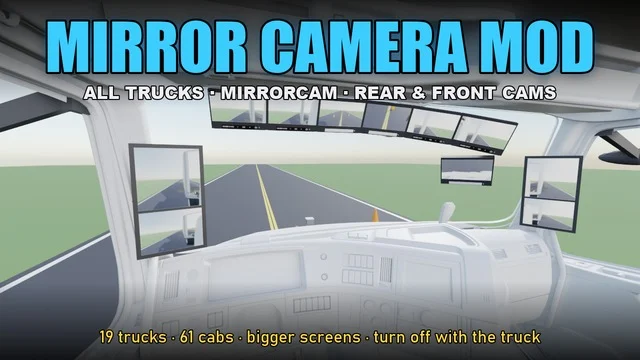
More screenshots on Steam Workshop ↗
What this mod does
Mirror Camera Mod – All Trucks, by 1pacorrro, turns the mirrors on SCS trucks into a camera system like the ones on modern trucks. It works on all 19 stock trucks and their 61 cabs, from the base game and the truck DLCs.
What’s included
- Camera arms with large screens on the windshield pillars.
- A hanging 4-screen monitor, a curved 6-screen one and a curved 7-screen one with a blind-spot camera.
- A rear camera on the cab, for hooking up the trailer, and on the trailer, for backing up with single trailers up to 53 feet.
- A front camera for parking and a right-side blind-spot camera.
Everything is fitted from the tuning menu, in the main mirror, hanging item, hood mirror and side mirror slots.
Limitations
The rear and front cameras take up the hood mirror slots. The game doesn’t detect the trailer, so you pick the rear camera manually, and it doesn’t work well with doubles, triples or very long combinations. It doesn’t work on modded trucks.
Version and issues
It’s for ATS 1.61, doesn’t need any DLC and doesn’t replace game files. The comments include reports of black screens (especially the pillar screens and the rear camera) on the Cascadia 2024 and the 2025 VNL 860.
Holyfix Check
Will it work with your mods?
Load your game.log.txt and check whether this mod is for your ATS version, whether you're missing a mod or DLC it needs and where to place it.
It's in Documents › American Truck Simulator › game.log.txt. It's read in your browser: the file is never uploaded.
Something else failing? Holyfix for ATS checks all your mods at once.
User rating
Our rating
0.0 / 5- Cameras and monitors for SCS's 19 trucks and 61 cabs
- Rear and front cameras for hooking up and parking
- Free, lightweight and doesn't replace game files
- There are reports of black screens and overlapping parts on some cabs (Cascadia 2024, 2025 VNL 860)
- The trailer camera doesn't work well with doubles, triples or long combinations
- It doesn't work on modded trucks
- Unofficial mod: trademarks belong to their owners; neither Holymod nor the author is affiliated with them
Requirements
- American Truck Simulator 1.61
- A Steam account to subscribe on the Workshop
- No DLC needed: it works on the base-game cabs and on any truck DLC cabs you own
How to install it
- Open the “Mirror Camera Mod – All Trucks” page on Steam Workshop and click “Subscribe.”
- Launch American Truck Simulator, open the Mod Manager and enable the mod.
- Take your SCS truck to a garage and open the tuning menu.
- Fit the cameras and screens in the main mirror, hanging item, hood mirror or side mirror slots.
- Before backing up, select the trailer rear camera; the game doesn't switch to it automatically.
Version history
-
7 Oct 2026Current
Released (the changelog has 1 change note)
Common problems
Does it work on modded trucks?
No. Only on SCS's 19 stock trucks.
Can I have hood mirrors and the rear camera at the same time?
No: the rear and front cameras use the hood mirror slots.
The screens look black
It's the most-reported bug; the author asks you to mention the truck and cab in the comments so he can fix it.
More mods for ATS
 ✓ ATS 1.61
  ✓ ATS 1.61
  ✓ ATS 1.61
  ✓ ATS 1.61
  ✓ ATS 1.61Requires DLC
  ✓ ATS 1.61