AW Type 1 for BeamNG.drive
1963 Beetle from the fictional AW brand, with an air-cooled rear engine, a radio that plays your music and tons of interactive controls. Works on BeamNG.drive 0.39.
Download AW Type 1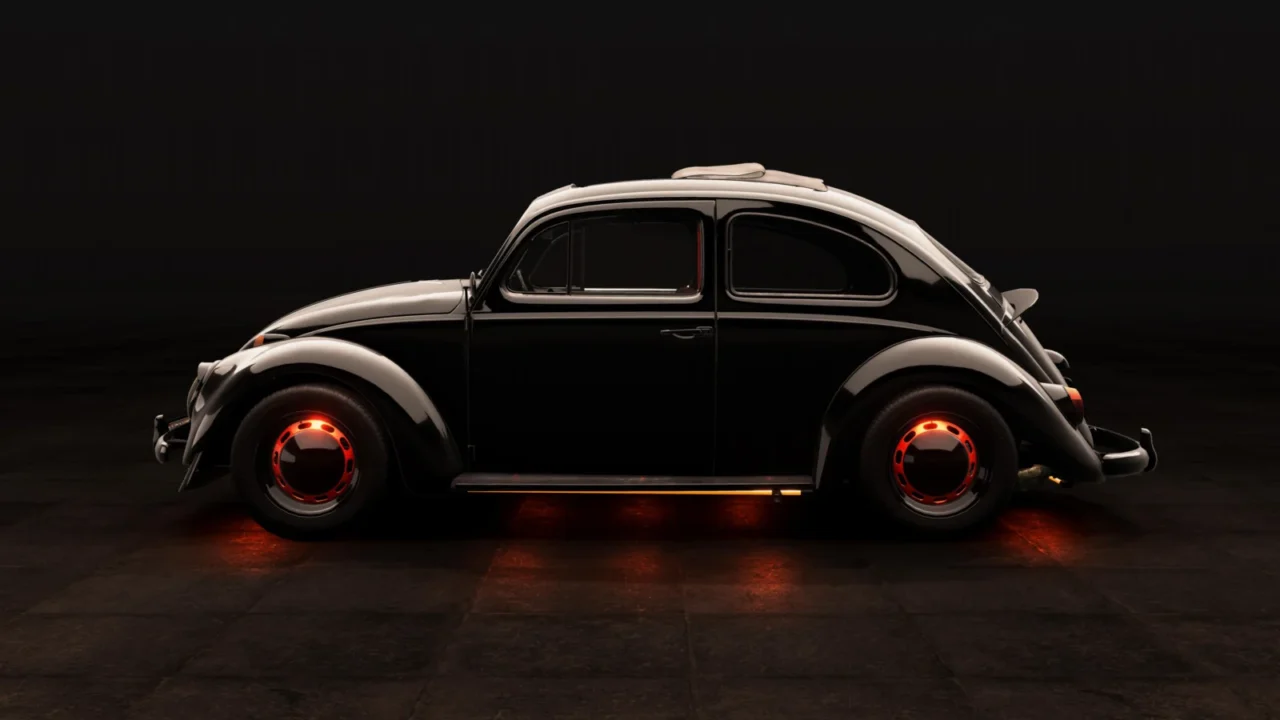
More screenshots on Official BeamNG Repository (beamng.com/resources) ↗
What this mod does
The AW Type 1 recreates a small 1963 family car with an air-cooled rear engine, the classic “Beetle,” under the fictional AW (Automobilwerke Wolfsburg) brand from the BeamNG.drive modding universe. It stands out for its level of detail: many players say it feels like an official in-game car.
What’s included
- Standard body and a ragtop version with a canvas roof that opens.
- Animated knobs, handles and thumbwheels; roll-up windows; interactive heating and air vents.
- A working radio: you can add your own stations with music folders (MP3, FLAC, OGG, OPUS or WAV).
- Battery simulation that charges and drains.
- Interior sound that changes if you have doors or windows open.
- Since September 2026, a 2.0 DOHC four-cylinder race engine, optional ABS and revised suspensions for tuning.
Who it’s for
It’s ideal if you enjoy classics and relaxed driving while fiddling with everything in the cabin. With the new race engine, you can also build a hot-rodded Beetle.
Release notes
The August 2026 update, released after 0.39 launched, reworked the lighting and added a full translation (English and German). Version 3.1 from October 2 fixes tire textures and adds a grip setting for the GT wheels. It’s still in Beta.
User rating
Highlights and things to keep in mind
- Very high level of detail and interactivity
- Radio with your own music and battery simulation
- Very recent updates (October 2026)
- Still in Beta
- Large file, almost 360 MB
- Some users wish the engine sound were louder
Requirements
- BeamNG.drive 0.39
- About 360 MB of free space for the .zip file
How to install it
- Open the AW Type 1 page on the official BeamNG Repository.
- Click Download or subscribe from the in-game Repository.
- If you download it manually, copy the .zip (don't unzip it) into the mods folder inside your user folder.
- Launch the game, check in the Mod Manager that it's enabled and find it in the vehicle selector.
- For your own music, create folders in settingsvehiclesbugradio using the format “frequency= name” (for example 88.3= MyMusic) and press Ctrl+R in the game to reload.
Version history
-
3.12 Oct 2026Current
Option to remove the lettering on the GT tires, a tire grip setting and texture fixes.
-
—28 Sep 2026
New 2.0 DOHC race engine, optional ABS and revised stock engines and suspensions.
-
—10 Aug 2026
Compatibility update: reworked lighting, full translation (English and German), more radio formats and interactive controls.
Common problems
How do I add my music to the radio?
Create one folder per station inside settingsvehiclesbugradio in your user folder, put MP3, FLAC, OGG, OPUS or WAV files in it and press Ctrl+R in the game.
Is it finished?
Not entirely: the mod is marked as Beta and gets frequent updates; delete the previous version before installing a new one.
Can I upload it to another website?
No, the copyright notice expressly forbids distributing it outside the Repository.
More mods for BeamNG