Traffic Chaos for BeamNG.drive
An app that drives BeamNG.drive's traffic crazy: control aggression, how much drivers respect red lights, and even make cars chase you. Ready for 0.40.
Download Traffic Chaos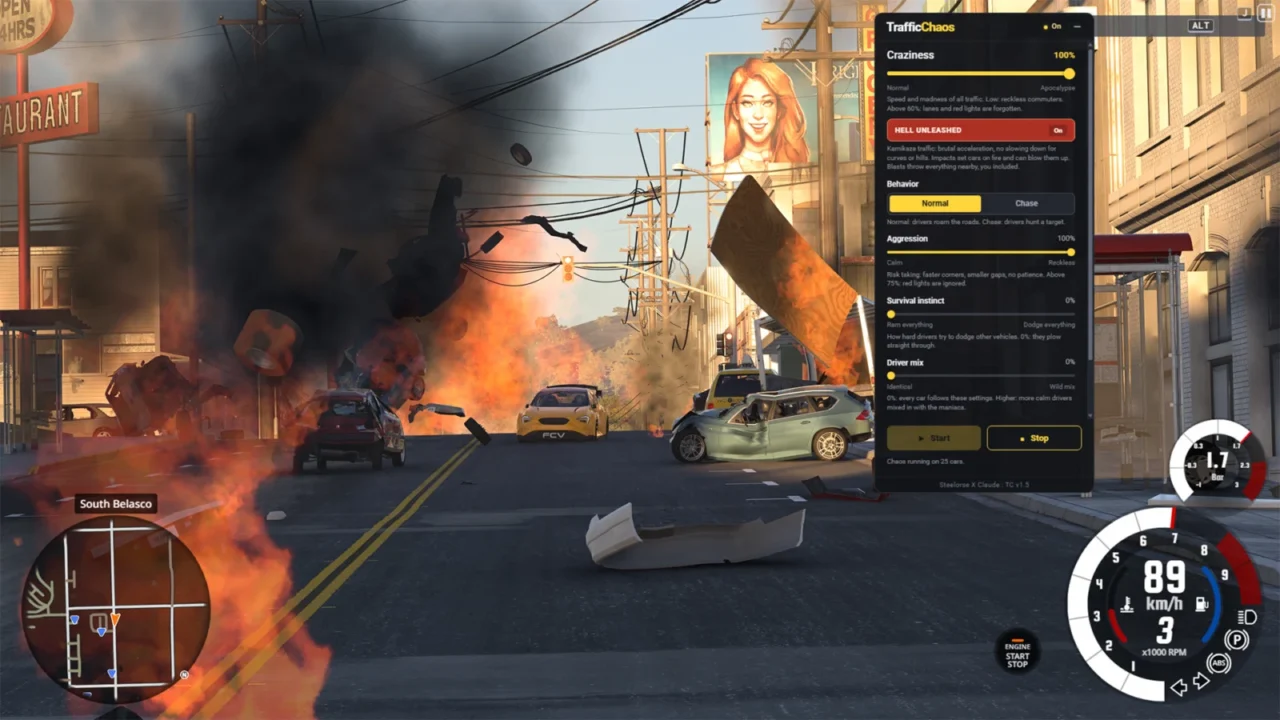
More screenshots on Official BeamNG Repository (beamng.com/resources) ↗
What this mod does
Traffic Chaos is a lightweight app that manipulates BeamNG.drive’s built-in traffic and turns it into chaos. It doesn’t add vehicles or control your car or your character on foot: it only changes how everyone else drives.
Main settings
- Craziness: traffic speed and mayhem. Above 60% drivers ignore lanes and red lights.
- Behavior: normal or chase. In chase mode you can be the only target, even on foot, or have half the traffic chase you while the other half chases each other.
- Aggression: faster cornering and smaller gaps; above 75% they run red lights.
- Survival instinct: how much they swerve to avoid things; at 0% they plow through everything in their way.
- Driver mix and wreck cleanup: crashed cars disappear and respawn between 1 and 30 seconds later.
Version 1.5 for 0.40
It’s been rebuilt for 0.40, with clearer descriptions, less load per frame and a clean restore when you press Stop. Craziness now adapts to each road’s speed limit. In Career mode it switches itself off to protect your saves.
Tips
The file is now called TrafficChaos.zip with no version number, so delete the old version from the Mod Manager first. With high settings you’ll get lots of crashes, debris and particles, and frame rates can drop on some PCs. The author mentions a hidden feature when you set craziness to 100%.
User rating
Highlights and things to keep in mind
- Ready for 0.40
- Lots of settings, from tense traffic to total chaos
- Chase mode against the player or between cars
- High settings can tank performance
- Doesn't work in Career mode (it switches off on purpose)
- When updating you have to delete the old version manually
Requirements
- BeamNG.drive 0.40
- Traffic enabled on the map
How to install it
- Open the Traffic Chaos page on the official BeamNG Repository.
- Click Download to get the .zip, or subscribe from the in-game Repository (Subscribe button).
- If you download it manually, copy the .zip (don't unzip it) into the mods folder inside your BeamNG.drive user folder (the launcher opens it with Manage User Folder).
- Launch the game and check in the Mod Manager that it's enabled.
- If you had an older version, delete it from the Mod Manager first.
- In game, press Esc, open UI Apps, add Traffic Chaos and press Start.
Version history
-
1.5.019 Oct 2026Current
Rebuilt for 0.40; craziness scales with the speed limit; file renamed to TrafficChaos.zip.
-
1.3.015 Sep 2026
Mixed chases and per-car setting variation on each spawn.
-
—14 Sep 2026
First version published on the Repository.
Common problems
Does it work in Career mode?
No: it's automatically disabled in Career so it won't mess up your saves.
Does it add new cars?
No, it only changes the behavior of the traffic the game already spawns.
It won't update to the new version, what do I do?
Delete the old .zip from the Mod Manager: file names with version numbers prevented it from being replaced.
More mods for BeamNG