DBM Cluster Vision – Bigger Dash Text & Map Page for Euro Truck Simulator 2
Bigger text on ETS2 1.61 truck instrument clusters plus a dash map page with speed, ETA, gear and speed limit. Free on Steam; requires DBM Upscaled Clusters.
Download DBM Cluster Vision – Bigger Dash Text & Map Page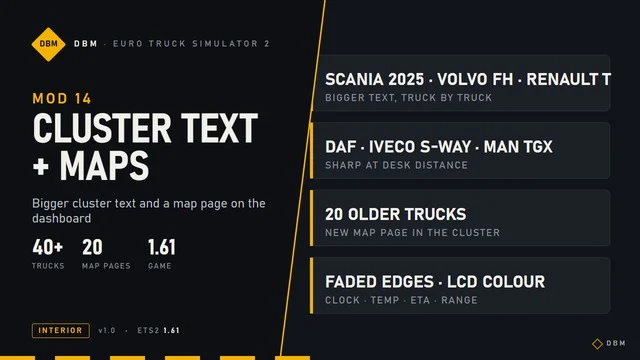
More screenshots on Steam Workshop ↗
What this mod does
DBM Cluster Vision is an interior mod by Claude Shannon that makes the instrument cluster easier to read and adds a map to it in Euro Truck Simulator 2 1.61. It’s an add-on for DBM Upscaled Clusters, which you need to have installed.
What it adds
- Bigger cluster text, scaled without stretching and without overlapping the values next to it.
- A map page on the cluster of trucks that didn’t have one, accessible with the infotainment key.
- On trucks with a large screen, a full-width map with speed, ETA, range, clock, outside temperature, speed limit, warning lights, gearbox selector, gear and an RPM bar with an ECO zone.
- Since version 1.2, the cruise control set speed on every map page.
Trucks
Full-width map on the Scania S and R, DAF 2021, XD and XF Electric, Iveco S-Way and MAN TGX 2020. Simple LCD-style map on the Scania Streamline and R 2009, Volvo FH16, MAN TGX Euro 5 and 6, Actros, Stralis, Hi-Way, DAF XF and Renault Magnum. The Volvo FH 2021 and 2024 and the Renault T 2024 keep their own map.
Load order
Place it above DBM Upscaled Clusters. It works with DBM Nav Data Pages and Lighting Nova. It was updated on October 4, 2026.
Holyfix Check
Will it work with your mods?
Load your game.log.txt and check whether this mod is for your ETS2 version, whether you're missing a mod or DLC it needs and where to place it.
It's in Documents › Euro Truck Simulator 2 › game.log.txt. It's read in your browser: the file is never uploaded.
Something else failing? Holyfix for ETS2 checks all your mods at once.
User rating
Our rating
0.0 / 5- A much more readable cluster, especially on large screens
- A dash map even on older trucks
- Very small file
- Requires DBM Upscaled Clusters
- Conflicts with other mods that change the same clusters: whichever is higher wins
- The author only guarantees 1.61 and later
- Unofficial mod: brands belong to their owners; neither Holymod nor the author is affiliated with them
Requirements
- Euro Truck Simulator 2 updated to version 1.61
- DBM Upscaled Clusters (Clusters HD), by the same author
- No DLC needed
- Steam account
How to install it
- Subscribe to DBM Upscaled Clusters on Steam Workshop if you don't have it yet.
- Open the “DBM Cluster Vision” page and click “Subscribe”.
- Launch ETS2 and open the Mod Manager.
- Enable both mods and keep DBM Cluster Vision above DBM Upscaled Clusters.
- In your save, press the cluster's infotainment key to get to the map page.
Version history
-
1.226 Oct 2026Current
Cruise control indicator on every map page
-
1.126 Oct 2026
Large-screen map rebuilt, with a warning light row, speed limit, gearbox selector, gear and RPM bar; fixes for MAN, DAF, Iveco and Actros 2014
-
28 Sep 2026
Release
Common problems
What other mod does it need?
DBM Upscaled Clusters (Clusters HD), which must sit below this one in the load order.
How do I get to the map page?
With the cluster's infotainment key.
Do all trucks get the new map?
No: the Volvo FH 2021 and 2024 and the Renault T 2024 keep their original map, and older trucks get a simple LCD-style map.
Is it compatible with DBM Nav Data Pages?
Yes, according to the author.
More mods for ETS2
 ✓ ETS2 1.61
  ✓ ETS2 1.61Multiplayer
  ✓ ETS2 1.61Multiplayer
  ✓ ETS2 1.61
  ✓ ETS2 1.61
  ETS2 1.57