DBM Road Textures – 4K Real-Scan Asphalt, Sidewalks & Curbs for Euro Truck Simulator 2
Replaces ETS2 1.61 asphalt, sidewalks and curbs with 4K textures made from real CC0 scans by ambientCG and Poly Haven, with normal maps and roughness-based gloss. Free, with a ProMods add-on.
Download DBM Road Textures – 4K Real-Scan Asphalt, Sidewalks & Curbs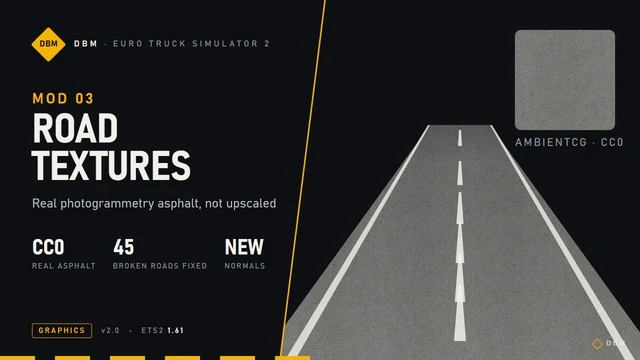
More screenshots on Steam Workshop ↗
What this mod does
DBM Road Textures replaces the road surfaces in Euro Truck Simulator 2 1.61 (asphalt, sidewalks, curbs, gutters, parking lots, yards and dirt roads) with textures rebuilt from real photographed materials, not upscaled versions of the originals. It’s made by Claude Shannon as part of the DBM series.
What it improves
- CC0 scans from ambientCG and Poly Haven, with visible aggregate in the asphalt.
- Normal maps on roads that didn’t have them, and gloss calculated from the scan’s roughness.
- Different reflections for asphalt, gravel and dirt.
- In 4.0: joints in the main asphalt, concrete pores on all 41 curbs and new sidewalks in six regions.
- In 4.1: remade mipmaps so surfaces don’t darken in the distance.
Load order and ProMods
It goes below Lighting Nova and Signs & Markings 4K, and above maps. It replaces other road texture mods, so use only one. With ProMods, add the «DBM Textures – ProMods Road» add-on above ProMods.
Performance
It’s about 5.5 GB. The author tested it in 4K with a 16 GB RTX 5070 Ti, using 12-13 GB of VRAM; with 8 GB they recommend lowering texture quality. If the game crashes while loading, they suggest setting Windows virtual memory to 32,768 MB.
Holyfix Check
Will it work with your mods?
Load your game.log.txt and check whether this mod is for your ETS2 version, whether you're missing a mod or DLC it needs and where to place it.
It's in Documents › Euro Truck Simulator 2 › game.log.txt. It's read in your browser: the file is never uploaded.
Something else failing? Holyfix for ETS2 checks all your mods at once.
User rating
Highlights and things to keep in mind
- Textures from real scans with a free license
- Improves asphalt, sidewalks and curbs all at once
- Dedicated ProMods add-on
- Over 5 GB and uses a lot of VRAM
- Incompatible with other road texture mods
- Strict load order with other DBM mods
Requirements
- Euro Truck Simulator 2 1.61
- Graphics card with enough VRAM (the author uses 16 GB; with 8 GB, lower texture quality)
- About 5.5 GB of free space
- Steam account
How to install it
- Open the "DBM Road Textures - 4K Real-Scan Asphalt, Sidewalks & Curbs 1.61" page on Steam Workshop and click "Subscribe".
- Launch Euro Truck Simulator 2 and wait for Steam to finish downloading the mod.
- Open the Mod Manager for your profile and enable "DBM Road Textures - 4K Real-Scan Asphalt, Sidewalks & Curbs 1.61".
- Place it below Lighting Nova and Signs & Markings 4K, and above maps.
- If you play with ProMods, also subscribe to "DBM Textures - ProMods Road" and place it above ProMods.
Version history
-
4.11 Oct 2026Current
Mipmaps rebuilt in linear space (243 textures)
-
4.024 Oct 2026
Asphalt joints, curb pores, sidewalks for six regions and ProMods add-on
-
23 Sep 2026
Release
Common problems
Does it work with ProMods?
Yes, with the DBM Textures - ProMods Road add-on placed above ProMods.
Where do the textures come from?
From real CC0-licensed scans by ambientCG and Poly Haven.
Can I use it with another road mod?
No, it replaces them: use only one.
What do I do if the game crashes while loading?
The author recommends raising Windows virtual memory to 32,768 MB on your fastest drive.
More mods for ETS2
 ETS2 1.60
  ETS2 1.53
  ✓ ETS2 1.61
  ✓ ETS2 1.61
  ETS2 1.57
  ✓ ETS2 1.61