DBM Nav Data Pages – Trip, Fuel & Truck Data for Euro Truck Simulator 2
Adds four navigation screen pages to ETS2 1.61 with speed, ETA, rest time, fuel economy, AdBlue, temperatures and air pressure. Free on Steam.
Download DBM Nav Data Pages – Trip, Fuel & Truck Data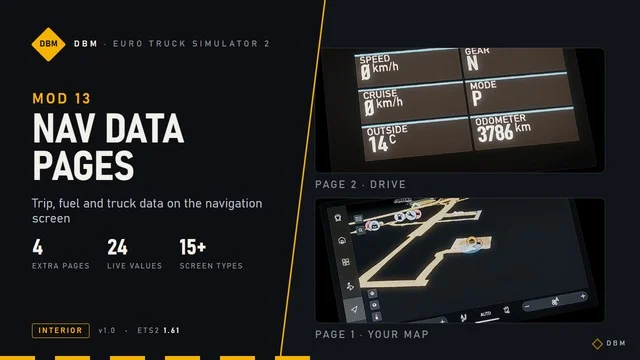
More screenshots on Steam Workshop ↗
What this mod does
DBM Nav Data Pages is an interior mod by Claude Shannon, from the DBM series, that turns your truck’s navigation screen into a small trip computer in Euro Truck Simulator 2 1.61.
The four new pages
- DRIVE: speed, gear, cruise control speed, driving mode, outside temperature and odometer.
- TRIP: estimated time of arrival, time until rest, range, distance, time and average speed for the trip.
- FUEL: current and average fuel consumption, fuel remaining and used on the trip, tank level and AdBlue level.
- TRUCK: coolant and oil temperature, air pressure, battery voltage, engine hours and oil pressure.
Trucks
The pages are fitted to the large screen of the Scania R and S (Smart Dash), Volvo FH 2021 and 2024, Renault T and E-Tech T, DAF XD, XG and XF Electric, Iveco S-Way and MAN TGX 2020. Older trucks show them on the standard navigation screen.
Usage and compatibility
Switch pages with the infotainment key (backslash by default). It replaces the navigation screen files, so it conflicts with other mods that change them, such as night mode mods. It works with Lighting Nova and the rest of the DBM mods. It was updated on October 5, 2026.
Holyfix Check
Will it work with your mods?
Load your game.log.txt and check whether this mod is for your ETS2 version, whether you're missing a mod or DLC it needs and where to place it.
It's in Documents › Euro Truck Simulator 2 › game.log.txt. It's read in your browser: the file is never uploaded.
Something else failing? Holyfix for ETS2 checks all your mods at once.
User rating
Our rating
0.0 / 5- Lots of useful info without leaving the cab
- Tailored pages for modern SCS trucks
- Very small file
- Incompatible with other mods that change the navigation screen (for example, night mode mods)
- The author only guarantees 1.61; it may work on older versions without support
- With many high-resolution texture mods, the author recommends raising Windows virtual memory to 32 GB to avoid crashes while loading
- Only released on Steam Workshop: reuploads on other sites aren't by the author
- Unofficial mod: trademarks belong to their owners; neither Holymod nor the author is affiliated with them
Requirements
- Euro Truck Simulator 2 updated to version 1.61
- An SCS truck (the ones with a large screen get tailored pages)
- No DLC or other mods needed
- Steam account
How to install it
- Open the “DBM Nav Data Pages” page on Steam Workshop and click “Subscribe”.
- Launch ETS2 and go to the Mod Manager.
- Enable the mod and place it above any other mod that changes the navigation screen.
- Load your save and get in your truck.
- Press the infotainment key (backslash by default) to cycle through the DRIVE, TRIP, FUEL and TRUCK pages.
Version history
-
5 Oct 2026Current
Fixed range on the Scania Smart Dash
-
28 Sep 2026
Release
Common problems
How do I switch pages?
With the infotainment key (backslash by default); the last page, the screen-off one, is replaced by the new ones.
Is it compatible with other navigation mods?
Not with those that change the same files, such as night mode mods: whichever is higher in the list wins.
Can I remove it mid-save?
Yes, the author says you can add or remove it at any time.
Why do some values change on the Scania?
On the Smart Dash screen the game doesn't send every value, so others are shown instead (for example, fuel remaining instead of range).
More mods for ETS2
 ✓ ETS2 1.61
  ✓ ETS2 1.61Multiplayer
  ✓ ETS2 1.61
  ✓ ETS2 1.61
  ✓ ETS2 1.61Multiplayer
  ✓ ETS2 1.61