DBM Upscaled Clusters – Sharp Dials & Screens for Euro Truck Simulator 2
Sharper instrument clusters in ETS2 1.61: 75 gauge, screen and icon textures upscaled 2–4x and numbers redrawn on 9 analog clusters. Free; about 255 MB.
Download DBM Upscaled Clusters – Sharp Dials & Screens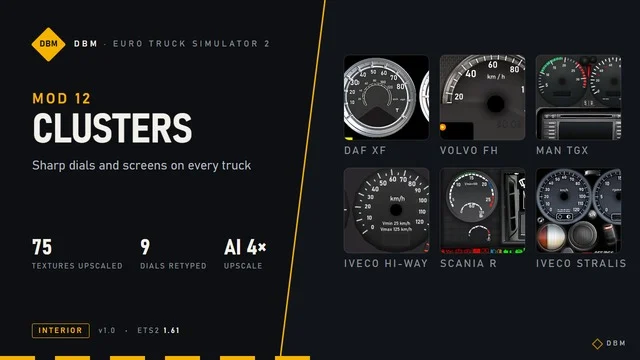
More screenshots on Steam Workshop ↗
What this mod does
DBM Upscaled Clusters is the instrument cluster mod from Claude Shannon’s DBM series. It makes the dashboard’s gauges, screens and icons look sharp in Euro Truck Simulator 2 1.61, especially at high resolutions.
What it improves
- 75 textures of gauges, screens, warning lights, menu icons and bezels, from the base game and DLCs, upscaled 2 to 4 times with a Real-ESRGAN model.
- Numbers and labels redrawn by hand with a DIN-style typeface on 9 analog clusters; they light up at night like the originals.
- Center screen cutouts adjusted to the new resolution.
It doesn’t touch the needles, bars or text the game draws live (fuel, clock, radio), or the navigation screen.
Trucks
Redrawn text and upscaling on the Volvo FH 2009, DAF XF, MAN TGX, Scania R 2009, Iveco Hi-Way, Iveco Stralis and Renault T. Screens and icons only on the Scania 2016, 2024E and 2025, Actros, Renault T 2024, E-Tech T and Magnum, MAN TGX Euro 6 and 2020, S-Way, DAF XD, XF Electric and Volvo FH 2012, 2021 and 2024.
Load order
It goes above maps like ProMods or RusMap; among DBM mods the order doesn’t matter. It conflicts with other mods that change the same clusters. It was released on September 28, 2026.
Holyfix Check
Will it work with your mods?
Load your game.log.txt and check whether this mod is for your ETS2 version, whether you're missing a mod or DLC it needs and where to place it.
It's in Documents › Euro Truck Simulator 2 › game.log.txt. It's read in your browser: the file is never uploaded.
Something else failing? Holyfix for ETS2 checks all your mods at once.
User rating
Our rating
0.0 / 5- Much sharper dashboard on large or 4K monitors
- Covers almost every SCS truck
- Can be added or removed at any time
- The textures are upscaled with artificial intelligence (the numbers on 9 clusters are redrawn by hand)
- Conflicts with other mods that change the same clusters: whichever is higher wins
- About 255 MB in size
- If the game crashes while loading, the author recommends raising Windows virtual memory to 32 GB
- Unofficial mod: trademarks belong to their owners; neither Holymod nor the author is affiliated with them
Requirements
- Euro Truck Simulator 2 updated to version 1.61
- About 255 MB of free space
- No DLC or other mods needed
- Steam account
How to install it
- Open the “DBM Upscaled Clusters” page on Steam Workshop and click “Subscribe”.
- Start ETS2 and wait for Steam to finish the download (about 255 MB).
- In the Mod Manager, enable the mod.
- Place it above ProMods, RusMap and any other maps.
- If you use other DBM mods, the order among them doesn't matter.
- Disable other mods that change the instrument cluster textures.
Version history
-
28 Sep 2026Current
Release
Common problems
Does it change the navigation screen?
No: the author doesn't touch the navigation screen or the text the game draws live.
Does it work in ATS?
No, the author explains that ATS clusters use different textures.
Does it use a lot of VRAM?
According to the author, the increase is small; with 8 GB cards he recommends lowering texture quality or scaling.
How were the textures made?
Upscaled with Real-ESRGAN's Remacri model in Upscayl; the numbers and labels were redrawn by hand, gauge by gauge.
More mods for ETS2
 ✓ ETS2 1.61
  ✓ ETS2 1.61Multiplayer
  ✓ ETS2 1.61
  ✓ ETS2 1.61Multiplayer
  ✓ ETS2 1.61
  ✓ ETS2 1.61