Garmin dēzl GPS for Euro Truck Simulator 2
Adds three Garmin dēzl-style windshield GPS units that show the live map and route, your speed, the limit and remaining drive time. Free, with no external programs.
Download Garmin dēzl GPS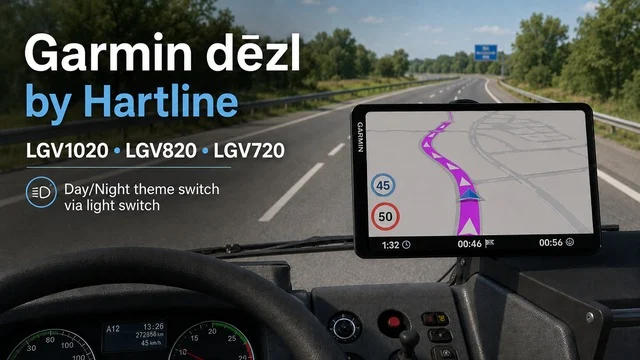
More screenshots on Steam Workshop ↗
What this mod does
This mod by Hartline adds a windshield GPS to the cab inspired by the Garmin dēzl range for truckers. The cool part is that it isn’t just decoration: the screen shows real information from your save.
What’s included
- Three sizes: LGV1020, LGV820 and LGV720, each with its own price in the configurator.
- Versions for left-hand and right-hand drive.
What you see on the screen
- The game’s navigation map with the live route, in magenta.
- Current speed and speed limit.
- In-game time, time remaining on the job and drive time until your mandatory rest.
- Automatic day and night mode depending on whether your truck’s lights are on.
Who it’s for
For anyone who drives with the interior camera and wants a more realistic GPS than the stock one without relying on DLLs, telemetry programs or other GPS mods. It mounts in the standard windshield GPS position, so it works on SCS trucks and on most mod trucks that respect that position. The Steam page lists it as compatible with ETS2 1.60 and 1.61. It’s a fan mod with no affiliation with Garmin.
Holyfix Check
Will it work with your mods?
Load your game.log.txt and check whether this mod is for your ETS2 version, whether you're missing a mod or DLC it needs and where to place it.
It's in Documents › Euro Truck Simulator 2 › game.log.txt. It's read in your browser: the file is never uploaded.
Something else failing? Holyfix for ETS2 checks all your mods at once.
User rating
Highlights and things to keep in mind
- The screen shows your real route, speed, limit and rest times
- Three sizes and versions for left- or right-hand drive
- No external programs or dependencies
- Requires the truck to have a windshield GPS slot
- Recent mod: it may change in future versions
- It's a Garmin-inspired design, not an official product of the brand
Requirements
- Euro Truck Simulator 2 version 1.61 (also 1.60)
- A truck with a standard windshield GPS position
How to install it
- Go to the mod's Steam Workshop page and click Subscribe.
- Open the Mod Manager and activate Hartline's Garmin dēzl.
- Go to a service shop and open your truck's interior customization.
- Pick one of the three models in the windshield GPS slot, in the version for your driving side.
- Set a destination so the screen shows the route and times.
- Turn on the truck's lights to check the switch to night mode.
Common problems
Do I need a telemetry program?
No. The author says it doesn't use DLLs or telemetry plugins.
Does it work on mod trucks?
On most of them, as long as they have the standard windshield GPS position.
Do I need TJ's GPS mod?
No. It's standalone and doesn't depend on other GPS mods.
More mods for ETS2
 Requires DLC
  ✓ ETS2 1.61
  ✓ ETS2 1.61
  ETS2 1.57
  ETS2 1.58Multiplayer
  ETS2 1.59