Icons! – realistic loading and unloading icons (DaStrobel) for Euro Truck Simulator 2
Swaps loading and unloading icons for more realistic ones and refreshes every trigger icon. Tested by the author up to ETS2 1.61; 123 KB, optional in Convoy.
Download Icons! – realistic loading and unloading icons (DaStrobel)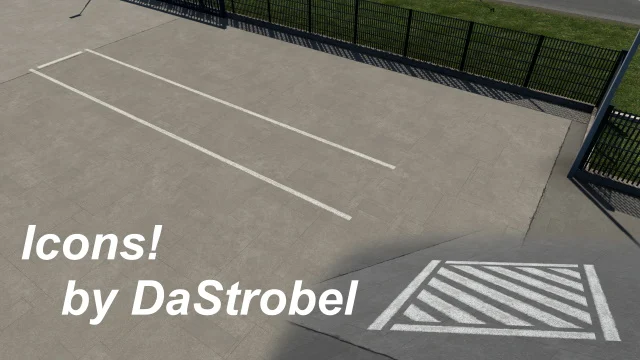
More screenshots on Steam Workshop ↗
What this mod does
Icons!, by DaStrobel, replaces the loading and unloading icons in Euro Truck Simulator 2 with more realistic ones and also changes every trigger icon in the game. It’s a small mod, about 123 KB, that has been on Steam Workshop since June 2022 and has over 86,000 subscribers.
Version
The author states in the description that they’ve tested it on every game version from 1.49 up to 1.61. The latest Workshop update is from October 1, 2026. No DLC or other mods needed.
Multiplayer
It’s set up as an optional mod for Convoy. The host has to enable optional mods when hosting the session, and anyone joining has to do the same when searching for it.
Known issue
Some icons may disappear because they end up below the road surface. According to the author, this happens when the icon is placed too low in the map editor or the prefab, and it can’t be fixed from the mod. The icons are still in the same spot the GPS shows, so you can use it to find them.
The page doesn’t mention compatibility with map mods. The author asks that it not be edited or reuploaded: always share the link to their page.
Holyfix Check
Will it work with your mods?
Load your game.log.txt and check whether this mod is for your ETS2 version, whether you're missing a mod or DLC it needs and where to place it.
It's in Documents › Euro Truck Simulator 2 › game.log.txt. It's read in your browser: the file is never uploaded.
Something else failing? Holyfix for ETS2 checks all your mods at once.
User rating
Our rating
0.0 / 5- More realistic-looking loading and unloading points
- Tested by the author on every version from 1.49 to 1.61
- Very lightweight and optional in Convoy
- Some icons may be hidden below the road, and the author can't fix it
- The page says nothing about map mods like ProMods
- The author forbids editing or reuploading it: share the link to their page
Requirements
- Euro Truck Simulator 2 1.61
- Steam account
- No DLC or other mods needed
How to install it
- Open the “Icons!” page on Steam Workshop and click “Subscribe”.
- Wait for Steam to finish downloading.
- Launch ETS2 and open the Mod Manager.
- Enable “Icons!” and confirm the changes.
- Load your save and drive up to a loading or unloading point to see the new icons.
- If you play Convoy, enable optional mods when creating or searching for the session.
Version history
-
1 Oct 2026Current
Latest update on Steam Workshop (tested on 1.61)
-
10 Jun 2022
Released on Steam Workshop
Common problems
What exactly does it change?
The loading and unloading icons, which get more realistic versions, and every trigger icon.
I can't see an icon
It may sit below the road if it was placed too low on the map; the author says it can't be fixed. Look for it where the GPS marks it.
Does it work in Convoy?
Yes, as an optional mod: both the host and anyone joining must enable optional mods.
Does it affect performance?
It's about 123 KB and only changes icons.
More mods for ETS2
 ✓ ETS2 1.61
  ✓ ETS2 1.61
  ETS2 1.60
  ETS2 1.53
  ✓ ETS2 1.61
  ✓ ETS2 1.61