Interior Cabin Lights (ETS2): colored ambient lights in the cab for Euro Truck Simulator 2
Ambient cab lighting in blue, green, orange, purple, red or white for SCS trucks and several modded ones. Free; updated on April 27, 2026.
Download Interior Cabin Lights (ETS2): colored ambient lights in the cab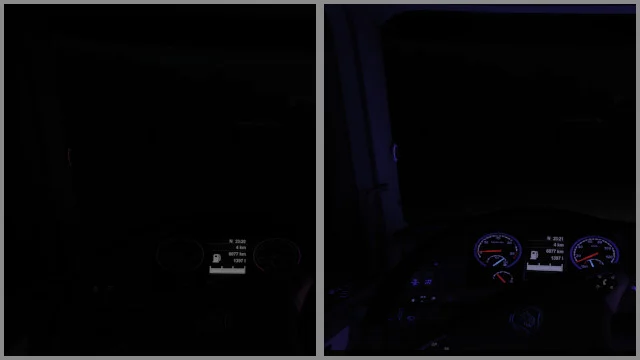
More screenshots on Steam Workshop ↗
What this mod does
Interior Cabin Lights, by Eddie Yantz, adds an ambient light glow inside the cab of SCS trucks in Euro Truck Simulator 2. You can choose blue, green, orange, purple, red or white. It has over 46,000 subscribers on Steam Workshop.
How to fit it
- The lights are in the service shop, under the Driver’s Plate and Co-Driver’s Plate parts.
- You can make them turn on with the parking lights or with the beacons. The beacons don’t have a default key: assign one.
- Leave light visibility ranges enabled and tick secondary vehicle lights in Graphics.
- They’re only visible once it’s dark.
Modded trucks included
Besides the SCS trucks, it works with the Actros 2019, RJL’s Scania T and T4, the Next Generation Scania P G R S Pack, the Scania PGR 2004-2018, the Volvo FH 2012 (RPIE reworked) and the Volvo FH 2022.
Version and warnings
The author doesn’t state a game version; the last update was on April 27, 2026. The author explains how to change the colors using the candela, hue and saturation values, but warns that every update overwrites your changes: keep a copy. There’s a separate version for ATS.
Holyfix Check
Will it work with your mods?
Load your game.log.txt and check whether this mod is for your ETS2 version, whether you're missing a mod or DLC it needs and where to place it.
It's in Documents › Euro Truck Simulator 2 › game.log.txt. It's read in your browser: the file is never uploaded.
Something else failing? Holyfix for ETS2 checks all your mods at once.
User rating
Our rating
0.0 / 5- Six ambient light colors
- Also works with several popular modded trucks
- Lightweight and free
- The author doesn't state a game version. It may cause errors on 1.61; Holyfix will warn you if so.
- Updates wipe out any colors you've edited by hand
- Only visible at night
Requirements
- Euro Truck Simulator 2
- A Steam account to subscribe on the Workshop
- No DLC needed
- Optional: the compatible modded trucks the author lists
How to install it
- Open the “Interior Cabin Lights (ETS2)” page on Steam Workshop and click “Subscribe”.
- Launch Euro Truck Simulator 2 and wait for Steam to finish the download.
- Open your profile's Mod Manager and enable the mod.
- At the service shop, fit the light on Driver's Plate or Co-Driver's Plate and pick the color.
- If you choose the beacons as the switch, assign them a key in Controls.
- In Graphics, leave light visibility ranges and secondary vehicle lights enabled.
Common problems
They don't turn on
They're only visible at night and with secondary vehicle lights enabled in Graphics.
Which key turns them on?
The parking lights or the beacons; the beacons don't have a default key.
I changed the color and lost it
Updates overwrite the files: keep a copy of your changes.
More mods for ETS2
 ✓ ETS2 1.61Multiplayer
  ETS2 1.59
 ✓ ETS2 1.61Requires DLC
  ETS2 1.60Multiplayer