Snowy Moon (LoG.Pro and Lighting Improvements) for Euro Truck Simulator 2
Snowy Moon DLL plugins adding temporal anti-aliasing (TAA/DLAA), motion blur and, in the paid version, better lighting. DirectX 11 on ETS2 1.61.
Download Snowy Moon (LoG.Pro and Lighting Improvements)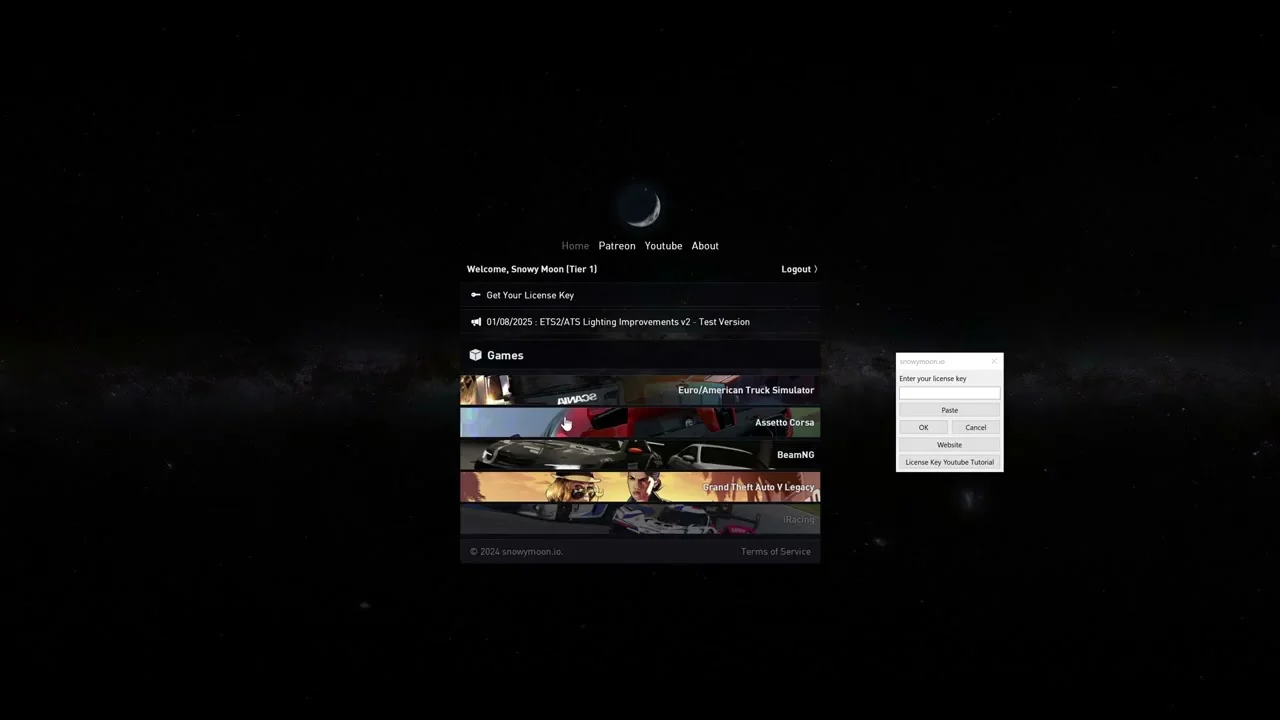
More screenshots on snowymoon.io (official website of Snowy Moon) ↗
What this mod does
Snowy Moon is a developer who publishes graphics plugins for Euro Truck Simulator 2 and American Truck Simulator. They aren’t .scs mods: they’re DLL files you copy into the game’s executable folder and configure from their own in-game menu.
What each plugin offers
- Lighting Improvements v2 (paid): reworks the game’s lighting and includes TAA Clarity, DLSS/DLAA 3.7 and motion blur. It’s the most complete option and the one the author keeps up to date; it supports 1.53 through 1.61.
- LoG.Pro (free, in alpha): the free successor to the old TAA. Its first layer offers TAA/DLAA anti-aliasing and motion blur for versions 1.59 to 1.61, with support for HDR, multi-monitor and VR.
- TAA v10 (free): TAA, DLSS/DLAA, FXAA and per-object motion blur. The author himself says that from 1.59 onward you should use LoG.Pro instead.
What it changes in the game
Temporal anti-aliasing removes most of the jagged edges and shimmering on fences, cables and vegetation, something the game’s internal scaling doesn’t fully fix. The lighting version also changes how light and shadows look.
Who it’s for
For players on 64-bit Windows 10/11 who want a cleaner image in ETS2 1.61 and don’t mind launching the game in DirectX 11. If you just want to get rid of jagged edges, start with LoG.Pro; if you want the full package, Lighting Improvements v2 requires a license (subscription or one-time payment).
Before you install it
Since these are DLL files loaded with the game, some antivirus programs may flag them; only download them from snowymoon.io or log.pro. If you play online, keep in mind that the official website says nothing about TruckersMP or Convoy.
Holyfix Check
Will it work with your mods?
Load your game.log.txt and check whether this mod is for your ETS2 version, whether you're missing a mod or DLC it needs and where to place it.
It's in Documents › Euro Truck Simulator 2 › game.log.txt. It's read in your browser: the file is never uploaded.
Something else failing? Holyfix for ETS2 checks all your mods at once.
User rating
Mod video
Highlights and things to keep in mind
- Temporal anti-aliasing and DLAA the game doesn't offer out of the box
- There's a free option (LoG.Pro) compatible with 1.61
- Lighting Improvements v2 gets support for every new game version
- Forces you to play in DirectX 11
- LoG.Pro is in alpha and Lighting Improvements v2 is paid
- The official website says nothing about TruckersMP or Convoy
Requirements
- 64-bit Windows 10 or Windows 11
- Launch the game with DirectX 11
- Lighting Improvements v2: paid license (monthly subscription or one-time lifetime payment)
- Lighting Improvements v2: turn off Windows HDR; not compatible with Route Advisor mods
How to install it
- Go to snowymoon.io (or log.pro for the free version) and download the ZIP for the version compatible with 1.61.
- Open the ETS2 install folder and go into bin\win_x64.
- Lighting Improvements v2: copy dxgi.dll and nvngx_dlss.dll there. LoG.Pro: copy dxgi.dll and dinput8.dll.
- Set the game to launch with DirectX 11.
- Load your save and press END or CTRL+P to open the plugin menu.
- If you use Lighting Improvements v2, enter your license key (the author has a video explaining how).
Version history
-
Lighting v2 2.5.825 Jun 2026Current
Support for game version 1.61
-
Lighting v2 2.5.72 Jun 2026
Support for game version 1.60
-
Lighting v2 2.5.68 May 2026
Fixed a crash when opening the plugin menu
Common problems
Do the files go in a "plugins" folder?
No. According to the official instructions, the DLLs go directly in the game's bin\win_x64 folder.
What's free and what's paid?
LoG.Pro and the old TAA versions (v8, v9, v10) are free. Lighting Improvements v2 needs a license: a monthly subscription via Patreon or Lemon Squeezy, or a one-time lifetime payment.
I get stuttering or flickering after installing it. What should I do?
On the LoG.Pro website, the author says that if you get lag or flickering, you should install an older NVIDIA driver (from May or earlier).
Can I use TAA v10 on 1.61?
The author says to use LoG.Pro instead of TAA v10 for 1.59 and later.
More mods for ETS2
 ✓ ETS2 1.61
  ✓ ETS2 1.61
  ETS2 1.60
  ETS2 1.53
  ✓ ETS2 1.61
  ✓ ETS2 1.61