Speed Limit Indicate (CCFAN): big speed limit display in the cabin for Euro Truck Simulator 2
A cabin accessory that shows the road's speed limit in large digits, in the corner or on the windshield. For SCS trucks; the title says 1.53 or later.
Download Speed Limit Indicate (CCFAN): big speed limit display in the cabin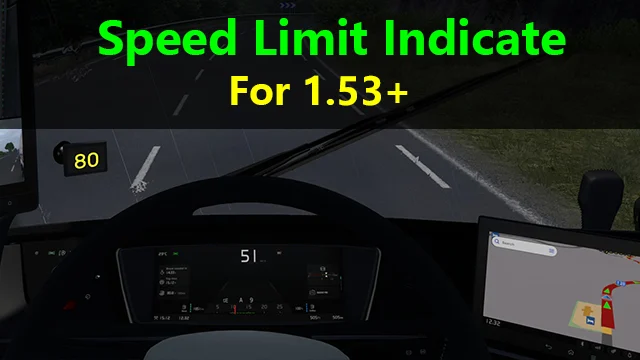
More screenshots on Steam Workshop ↗
What this mod does
Speed Limit Indicate, by CCFAN, adds a large display to the cabin in Euro Truck Simulator 2 showing the speed limit of the road you’re driving on. It has almost 51,000 subscribers on Steam Workshop.
How it works
- It’s an accessory you fit in the windshield corner or in the windshield sets.
- It only works with official SCS trucks.
- Since the author rebuilt it for 1.49, it works even if you have the dashboard map turned off.
Compatibility
It reads data from the GPS, so other mods that change the GPS or navigation interface can break it. The author expects it to keep working in future versions as long as the game doesn’t change that data. If it stops showing after an update, he advises removing the part and buying it again in the service shop. There’s a separate version for American Truck Simulator.
Version
The mod’s title says «for 1.53+», and the last update is from December 29, 2024.
Issues reported by users
Some users say it doesn’t show up on the MAN trucks and that with the new Scania Smart Dash it only reads 75. The author hasn’t replied in the comments.
Holyfix Check
Will it work with your mods?
Load your game.log.txt and check whether this mod is for your ETS2 version, whether you're missing a mod or DLC it needs and where to place it.
It's in Documents › Euro Truck Simulator 2 › game.log.txt. It's read in your browser: the file is never uploaded.
Something else failing? Holyfix for ETS2 checks all your mods at once.
User rating
Our rating
0.0 / 5- Speed limit always in view
- Doesn't need navigation turned on
- Free, no DLC required
- Latest game version confirmed by the author: 1.53. It may cause errors on 1.61; Holyfix will warn you if so.
- May clash with mods that change the GPS interface
- With the new Scania Smart Dash it may always read 75 (reported by users)
Requirements
- Euro Truck Simulator 2
- Steam account
- No DLC required
- An official SCS truck
How to install it
- Open the “Speed Limit Indicate for 1.53+” page on Steam Workshop and click “Subscribe”.
- Wait for Steam to finish the download.
- Launch ETS2, open the Mod Manager and enable the mod.
- Go to the service shop and fit the display in the windshield corner or in the windshield sets.
Common problems
It doesn't show after a game update
The author advises removing the part and buying it again.
Do I need the dashboard map?
Not anymore: since 1.49 it works with navigation turned off.
Does it work with modded trucks?
No, only with official SCS trucks.
More mods for ETS2
 ETS2 1.59
  ✓ ETS2 1.61Multiplayer
  ✓ ETS2 1.61
  ETS2 1.60
  ✓ ETS2 1.61
  Multiplayer