XPL LED bars for Euro Truck Simulator 2
LED bars inspired by the VISIONX XPL series, in four sizes, white or amber light and bottom or rear mounting. They work as auxiliary lights or with high beams. Tested on ETS2 1.61.
Download XPL LED bars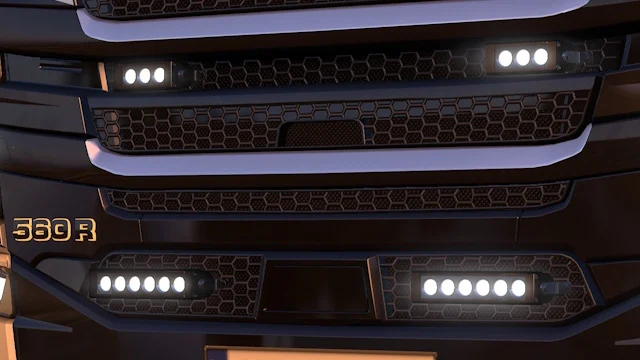
More screenshots on Steam Workshop ↗
What this mod does
kuramochia is a Japanese modder known for small, beautifully finished accessories. This pack adds LED light bars in the style of the VISIONX XPL series for you to mount on your truck.
What’s included
- Four widths: 6, 9, 13 and 21 inches.
- Two mounting types: bottom, to hang them from a bar, and rear, to fix them directly.
- Two modes: as an auxiliary light or switched on with the high beams.
- White or amber light.
- Their own shadows and flares since the latest versions.
How to use them
The bars go in the roof bar or grille slots (r_grill) and the front bumper slots (f_grill). If you pick the auxiliary version, you switch them on from the F4 menu, under light settings, with the front or roof auxiliary light options. The high-beam version comes on by itself when you turn on your high beams.
Who it’s for
For anyone who wants to light up back roads better at night or give their rig a work-truck touch. It’s a recent mod (September 2026) that the author has been improving almost daily, and the description says it has been tested on version 1.61.
Holyfix Check
Will it work with your mods?
Load your game.log.txt and check whether this mod is for your ETS2 version, whether you're missing a mod or DLC it needs and where to place it.
It's in Documents › Euro Truck Simulator 2 › game.log.txt. It's read in your browser: the file is never uploaded.
Something else failing? Holyfix for ETS2 checks all your mods at once.
User rating
Highlights and things to keep in mind
- Four sizes and two mounting types
- Choosing between auxiliary and high-beam mode gives you lots of options
- Light and frequently updated mod
- It's a very recent mod and it's still changing
- You need a truck with bar or bumper slots
- It doesn't say whether it works in Convoy or TruckersMP
Requirements
- Euro Truck Simulator 2 version 1.61
- A truck with light bar or bumper slots (r_grill or f_grill)
How to install it
- Subscribe to the mod on Steam Workshop.
- Enable it in the ETS2 Mod Manager.
- Go to a service shop and look for the XPL bars in the roof bar or bumper slots.
- Choose the size, mounting type, color and whether you want the auxiliary or high-beam version.
- On the road, switch on the auxiliary version from the F4 menu, under light settings.
Version history
-
0.3.129 Sep 2026Current
Added shadows
-
0.328 Sep 2026
Amber version, fixed white flares and icons based on mounting type
-
0.1.224 Sep 2026
Adjusted the position of the bottom-mount version
Common problems
The bars don't light up. What's wrong?
If you fitted the auxiliary version, you need to turn it on in the F4 menu, under light settings, with the front or roof auxiliary lights. The high-beam version only comes on with the high beams.
Where do they go?
In your truck's light bar or grille slots (r_grill) and front bumper slots (f_grill).
Is there an amber light?
Yes, since version 0.3 there's an amber version as well as the white one.
More mods for ETS2
 ✓ ETS2 1.61Requires DLC
  ✓ ETS2 1.61
  ✓ ETS2 1.61
  ✓ ETS2 1.61Multiplayer
 ETS2 1.59