AutoDrive for Farming Simulator 25
Build route networks so your vehicles drive themselves: haul and unload cargo, collect from the combine or park. PC/Mac only, from the official GitHub.
Download AutoDrive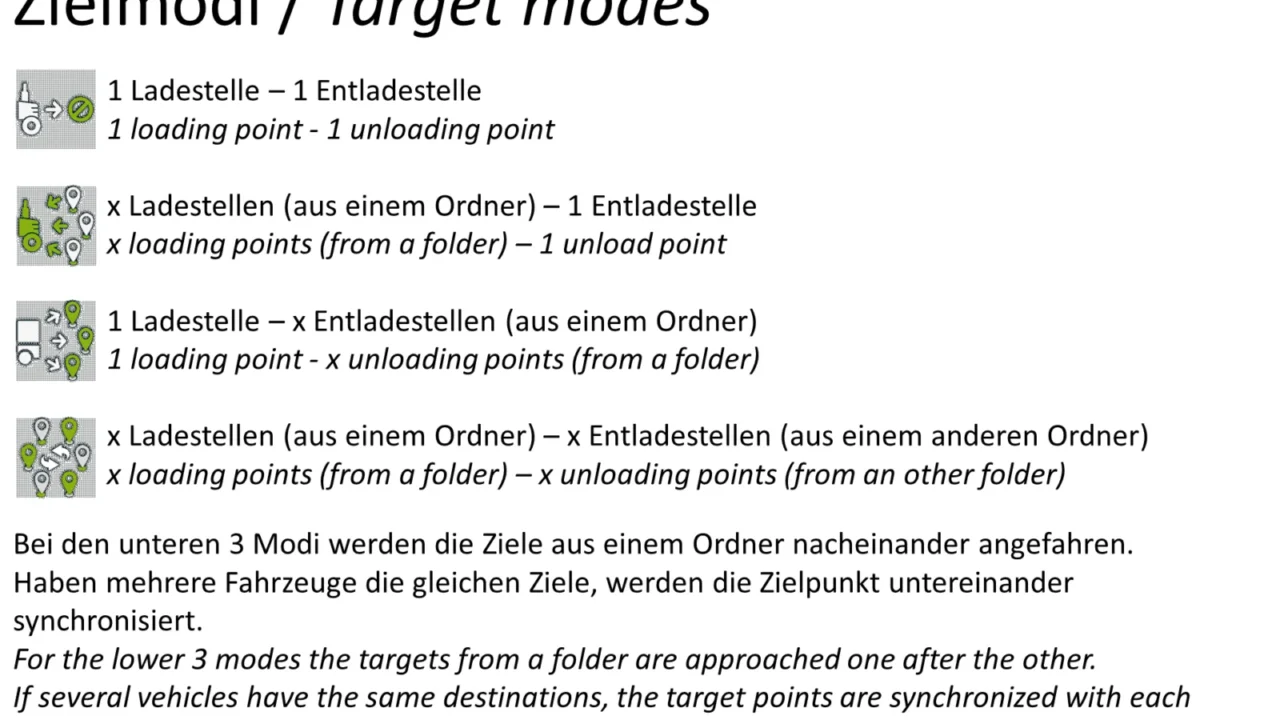
More screenshots on GitHub (Stephan-S/FS25_AutoDrive) ↗
What this mod does
AutoDrive is the best-known self-driving script for Farming Simulator. It lets you lay out a route network on the map and send your vehicles from one point to another without driving yourself: from the field to the silo, from the farm to the shop, or to a parking spot. The Farming Simulator 25 version is maintained by the same team that created it and is released on their official GitHub under the MIT license.
How it works
- Open its panel (HUD) with Left Alt + Numpad 0 and the settings with Alt + Ctrl + 0.
- In edit mode you record routes by driving with the REC button: one-way, two-way, reverse or secondary.
- Each destination is a named point; then you choose where to go and what task to do.
- Drivers load and unload trailers, collect grain from combines, refuel and respect right-of-way at intersections.
Recent changes
Version 3.0.1.0 (March 2026) added traffic checks to prevent jams between vehicles, automatic breakdown checks on long jobs, and support for the bunker silo from the Highlands Fishing DLC. Version 3.0.1.2 fixed active unloading of combines, seed and fertilizer loading for seeders, and loading multiple trailers.
Multiplayer and consoles
It works in single player, hosted multiplayer and dedicated servers, although the route manager and automatic network creation aren’t available on servers. It isn’t on the ModHub, so you can’t use it on PS5 or Xbox, which only support ModHub mods.
Holyfix Check
Will it work with your mods?
Load your log.txt and check whether this mod is for your FS25 version, whether you're missing a mod or DLC it needs and where to place it.
It's in Documents › My Games › FarmingSimulator2025 › log.txt. It's read in your browser: the file is never uploaded.
Something else failing? Holyfix for FS25 checks all your mods at once.
User rating
Highlights and things to keep in mind
- Automates repetitive hauling and unloading
- Free, open source and frequently updated
- Works in multiplayer
- PC/Mac only
- You have to record or import the route network for each map
- Learning curve with lots of keyboard shortcuts
Requirements
- Farming Simulator 25 on PC or Mac (not available on consoles)
- Up-to-date game version (since 3.0.0.8 it needs at least FS25 1.7)
- Keyboard and mouse to record and edit routes
How to install it
- Go to the releases page on the official GitHub (Stephan-S/FS25_AutoDrive) and download FS25_AutoDrive.zip from the latest release.
- Copy the .zip, without extracting or renaming it, into Documents/My Games/FarmingSimulator2025/mods.
- Delete any old or duplicate copies of AutoDrive from that folder.
- Enable AutoDrive when loading your savegame and get into a vehicle.
- Press Left Alt + Numpad 0 to open the HUD and record your first route with the REC button in edit mode.
- Name your destinations and send the vehicle from the HUD.
Version history
-
3.0.1.227 Mar 2026Current
Fixed active unloading of combines, seed and fertilizer loading, and loading multiple trailers
-
3.0.1.05 Mar 2026
Traffic control against jams, breakdown checks, support for the Highlands Fishing bunker silo
-
3.0.0.83 Dec 2025
In-game network editing, destination point options and steering and collision improvements; requires FS25 1.7 or later
Common problems
The mod won't load
Delete duplicate AutoDrive .zip files from the mods folder and download it again from GitHub. The file must be named FS25_AutoDrive.zip, without extras like (1).
I can't see the route points or lines
In edit mode, press Right Ctrl. If they still don't show, clear the shader cache in Documents/My Games/FarmingSimulator2025/shader_cache.
Can I use it on PS5 or Xbox?
No. AutoDrive is only distributed through GitHub and consoles only load ModHub mods. On console, the alternative is CoursePlay.
Does it work on servers?
Yes, but the route manager and automatic network creation aren't available on servers.
More mods for FS25
 PC and consoles
  PC and consoles
  Multiplayer
  Multiplayer
  PC and consoles
  PC and consoles